CyberPower vs Tripp Lite: Which UPS Brand Fits Home Use? (October 2026)
Choose CyberPower for more outlets, USB charging and higher watt capacity, or Tripp Lite for a user-replaceable battery and line protection. Match the unit to your load and outlet needs.
On this page (8 sections)
- CyberPower vs Tripp Lite: which home setup fits each?
- How do the two 1500VA UPS units compare on capacity?
- Which outlets should you use for battery backup?
- What do the displays and power features tell you?
- How should you set up and care for a home UPS?
- Is the smaller CyberPower ST900U a better fit?
- How should you choose between CyberPower and Tripp Lite?
- Which UPS brand fits your home?
For cyberpower vs tripp lite, choose CyberPower for more outlets, USB charging and the higher watt rating, or Tripp Lite for a user-replaceable battery and line protection. The CyberPower CP1500AVRLCD3 and Tripp Lite OMNI1500LCDT are both 1500VA units, but their watt capacities and features differ.
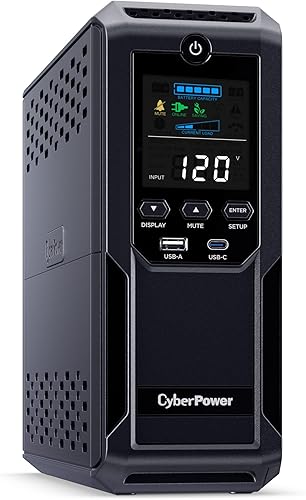
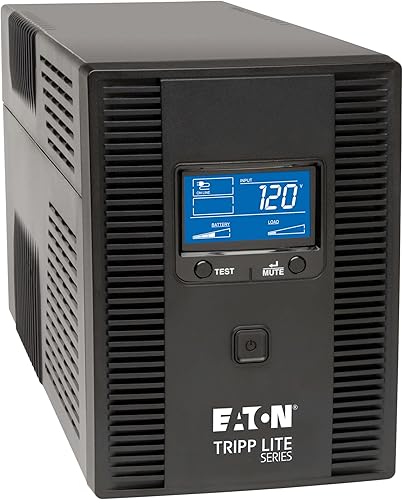
The CyberPower CP1500AVRLCD3 is rated at 900W and has 12 outlets. The Tripp Lite OMNI1500LCDT is rated at 810W, has 10 outlets, and uses a replaceable RBC51 battery cartridge.
For a smaller load, the CyberPower ST900U is a 900VA/500W standby option with 12 outlets. Start your choice with the equipment you need to keep running, then match its total draw to the UPS watt rating.
CyberPower vs Tripp Lite: which home setup fits each?
CyberPower fits a desk or entertainment area with several devices, while Tripp Lite fits a setup where battery replacement or data-line protection matters. Count devices and connections first, then choose features that address a real need.
The CP1500AVRLCD3 has 6 battery-backed outlets and 6 surge-only outlets. Tripp Lite's OMNI1500LCDT has 10 outlets, plus Ethernet RJ45 and telephone/DSL RJ11 line protection.
Both 1500VA models include automatic voltage regulation (AVR). CyberPower says its AVR corrects minor power fluctuations without switching to battery, while Tripp Lite says its AVR corrects brownouts and overvoltages between 92V and 150V to standard 120V without using battery power.
When does CyberPower make more sense?
Choose the CP1500AVRLCD3 when your home setup needs 12 outlets, USB charging and 900W capacity. Its USB ports include one Type-A and one Type-C, and the color LCD displays battery and power conditions.
This unit works well for a desk with a computer, display, router and other low-draw devices, provided the combined load fits. It can also suit an entertainment area where you want to keep selected electronics powered through an outage.
Skip it if you need more than 6 battery-backed outlets or if your equipment's maker calls for a different output type. The CP1500AVRLCD3 uses simulated sine wave output, so check the equipment guidance before connecting sensitive gear.
The unit has a 3-year warranty that includes the battery. Read the CyberPower CP1500AVRLCD3 review for a closer look at that model's features.
When does Tripp Lite make more sense?
Choose the OMNI1500LCDT if you want a replaceable internal battery or protection for Ethernet and telephone/DSL lines. Its LCD reports runtime, wattage load, overload, AVR, input voltage and battery status.
That combination can suit a home computer or network setup where you want to see load and runtime information and plan to replace the battery yourself. Its 810W capacity is lower than CyberPower's 900W, so check the actual draw rather than treating equal VA ratings as equal capacity.
Skip this model if your equipment needs more than 810W or if USB charging ports and a higher outlet count are central to your setup. Tripp Lite's 10 outlets may be enough for a focused desk, but count the plugs and adapters you intend to use.
How do the two 1500VA UPS units compare on capacity?
The CyberPower is rated for 900W, and the Tripp Lite is rated for 810W. VA describes apparent power, while the watt rating is the direct limit to compare with the combined draw of your connected devices.
Add the power draw of the computer, monitor, router and any other device you expect to back up. Leave room for changes in load instead of planning to run at the unit's maximum.
A UPS can only support equipment within its capacity. Our guide on how much VA you need in a UPS explains how to size a unit for a planned setup.
Is a 1500VA UPS enough for a desktop computer?
It can be, if the total load stays within the UPS watt rating. A desktop's draw varies with its parts and workload, so include the monitor and network devices rather than estimating from the computer alone.
Decide what you want the battery to do. If the goal is saving work and shutting down, you may only need the computer, monitor and network connection on battery backup.
See the best UPS for a desktop PC guide for options aimed at computer setups. If you have a demanding system, check its power requirements before choosing either 1500VA model.
Which outlets should you use for battery backup?
Use battery-backed outlets for equipment you need to keep running or shut down safely. Surge-only outlets protect against surges but won't keep a device powered during an outage.
On the CyberPower CP1500AVRLCD3 and ST900U, only 6 of 12 outlets provide battery backup. Reserve those for essential devices and use surge-only outlets for accessories that can turn off when utility power fails.
For the Tripp Lite, identify the battery-backed outlets before connecting critical equipment. Its Ethernet and telephone/DSL line protection covers those connections separately from the power outlets.
A common mistake is counting every outlet as backup capacity. Another is plugging in a full desk without checking whether the combined load exceeds the UPS rating.
See what should be plugged into a UPS for guidance on prioritizing devices and keeping unsuitable loads off battery backup. Avoid adding a surge protector to a UPS unless the UPS maker allows that arrangement.
What do the displays and power features tell you?
Both 1500VA models have an LCD, but they show different information. CyberPower emphasizes battery and power conditions, while Tripp Lite includes runtime and wattage load details.
The CP1500AVRLCD3 also has USB-A and USB-C charging ports for phones and tablets. Its AVR handles minor power changes without switching to battery power, which can reduce unnecessary battery use.
The OMNI1500LCDT's screen reports runtime, load, overload, AVR, input voltage and battery status. Its line protection may be useful if Ethernet or telephone/DSL connections are part of the setup.
A display helps you check operating conditions, but it does not replace choosing the right capacity. Review the manual for alarm meanings, limits and steps to take when the unit reports an overload or battery issue.
How should you set up and care for a home UPS?
Set up a UPS with the devices you intend to back up, then check that its load and battery status are within normal limits. Follow the model's manual for its initial charge, placement and alarm instructions.
Place the unit where its vents are clear and where you can reach the controls and outlets. Keep it away from damp areas and excessive heat, and avoid stacking objects on it.
Connect the essential devices to battery-backed outlets first. After setup, check the LCD and software where available, and confirm that each device you expect to ride through an outage is on a backup outlet.
Both 1500VA models use lead-acid batteries and specify an 8-hour charge time. The CyberPower CP1500AVRLCD3 includes free PowerPanel Personal software, and the Tripp Lite's battery can be replaced with its RBC51 cartridge.
Plan to check battery condition periodically and follow the manufacturer's instructions for replacement and disposal. The guide to testing a UPS battery at home covers basic checks, while how often to replace a UPS battery explains why age matters.
Is the smaller CyberPower ST900U a better fit?
The ST900U suits a smaller load when 500W is enough and you want a slim unit with 12 outlets. It is not a capacity match for either 1500VA model.
This standby UPS has 6 battery-backed outlets and 6 surge-only outlets. It also has a 5 ft power cord and a slim profile that can suit a home office or network corner.
Choose it for selected devices such as a router, monitor or smaller computer setup after checking the total load. Skip it if the combined draw approaches or exceeds 500W, or if you need the higher capacity of a 1500VA unit.
For a network-focused setup, our home network UPS guide can help you decide which devices should stay powered during an outage. Keep the network gear on battery backup and leave nonessential accessories off.
What common UPS buying mistakes should you avoid?
The main mistakes are choosing by VA alone, miscounting backup outlets and connecting devices you do not need during an outage. A little planning before setup makes the outlet layout and capacity easier to use.
Do not assume two 1500VA models support the same load. Compare the 900W and 810W ratings with your equipment's combined draw.
Do not mistake surge-only outlets for battery backup. On CyberPower's two models here, half the outlets are surge-only, so place a router or computer on a battery-backed outlet.
Also avoid filling the UPS with printers, speakers or other accessories by default. Decide what needs power during an outage, check the equipment's guidance, and reserve battery capacity for those devices.
How should you choose between CyberPower and Tripp Lite?
Pick CyberPower for its 12-outlet layout, USB charging and, on the CP1500AVRLCD3, 900W capacity; pick Tripp Lite for a user-replaceable battery and Ethernet or telephone/DSL protection. Choose the ST900U when your load is smaller and stays within 500W.
The CP1500AVRLCD3 is the better fit for a busy home desk that needs six battery-backed outlets, plus extra surge-only connections. The OMNI1500LCDT fits a focused setup where battery replacement and line protection matter more than maximizing outlet count or watt capacity.
Before buying, total your load, identify the devices that need battery backup, and confirm the outlet layout. For another brand comparison, read APC vs Tripp Lite UPS.
| Product | Best for | Capacity | Outlets | Display | Our score |
|---|---|---|---|---|---|
| CyberPower CP1500AVRLCD3 1500VA UPS | busy home desks | 1500VA/900W | 12 total, 6 battery backup | Color LCD | 8.5 |
| Tripp Lite OMNI1500LCDT 1500VA UPS | planned battery swaps | 1500VA/810W | 10 | 7.8 | |
| CyberPower ST900U Standby 900VA UPS | compact network corners | 900VA/500W | 12 total, 6 battery backup | 7.7 |
Our scores weigh each model's capacity, outlet layout and features against the needs of someone comparing UPS units for home use.
Which UPS brand fits your home?
For cyberpower vs tripp lite, choose the CP1500AVRLCD3 if you need more outlets, USB charging and 900W capacity, or the OMNI1500LCDT if replaceable batteries and line protection matter more. Choose the ST900U for a smaller setup that fits within 500W.
Check the total load and which devices need battery backup before you decide. Then use the UPS brands guide to compare the features that matter for your home.
Frequently asked questions
Is CyberPower or Tripp Lite better for a home UPS?
CyberPower fits a home setup that needs 12 outlets, USB charging or a color LCD. Tripp Lite fits better when user-replaceable batteries, runtime details on the LCD or Ethernet and telephone line protection matter.
Compare the exact model's watt capacity with your equipment before choosing.
Does the CyberPower CP1500AVRLCD3 have more power than the Tripp Lite OMNI1500LCDT?
The CyberPower CP1500AVRLCD3 is rated at 900W, while the Tripp Lite OMNI1500LCDT is rated at 810W. Both are 1500VA units, but the watt rating is the more useful figure when checking whether your connected equipment fits.
Which UPS has a replaceable battery?
The Tripp Lite OMNI1500LCDT has an internal battery that users can replace with its RBC51 battery cartridge. CyberPower's CP1500AVRLCD3 includes battery coverage in its 3-year warranty, but its user-replacement method isn't specified.
Can I plug a router into either UPS?
Yes. The CyberPower ST900U is described for broadband routers, and the other two models are described for networking devices.
Check which outlets provide battery backup, since surge-only outlets won't keep a router running during an outage.



