APC vs Tripp Lite UPS: How the Two Brands Compare (October 2026)
Choose the APC BX1500M for detailed LCD monitoring and five battery-backed outlets, or the Tripp Lite SMART1500LCDT when all 10 outlets need backup. For a smaller load, the Tripp Lite INTERNET750U offers 450W capacity and 12 outlets.
On this page (9 sections)
- APC vs Tripp Lite UPS: which model fits your setup?
- How do APC and Tripp Lite outlet layouts compare?
- Which brand offers more useful voltage regulation?
- How do their displays and alerts differ?
- What surge and data-line protection do they provide?
- Which UPS is easier to set up and maintain?
- What common mistakes should you avoid?
- When should you choose APC over Tripp Lite?
- APC vs Tripp Lite UPS: which should you choose?
For APC vs Tripp Lite, pick the APC BX1500M for detailed LCD monitoring and five battery-backed outlets, or the Tripp Lite SMART1500LCDT when all 10 outlets need backup. The Tripp Lite INTERNET750U is a smaller 450W option for a lighter load.
The two 1500VA models both support up to 900W and include AVR, but their outlet layouts serve different setups. Start with the devices you want to keep running during an outage, then check total wattage and the connections you need to protect.

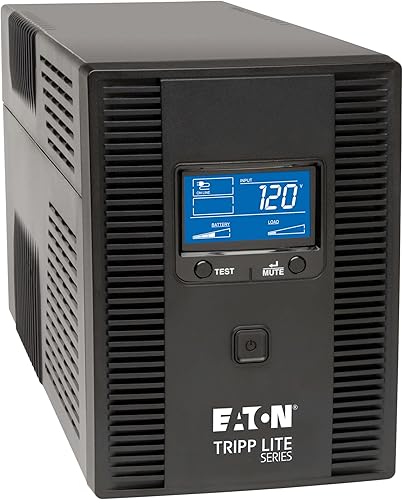
APC vs Tripp Lite UPS: which model fits your setup?
The APC BX1500M and Tripp Lite SMART1500LCDT each provide 1500VA and 900W; the Tripp Lite INTERNET750U provides 750VA and 450W. Match the watt limit to the combined load of the equipment you plan to connect.
The BX1500M suits a computer or home office where five battery-backed outlets are enough and you want its LCD to show battery charge, estimated runtime, load capacity and input voltage. Its other five outlets provide surge protection without battery backup.
The SMART1500LCDT fits a setup with several devices that should stay powered during an outage. All 10 of its outlets provide battery backup and surge protection, and the LCD reports runtime, wattage load, overload, AVR, input voltage and battery status.
The INTERNET750U is for a more modest load, such as a router and modem or a small group of electronics. It has 12 outlets split evenly between battery-backed and surge-only, but its 450W limit rules it out for equipment whose combined draw exceeds that amount.
For help sizing a unit around your equipment, see how much VA you need in a UPS. VA is only one part of the fit: also check watts, battery-backed outlets and how much runtime you need.
How do APC and Tripp Lite outlet layouts compare?
The SMART1500LCDT backs up all 10 of its outlets, while the BX1500M backs up 5 of 10 and the INTERNET750U backs up 6 of 12. The number of total outlets doesn't tell you how many devices will stay on during an outage.
Reserve battery-backed outlets for equipment that needs time to keep running or shut down safely. A desktop computer, monitor and router may be priorities; a peripheral that can be switched off may fit better on a surge-only outlet.
Check the label on each outlet before connecting devices. It is easy to mistake a surge-only outlet for a battery-backed one when the two types sit on the same UPS.
A laser printer or other high-draw device can also be a poor fit for a battery backup, depending on its power needs and the UPS manual. Add the actual watt draw of each connected device and leave room under the unit's maximum.
The guide to what belongs on a UPS can help you sort essential equipment from optional peripherals. If you are considering adding a surge protector, read whether you can plug one into a UPS first.
Which brand offers more useful voltage regulation?
All 3 models include AVR, which corrects some voltage changes without using battery power. The BX1500M and SMART1500LCDT specify different correction ranges, so compare the range if your home has frequent brownouts or high voltage.
The BX1500M corrects low voltage brownouts from 88V and surges of plus or minus 13%, then boosts or trims voltage to 120V. The SMART1500LCDT corrects brownouts and overvoltage between 92V and 150V back to 120V.
The INTERNET750U also includes AVR, but its correction range isn't specified here. If that detail matters for your location, check the unit's instructions before buying.
AVR works while utility power is available and within the unit's correction range. During an outage, the battery supplies temporary power.
Learn what AVR means on a UPS to understand how it differs from battery backup.
How do their displays and alerts differ?
The BX1500M and SMART1500LCDT have LCDs, while the INTERNET750U uses LED indicators. Choose an LCD if you want to read load and battery information at the unit; choose the INTERNET750U if basic status lights meet your needs.
The BX1500M's LCD shows battery charge, estimated runtime, load capacity and input voltage. These readings help you spot a heavy load and plan a shutdown during an outage.
The SMART1500LCDT also displays runtime and wattage load, along with overload, AVR, input voltage and battery status. Its display covers several operating details in one place.
The INTERNET750U's LEDs indicate operating mode, protection status, overload and low or replace-battery alerts. Its runtime depends on the load: the stated examples are 22 minutes for a 100W TV, 10 minutes for a 200W office PC and 2.7 minutes for a 400W gaming PC.
Treat an LCD runtime estimate as a guide, not a fixed promise. Runtime changes with the connected load and operating conditions, so prioritize the equipment you need during an outage.
What surge and data-line protection do they provide?
The BX1500M specifies 789 joules of surge protection and built-in coaxial and Ethernet protection; the SMART1500LCDT specifies 650 joules, and the INTERNET750U specifies 316 joules. Compare connection types as well as the outlet protection.
The SMART1500LCDT includes 100 Mbps Ethernet RJ45 and telephone or DSL RJ11 data-line protection. The INTERNET750U also has network data-line surge suppression for a 100 Mbps connection.
The BX1500M's built-in Ethernet and coaxial protection can be useful if those lines connect to equipment in your setup. Confirm that the connectors match your cables, and follow the UPS instructions when routing power and data lines.
A surge-only outlet still provides surge protection, but it does not provide battery power. Plan which devices need outage runtime separately from which ones simply need surge protection.
Which UPS is easier to set up and maintain?
All 3 models have user-replaceable batteries, but they use different replacement parts and offer different setup features. Check the compatible battery and the manufacturer's instructions for your exact model before replacement.
The BX1500M uses an APCRBC124 battery sold separately. The SMART1500LCDT uses Tripp Lite's RBC51 cartridge, while the INTERNET750U has an internal user-replaceable battery.
The INTERNET750U is the only one here described with keyhole tabs for under-desk or wall mounting. Choose a location with room to reach the outlets and read the indicators, and avoid placing the UPS where it can be bumped or covered.
The BX1500M and INTERNET750U have an average battery life of 3 years. No lifespan figure is specified for the SMART1500LCDT, so plan to check its battery condition rather than assuming the same replacement interval.
After connecting the UPS, plug essential devices into battery-backed outlets and turn the unit on according to its manual. Check the display or LEDs.
Confirm that the load stays below the watt limit. For ongoing care, learn how to test a UPS battery at home.
What common mistakes should you avoid?
The most common buying mistake is choosing by VA or total outlet count alone. Check watts, battery-backed outlets, runtime needs and cable protection before deciding.
A 1500VA label doesn't mean every setup will get the same runtime. The two 1500VA models have a 900W maximum, but a higher connected load uses battery capacity faster than a lighter one.
Don't count surge-only outlets as backup outlets. The BX1500M and INTERNET750U split their outlets between battery backup and surge-only protection, so map each device to the right outlet.
Don't assume data-line protection matches your network. The SMART1500LCDT and INTERNET750U specify 100 Mbps network protection.
The BX1500M includes Ethernet and coaxial surge protection. Check your actual cable types and network needs.
Finally, don't wait for an outage to learn which equipment the UPS supports. Review its status indicators, know where the battery-backed outlets are and keep the unit's battery instructions available.
When should you choose APC over Tripp Lite?
Choose APC's BX1500M if five battery-backed outlets and its detailed LCD fit your setup. Its 1500VA / 900W capacity, AVR and display suit a desktop or home office that needs monitoring and does not need battery power at every outlet.
Choose the Tripp Lite SMART1500LCDT if you need battery backup at all 10 outlets. It offers the same 1500VA / 900W capacity and has LCD information for runtime, load, input voltage and battery status.
Choose the INTERNET750U if your load fits within 450W and 6 battery-backed outlets are enough. Its 12 total outlets and mounting tabs can work for a compact network or electronics setup, though its LEDs provide less detail than an LCD.
Skip the INTERNET750U for a high-draw computer setup that approaches or exceeds 450W. Skip either 1500VA model if your combined equipment load exceeds 900W, and choose a different capacity instead.
The APC BX1500M vs BR1500MS2 comparison can help if you have narrowed your shortlist to APC models. For another brand matchup, compare CyberPower vs Tripp Lite UPS options.
APC vs Tripp Lite UPS: which should you choose?
Pick the BX1500M for LCD monitoring and five battery-backed outlets, the SMART1500LCDT when all 10 outlets need backup, or the INTERNET750U for a smaller load up to 450W. Your best fit depends on the devices that must stay on, their combined wattage and the connections you need to protect.
Before buying, total the intended load, count battery-backed outlets and decide how much runtime you need for saving work or shutting down. If a computer is the main load, see our desktop PC UPS guide for other points to weigh.
Frequently asked questions
Is APC or Tripp Lite better for a computer UPS?
Either brand can suit a computer, but match the exact model's watt capacity to your equipment. The APC BX1500M and Tripp Lite SMART1500LCDT each support up to 900W; the INTERNET750U supports up to 450W.
Add the computer, monitor and other intended devices before choosing.
Do APC and Tripp Lite UPS units have AVR?
All 3 models here include automatic voltage regulation. The BX1500M corrects low voltage brownouts from 88V and surges of plus or minus 13%; the SMART1500LCDT handles brownouts and overvoltage from 92V to 150V.
The INTERNET750U includes AVR, though its correction range isn't specified here.
How many devices can you plug into these UPS units?
The APC BX1500M has 10 outlets, with 5 battery-backed and 5 surge-only. The Tripp Lite SMART1500LCDT has 10 battery-backed outlets, while the INTERNET750U has 12 total, split between 6 battery-backed and 6 surge-only.
Count the devices that need backup, not just every plug.
Which UPS brand is better for a home network?
Choose by your network equipment's load and the connections you need to protect. The INTERNET750U has 6 battery-backed outlets and 100 Mbps network data-line protection; the BX1500M has built-in Ethernet and coaxial surge protection.
Check the connection types and watt draw for your router, modem and other devices.



