How Often Should You Replace a UPS Battery?
Many sealed lead-acid UPS batteries need replacement after about 3–5 years, but the answer to how often you should replace a UPS battery depends on its condition, use, and the manufacturer's guidance. Check for warnings, failed self-tests, or reduced runtime, then confirm the replacement matches your exact UPS model.
On this page (8 sections)
- How often should you replace a UPS battery?
- What signs mean a UPS battery may need replacing?
- What affects how long a UPS battery lasts?
- How do you choose a replacement UPS battery?
- Can you replace a UPS battery yourself?
- When should you replace the whole UPS instead?
- How can you make a UPS battery last longer?
- How often should you replace a UPS battery if runtime is falling?
Many sealed lead-acid UPS batteries need replacement after about 3–5 years, but how often you should replace a UPS battery depends on its condition, use, and the guidance for your model. Watch for alerts, failed self-tests, and a clear drop in runtime, then match any replacement to the exact UPS model.
Age is a useful reminder to check the battery, not a universal deadline. Heat, frequent outages, and repeated battery use can shorten service life, while a battery that still passes checks may remain useful beyond a rough age estimate.
A UPS can continue powering equipment from the wall even as its battery loses capacity. The change may only become obvious during an outage, when the unit runs connected devices for less time than before.
How often should you replace a UPS battery?
For many sealed lead-acid UPS batteries, check replacement needs around 3–5 years. Your UPS manual takes priority because the right schedule depends on its battery and operating conditions.
A battery warning, a failed self-test, or reduced runtime can matter more than age alone. If you need the basics first, read what a UPS battery is and how it works, then use how to test a UPS battery at home to check its condition.
Keep a simple record of the installation date, self-test results, and any runtime changes. That gives you a useful baseline and can help distinguish gradual capacity loss from a sudden fault.
What signs mean a UPS battery may need replacing?
A battery warning, failed self-test, or noticeable runtime drop are common reasons to investigate a replacement. Check your manual for the meaning of the alert on your particular unit.
Swelling or leakage calls for a different response: stop using the damaged battery and follow the UPS maker's safety instructions. Don't handle a battery that is visibly damaged as if it were a routine cartridge swap.
A short runtime can also point to a UPS that needs replacement, especially if a fresh, compatible battery does not restore enough backup time. APC notes that a replacement battery may not deliver expected runtime if the UPS itself is no longer in good shape.
Does UPS beeping mean you need a new battery?
A beep can signal a battery problem, but it can also mean the UPS is running on battery power or reporting another condition. Check the screen and manual before ordering a replacement.
The guide to why a UPS beeps and what its alarms mean can help you connect an alert to a sensible next step. Don't mute a warning until you understand what triggered it.
How often should you replace a UPS battery after a failed self-test?
A failed self-test is a reason to investigate promptly, but it doesn't by itself identify which part has failed. Check the manual, confirm the battery's age and fit, and follow the maker's troubleshooting steps.
If the battery is old or the unit reports a battery fault, use a compatible replacement and repeat the check as directed. If the fault remains, the UPS may need service or replacement.
What affects how long a UPS battery lasts?
Heat and frequent battery use can shorten battery life. Keep the UPS in the operating conditions described in its manual, and avoid enclosed or high-temperature locations when the manufacturer warns against them.
Outages can make the battery cycle more often. A unit that regularly switches to battery power may need closer attention than one that rarely experiences interruptions.
Battery chemistry also matters. Sealed lead-acid and lithium batteries have different service characteristics, so compare them in this guide to lithium-ion versus lead-acid UPS batteries before choosing a new system.
How do you choose a replacement UPS battery?
Choose a battery cartridge specified for your exact UPS model. Matching a brand or voltage alone does not confirm the cartridge will fit or work correctly.
Start with the model number on the UPS, then check the manual's replacement part number and any serial-number limits. Confirm the cartridge shape and connection instructions before buying.
If no compatible battery is available, or the unit has other faults, compare the cost and fit of replacing the whole UPS.
This GOLDENMATE is a whole 1000VA/600W UPS with a lithium iron phosphate battery, LCD panel, and eight battery-backup and surge-protection outlets. It suits someone who wants a new unit with a stated long battery life and has equipment whose combined load stays within 600W.
Skip it if you only need a cartridge for an existing UPS, or if your connected equipment needs more than its rated capacity. Its fan activates during heavy battery use, so account for that when choosing a location.
APC APCRBC163 is the cartridge to consider for an APC Back-UPS Pro BR1500MS2. Verify that exact model before ordering; it isn't a general-purpose replacement for every APC UPS.
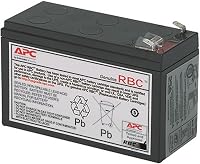
APC RBC17 fits select APC Back-UPS models, including BE650G1, BR700G, BE850G2, BE850M2, BX850M, and BN900M. It comes pre-assembled for user installation, which can suit owners of those models who want a cartridge with replacement instructions.
Skip it if your UPS model isn't on the compatibility list or the manual calls for a different part. Similar model names are easy to confuse, so check the full model code.
CyberPower RB1290X2 contains two sealed lead-acid batteries in a pre-assembled, user-installable cartridge. It suits compatible CyberPower models such as BRG1350AVRLCD, BRG1500AVRLCD, LX1500GU, CP1350AVRLCD, and CP1500AVRLCD.
For CP1500PFCLCD, compatibility applies only when the serial number begins with “CXX.” Skip this cartridge if your model or serial number does not meet those conditions.
Can you replace a UPS battery yourself?
You can replace a battery yourself only when the UPS supports user replacement and its manual provides instructions. Some cartridges are built for user installation; other units need service.
Before starting, save your work and shut down connected equipment. Follow the UPS manual for powering down, disconnecting the unit, and accessing the battery compartment.
Use the specified cartridge and avoid forcing connectors or changing the wiring. Keep the work area clear and follow any handling precautions in the manual.
Don't open a sealed battery or attempt to repair it. If you see swelling, leakage, unusual noise, or another abnormal condition, stop and contact the manufacturer or qualified service provider.
After installation, close the compartment, reconnect the UPS as instructed, and let the battery charge for the time specified by the manual before relying on it. Run the recommended self-test and confirm the status indicators show normal operation.
Used batteries need proper handling and recycling. CyberPower RB1290X2 packaging can be reused to deliver expired batteries to recycling centers.
When should you replace the whole UPS instead?
Replace the whole UPS when it has faults beyond the battery, cannot pass its self-test with a compatible replacement, or cannot provide the runtime your equipment needs. A cartridge won't fix a failed UPS or a unit that is too small for its load.
Before deciding, list the devices you need to keep powered and check their combined power needs against the UPS capacity. Think about whether you need enough time to save work and shut down, or longer backup for networking equipment.
The guide to choosing a UPS battery backup for your home walks through capacity and use needs.
How can you make a UPS battery last longer?
Keep the UPS in the conditions its manual recommends and avoid unnecessary battery use. Make sure the unit has the ventilation it needs, and don't exceed the rated load.
Check the battery status and run self-tests on the schedule recommended for your model. Record alerts and runtime changes so you can spot a pattern instead of relying on memory.
Don't wait for an outage to find out whether the battery still meets your needs. A periodic check using this UPS battery test guide can reveal reduced performance before backup matters.
How often should you replace a UPS battery if runtime is falling?
If runtime is falling, check the battery's age, alerts, and compatibility, then run the self-test according to the manual. Replace the battery when its condition or the maker's guidance points to failure, and replace the whole UPS if a compatible cartridge cannot restore the backup you need.
Choose APCRBC163 for a BR1500MS2, RBC17 for its compatible APC models, or RB1290X2 for its compatible CyberPower models. If you're choosing a new system instead, the GOLDENMATE is a complete lithium UPS with a 600W capacity; it isn't a replacement cartridge.
The practical answer to how often you should replace a UPS battery is to check it regularly and act on condition, alerts, and model-specific guidance. Use the manual's schedule as your baseline, and don't wait for an outage to discover that runtime has become too short.
Frequently asked questions
How often should you replace a UPS battery?
Many sealed lead-acid UPS batteries need replacement after about 3–5 years, but heat, frequent outages, and battery use can shorten that time. Follow your UPS manual, and pay attention to a battery warning, failed self-test, swelling, leakage, or a clear drop in runtime.
Can a UPS battery last 10 years?
Some lithium UPS batteries are designed for longer service than common sealed lead-acid batteries, but lifespan depends on the battery and its operating conditions. Check the specific UPS manual and battery warranty, and replace a battery if its condition or performance calls for it.
Should I replace a UPS battery if it still works?
Not just because it has reached a certain age. If the UPS passes its self-test and provides the runtime you need, follow the maker's maintenance guidance; replace the battery when it gives a warning, fails a test, or no longer supports your equipment long enough.
Can you replace a UPS battery yourself?
Some UPS models use user-replaceable cartridges, while others require service. Check the manual for the replacement steps and exact compatible battery; disconnect equipment and power as instructed, and recycle the old battery through an appropriate program.