How to Test a UPS Battery at Home
To learn how to test a UPS battery, start with the unit’s self-test and status display. If the manual permits, follow with a brief backup check using a safe, noncritical load.
On this page (9 sections)
- How do you test a UPS battery with its self-test?
- How do you run a brief backup check safely?
- Can a multimeter show whether a UPS battery is healthy?
- What should you check before testing?
- Which UPS battery replacement should you choose?
- What do UPS alarms and short runtimes mean?
- How should you prepare and care for a UPS battery?
- What mistakes make a battery check less useful?
- How should you decide whether to test again or replace the battery?
To learn how to test a UPS battery, start with the unit’s self-test and status display. If the manual permits, follow with a brief backup check using a safe, noncritical load.
A self-test follows the UPS’s diagnostic process. A backup check can show whether it supports a load during a brief power interruption, but it cannot guarantee a particular runtime in a longer outage.
How do you test a UPS battery with its self-test?
Run the self-test described in your UPS manual or control software. Keep the unit connected to power, then check its display or indicators before and after the check.
Steps vary by model. Some units have a test button, while others provide the check through software or a screen menu.
Before starting, save open work and look for visible damage, unusual heat, or swelling. Don’t guess at a button sequence or repeat a test after a fault; follow the maker’s troubleshooting steps.
A self-test can identify some battery or UPS problems, but it may not show how long your equipment will run during an outage. For a plain-language overview, see what a UPS battery does.
How do you run a brief backup check safely?
Use only a safe, noncritical load, and follow the UPS maker’s instructions. Save your work, then use the manual’s steps for switching to battery power and restoring normal power.
Don’t use your main computer if an unexpected shutdown would risk unsaved work. Keep life-sustaining medical equipment, emergency communication equipment, and other essential devices off the test load.
If the UPS signals a problem, shuts down, or behaves differently from the manual’s directions, end the check and restore wall power. Don’t repeat a check that causes an alarm or shutdown.
Backup time depends on the UPS, battery condition, and connected load. For context on one common capacity, read how long a 1500VA UPS may run a computer.
Can a multimeter show whether a UPS battery is healthy?
A multimeter can measure voltage, but voltage alone cannot confirm useful backup runtime. A battery may show voltage and still fail to support a load for as long as you need.
Don’t open the UPS casing to reach a battery. If the battery is designed for user replacement, consult the manual before removing it and keep metal tools away from the terminals.
Only measure a battery if you know how to do so safely and can follow the meter and UPS instructions. Stop if the battery is swollen or damaged, the terminals are hard to reach, or you’re unsure how to proceed.
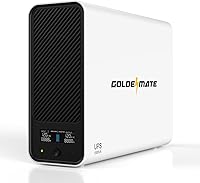
The CyberPower CP1500AVRLCD3 is for someone choosing a complete UPS for workstations, networking devices, or home entertainment equipment, rather than replacing a battery in an existing unit. It has 1500VA/900W capacity, 12 outlets, automatic voltage regulation, and a six-foot power cord.
Its six battery backup and surge-protected outlets suit devices that need backup, while six more outlets provide surge protection only. Skip it if you need a replacement cartridge for an existing UPS or if your equipment requires a different output waveform; this unit uses simulated sine wave output, so check device compatibility first.
What should you check before testing?
Read the UPS manual and identify the connected load before you begin. A test is easier to interpret when you know which devices use battery-backed outlets and which use surge protection only.
Check the status lights or display for an existing battery warning. Confirm that the UPS has normal wall power and that its ventilation openings are clear.
Save files and close work on any computer that could lose power. If a device must stay on, leave it off the test load.
Think about what result you need. A self-test can help find an alert or fault, while a brief backup check can show whether a noncritical load stays on.
Neither gives a dependable estimate for a different load or a longer outage.
Which UPS battery replacement should you choose?
Choose a replacement by exact UPS model compatibility, not by appearance or voltage alone. Confirm the model on the UPS label and compare it with the cartridge’s compatible model list before you buy.
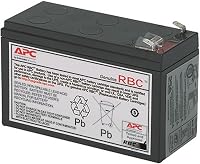
The APC APCRBC124 suits owners of the specified APC Back-UPS and Smart-UPS models who want a model-specific replacement cartridge. It is a sealed lead-acid battery pack with a two-year manufacturer warranty.
Skip it if your UPS model isn’t on its compatibility list or if you’re replacing a CyberPower unit.
The APC APCRBC154 is for owners of those four APC Back-UPS models. Its cartridge is designed for straightforward replacement, but a new battery may not restore expected runtime if the UPS itself is in poor condition.
Skip it if your model doesn’t match or the UPS has other faults.
The CyberPower RB1290 suits owners of those compatible CyberPower models who want a preassembled, user-installable cartridge. It is a sealed lead-acid battery that doesn’t need fluid replacement and comes with reusable packaging for recycling.
Skip it if your UPS model isn’t compatible or if you need a complete backup unit rather than a replacement battery.
These three cartridges are not interchangeable. Check the complete model number and the manual’s replacement guidance before ordering, even when two batteries appear similar.
What do UPS alarms and short runtimes mean?
A battery warning, failed self-test, or much shorter backup time can point to a battery problem. Check the manual for the meaning of the alert because tones and display messages vary by model.
An alarm can also signal an overload or another UPS condition. Adjust the load only as the manual directs, then see whether the alert remains.
For help identifying an alarm, see what each UPS beep can mean. If the battery is aging or repeatedly failing a self-test, how often to replace a UPS battery covers common replacement signs.
How should you prepare and care for a UPS battery?
Keep the UPS connected and use it as its manual directs between checks. Avoid repeated battery drains just to estimate runtime, since a short check is meant to reveal a problem, not to use up backup capacity.
Keep ventilation openings clear and watch for alerts on the unit’s display or software. The CyberPower CP1500AVRLCD3’s LCD shows battery and power conditions, and its AVR corrects minor power fluctuations without switching to battery power.
When replacing a cartridge, follow the UPS maker’s removal, installation, and recycling instructions. Don’t handle a swollen, leaking, hot, or damaged battery as routine maintenance.
A fresh battery won’t solve every UPS problem. If the unit continues to report a fault or provide unexpectedly short backup after replacement, consult its troubleshooting guidance and consider whether the UPS itself needs replacing.
What mistakes make a battery check less useful?
The most common mistakes are testing critical equipment, skipping the manual, and treating one voltage reading as proof of runtime. Each can lead to a risky or misleading result.
Don’t disconnect wall power without first saving work and confirming the manual’s procedure. Don’t assume that every outlet on a UPS provides battery backup; some provide surge protection only.
Avoid running repeated backup checks after an alarm or shutdown. Record the warning, note what was connected, and use that information to follow the maker’s troubleshooting steps.
How should you decide whether to test again or replace the battery?
Use the self-test, status display, and change in backup performance together. Run a brief backup check only when the manual allows it and the load is safe to interrupt.
If the UPS reports a battery fault or runtime has dropped, confirm the exact model and approved battery before buying. Choose the APC APCRBC124, APC APCRBC154, or CyberPower RB1290 only when your UPS model matches its compatibility list.
If the UPS has no battery fault and works as expected, follow the manual’s maintenance schedule instead of repeatedly draining the battery. For a replacement backup unit, start with how to choose a UPS battery backup.
Frequently asked questions
How do I know if my UPS battery is still good?
Run the UPS self-test as its manual describes, then check for a battery warning, fault, or unusually short backup time. A passing self-test is useful, but it doesn't guarantee the battery will provide the runtime you need during a longer outage.
Replace a battery only after checking the UPS model and its replacement guidance.
Can I test a UPS battery with a multimeter?
A multimeter can measure voltage, but a voltage reading alone doesn't show how much usable backup time a battery can provide. Don't open a UPS or disconnect its battery unless the manual says you can do so safely.
Use the correct meter setting and probes, and get help if you aren't familiar with battery terminals.
Should I unplug my UPS to test its battery?
A brief backup test may involve removing wall power, but only follow the UPS maker's instructions and first save your work. Keep important or sensitive equipment off the test load, and reconnect power promptly if the UPS alarms, shuts down, or behaves unexpectedly.
A built-in self-test is the safer first step.
How often should I test a UPS battery?
Follow the schedule in your UPS manual and run a self-test after replacing the battery or when the UPS reports a battery alert. A short test can reveal a fault, but don't repeatedly drain the battery to check its runtime.
See how often to replace a UPS battery for signs of aging.