9 Best UPS for a Home Network and Wi-Fi (October 2026)
The best UPS for home networks and Wi-Fi include the APC Back-UPS BE600M1 600VA for compact networks, the GOLDENMATE 600VA/360W Lithium UPS for low-maintenance networks, and the APC Back-UPS BE650G1 650VA for smart-home hubs.
On this page (9 sections)
- Which UPS is best for a home network?
- The best UPS units for home networks and Wi-Fi
- How do you choose a UPS for a router and modem?
- Which devices should stay powered during an outage?
- How much runtime can you expect from a network UPS?
- Should you choose a lithium or lead-acid UPS?
- How should you set up a UPS for home Wi-Fi?
- How do you care for a home network UPS?
- What mistakes should you avoid when buying a network UPS?
The best UPS for a home network is the APC Back-UPS BE600M1 600VA for a compact modem-and-router setup. It has five battery-backed outlets and a USB charging port, while the GOLDENMATE offers six backed outlets with a LiFePO4 battery.
A UPS keeps your network devices powered through an outage, giving you time to stay connected or wait for power to return. It can't restore internet service if your provider's equipment or nearby network infrastructure has lost power.
Choose by the devices you need to keep running, their combined watt draw and the outlet layout. Our guide to choosing a UPS battery backup covers sizing basics, and what to plug into a UPS helps prioritize devices.
Our picks at a glance
-
1

-
2
 Best for low-maintenance networks
GOLDENMATE 600VA/360W Lithium UPS
7.9/10 our score
See it on Amazon -
3

- 4
 Check it
CyberPower ST900U Standby 900VA UPS
Best for shared workspaces - 5
 Check it
CyberPower EC650LCD Ecologic 650VA UPS
Best for visible status - 6
 Check it
CyberPower SL700U Standby 700VA UPS
Best for narrow shelves - 7
 Best for unstable voltageCheck it
 - 8
 Check it
Tripp Lite INTERNET750U 750VA UPS
Best for wired connections - 9
 Check it
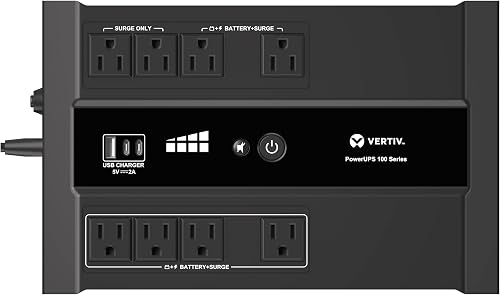
Vertiv Liebert PowerUPS 100 PST6-1100LVMT
Best for larger networks
Which UPS is best for a home network?
The APC Back-UPS BE600M1 600VA suits a typical router and modem pair, while larger setups may benefit from more outlets or higher watt capacity. We compared features that matter for network gear: battery-backed outlets, battery type, outlet layout, status information and voltage regulation.
The scores reflect how well each unit's features match common home network needs, including keeping essential gear connected and making setup manageable. Runtime varies with the devices connected, so check the expected load before relying on a particular outage duration.
| Product | Best for | Capacity | Battery-backed outlets | Battery type | Our score |
|---|---|---|---|---|---|
| APC Back-UPS BE600M1 600VA | compact networks | 600VA/330W | 5 | Lead acid | 8.5 |
| GOLDENMATE 600VA/360W Lithium UPS | low-maintenance networks | 600VA/360W | 6 | LiFePO4 lithium | 7.9 |
| APC Back-UPS BE650G1 650VA | smart-home hubs | 650VA/390W | 4 | Lead acid | 7.8 |
| CyberPower ST900U Standby 900VA UPS | shared workspaces | 900VA/500W | 6 | Lead acid | 7.7 |
| CyberPower EC650LCD Ecologic 650VA UPS | visible status | 650VA/390W | Not specified here | 7.6 | |
| CyberPower SL700U Standby 700VA UPS | narrow shelves | 700VA/370W | 5 | Lead acid | 7.5 |
| Tripp Lite AVR900U 900VA UPS | unstable voltage | 900VA/480W | 6 | Lead acid | 7.4 |
| Tripp Lite INTERNET750U 750VA UPS | wired connections | 750VA/450W | 6 | Sealed lead acid | 7.3 |
| Vertiv Liebert PowerUPS 100 PST6-1100LVMT | larger networks | 1100VA/670W | 6 | Lead acid | 7.1 |
The best UPS units for home networks and Wi-Fi
These picks cover compact router setups, wired network protection, extra outlets and voltage regulation. Keep the modem and router on battery-backed outlets, then add other equipment only if the UPS has capacity to spare.
APC Back-UPS BE600M1 600VA: Best for compact networks
- 600VA/330W
- 5 battery-backed outlets
- 2 surge-only outlets
- Built-in 1.5A USB port
A compact unit with five battery-backed outlets for a modem, router and other essential gear. Its USB port can charge a phone during an outage.
Pros
- 5 outlets with battery backup
- User-replaceable battery
- Compact form
Cons
- Lower capacity than the larger picks
- Battery charge time is 10 hours
The APC Back-UPS BE600M1 600VA is the straightforward choice for a modem, router and one or two other small devices. Five outlets provide battery backup, while two are surge-only for gear that does not need outage power.
APC gives a runtime figure of 23 minutes at a 100W load. Your network equipment may draw less than that, but actual runtime depends on the combined load and battery condition.
The user-replaceable lead-acid battery helps extend the unit's service life. A built-in 1.5A USB port can charge a phone during an outage, though the AC outlets should take priority for keeping the network online.
This is a good match when the UPS will sit near a modem and router and you want the essential equipment on backed outlets. Skip it if you need to power a larger collection of network and office devices, or if you want a lithium battery.
GOLDENMATE 600VA/360W Lithium UPS: Best for low-maintenance networks
- 600VA/360W
- LiFePO4 battery
- 6 battery-backed outlets
- USB-A and USB-C ports
Six battery-backed outlets suit a small network setup, and its LiFePO4 battery avoids the replacement routine of lead-acid models, according to GOLDENMATE.
Pros
- LiFePO4 battery
- All 6 outlets have battery backup
- USB-A, USB-C and wireless charging
Cons
- Standby design with simulated sine wave output
- Designed for standard 110V household power
The GOLDENMATE 600VA/360W Lithium UPS is a compact option if you want all six outlets backed by the battery. It uses a LiFePO4 battery, and GOLDENMATE says it is designed for more than 3,000 charge cycles.
Its 76.8Wh battery is intended for short-term backup, not extended power for a home. GOLDENMATE describes the unit as a standby UPS that should stay connected to utility power during normal operation so it can charge the battery.
A communication port supports automatic safe shutdown through Windows settings when connected to a Windows PC. For a network-only setup, its six backed outlets and USB charging options are the more direct benefits.
Choose this model if avoiding routine battery replacement is a priority and your connected load fits its 360W limit. Skip it if you need a portable power source for long outages or equipment that requires more capacity.
APC Back-UPS BE650G1 650VA: Best for smart-home hubs
- 650VA/390W
- 4 battery-backed outlets
- 4 surge-only outlets
- User-replaceable battery
Four battery-backed outlets can cover a modem, router and a couple of other essential devices. Four more outlets offer surge protection for gear that does not need outage power.
Pros
- 8 total outlets
- User-replaceable battery
- Indicators and muteable audible alerts
Cons
- Only 4 outlets have battery backup
- Battery replacement model details vary across descriptions
The APC Back-UPS BE650G1 650VA gives you eight total outlets, with four battery-backed and four surge-only. That split works if you want to keep a router, modem and a couple of other small devices running while protecting less critical equipment from surges.
APC gives up to 22 minutes of runtime at a 100W load. Its battery is user-replaceable, and the unit has indicators and audible alerts that can be muted.
This is a modest step up in stated watt capacity from the 600VA picks, but the number of battery-backed outlets is lower than on some larger units. Map each device to an outlet before buying, particularly if your modem and router have bulky power adapters.
Choose it when you want separate outlets for essential smart-home gear and surge-only equipment. Skip it if more than four devices need backup at once, even if the total number of outlets looks sufficient.
CyberPower ST900U Standby 900VA UPS: Best for shared workspaces
- 900VA/500W
- 6 battery-backed outlets
- 6 surge-only outlets
- 4 widely spaced outlets
The 12-outlet layout gives a home network room to share backup with other electronics. Six outlets provide battery backup while six offer surge protection only.
Pros
- 12 outlets total
- Four widely spaced outlets
- PowerPanel management software
Cons
- Only 6 outlets have battery backup
- Simulated sine wave output
CyberPower ST900U Standby 900VA UPS suits a network corner that also includes a desktop, display or entertainment device. It has 12 outlets, with six battery-backed and six surge-only, and four outlets spaced for larger plugs.
The 900VA/500W capacity gives more room for a mixed load than the compact picks. Its simulated sine wave output is a factor to consider when choosing equipment, especially if you plan to connect a device with specific power requirements.
The unit includes PowerPanel management software and a USB cable for computer power management. For a router and modem alone, its capacity may be more than you need, but the outlet count can help when several essential devices share one location.
Buy it when the UPS will support network equipment alongside a workstation or home entertainment gear. Skip it for a simple router-and-modem pair if you have no plans to use the additional outlets or capacity.
CyberPower EC650LCD Ecologic 650VA UPS: Best for visible status
- 650VA/390W
- LCD panel for battery and power conditions
- 8 outlets
- Simulated sine wave output
Its multifunction LCD gives immediate details about battery and power conditions. CyberPower describes it for networking devices and workstations.
Pros
- LCD status panel
- 8 outlets
- PowerPanel software
Cons
- Battery-backed outlet split is not specified here
- Simulated sine wave output
The CyberPower EC650LCD Ecologic 650VA UPS is the pick for readers who want to see battery and power conditions on an LCD panel. CyberPower describes it for networking devices and workstations, with eight outlets and 650VA/390W capacity.
The outlet split between battery backup and surge-only protection isn't specified here, so check the outlet labels before connecting essential network gear. Put the modem and router on outlets marked for battery backup.
Its ECO Mode can turn off connected peripherals when a computer is off or asleep, with a USB connection required. That feature may help in a desk setup, though it's less useful when the UPS powers only a modem and router.
Choose this model if seeing power and battery conditions on a screen matters to you. Skip it if you need clearly documented backup outlet allocation before purchase and can't confirm which outlets run on battery.
CyberPower SL700U Standby 700VA UPS: Best for narrow shelves
- 700VA/370W
- 5 battery-backed outlets
- 3 surge-only outlets
- 2 USB charging ports
A slim profile and five battery-backed outlets can work for a smaller networking corner. Its wall-mount slots offer another placement option.
Pros
- 5 battery-backed outlets
- Wall-mount slots
- Two USB charging ports
Cons
- Lower capacity than 900VA picks
- Simulated sine wave output
The CyberPower SL700U Standby 700VA UPS offers a slim profile and five battery-backed outlets for a compact network shelf or desk. Three additional outlets are surge-only, and two USB ports can charge mobile devices.
The 700VA/370W capacity falls between the smaller 600VA models and the 900VA options. Its wall-mount slots may help if the network gear is installed near an outlet and you want to keep the UPS off a crowded desk.
Like the other CyberPower standby picks here, it uses simulated sine wave output. Check whether that output type fits all the equipment you plan to connect.
Choose it for a modest network setup where its shape or wall-mount option makes placement easier. Skip it if your planned load is close to the unit's capacity or you need more than five backed outlets.
Tripp Lite AVR900U 900VA UPS: Best for unstable voltage
- 900VA/480W
- Automatic voltage regulation
- 6 battery-backed outlets
- User-replaceable battery
Automatic voltage regulation corrects minor power fluctuations without switching to battery. Six battery-backed outlets can serve network equipment and other essential electronics.
Pros
- AVR for input voltages from 89V to 145V
- Replaceable battery
- USB connection for computer shutdown software
Cons
- Six other outlets are surge-only
- Larger and heavier than compact picks
The Tripp Lite AVR900U 900VA UPS stands out for automatic voltage regulation, which corrects input voltage between 89V and 145V without switching to battery. That can help in a home where voltage dips or rises are a regular concern.
It has 12 outlets, split evenly between battery backup and surge-only protection. The replaceable lead-acid battery and USB connection for PowerAlert software add maintenance and shutdown options for a home office network.
This model is rated at 900VA/480W. If you're considering a unit with AVR, our guide to what AVR means on a UPS explains how it works and what to compare.
Choose this model if voltage correction is a priority and you also want capacity for several devices. Skip it if you only need basic backup for a modem and router, since a smaller unit may fit that job with less unused capacity.
Tripp Lite INTERNET750U 750VA UPS: Best for wired connections
- 750VA/450W
- 6 battery-backed outlets
- 6 surge-only outlets
- Network data-line surge suppression
This model includes data-line surge suppression jacks for a wired network connection. Six outlets have battery backup, with six more for surge protection.
Pros
- Network data-line surge suppression
- User-replaceable battery
- LED status indicators
Cons
- Data-line protection is for a 100 Mbps network connection
- Charge time is 12 hours
The Tripp Lite INTERNET750U 750VA UPS is designed with wired network equipment in mind. It has data-line surge suppression jacks for a 100 Mbps network connection, in addition to six battery-backed outlets and six surge-only outlets.
The UPS is rated at 750VA/450W, and its internal battery is user-replaceable. Tripp Lite gives example runtimes for different loads, which shows why a router setup can run for a different length of time than a computer setup.
Check whether the 100 Mbps data-line feature matches your network equipment before choosing this model for cable protection. AC battery backup and data-line surge suppression serve different roles.
Choose it if you use a wired connection and its data-line protection matches your network speed and connectors. Skip it if your network is faster than that feature supports or you only want Wi-Fi equipment backed up through AC outlets.
Vertiv Liebert PowerUPS 100 PST6-1100LVMT: Best for larger networks
- 1100VA
- 670W output
- 6 battery-backed outlets
- USB-A and USB-C charging
The 1100VA unit has six battery-backed outlets and two surge-only outlets. Its user-replaceable battery and alarm mute button may suit a network area where maintenance access matters.
Pros
- Highest stated watt capacity here
- User-replaceable battery
- USB-A and USB-C ports
Cons
- Larger than the compact 600VA picks
- Standby design with simulated sine wave output
The Vertiv Liebert PowerUPS 100 PST6-1100LVMT has a stated 1100VA capacity and 670W output, the highest watt figure among these picks. Six outlets provide battery backup and surge protection, with two more for surge-only devices.
Its user-replaceable battery makes maintenance access simpler, while USB-A and USB-C ports can charge mobile devices. Vertiv also includes an alarm mute button and describes the unit for wireless networks and other electronics.
This is a larger-capacity choice for a home network shared with more equipment. If your only goal is to keep a router and modem up, compare its size and capacity with the smaller 600VA models.
Choose it when your network shares backup with a heavier load and the higher stated watt capacity suits that equipment. Skip it if you have a small network and want a compact unit with more backed outlets for the money you spend on capacity.
How do you choose a UPS for a router and modem?
Choose a UPS by adding the watt draw of the modem, router and every other device you want available during an outage. Keep the total below the UPS watt limit and leave room for a sensible margin.
Check each power adapter label or device manual for its watt draw. If a device lists volts and amps instead of watts, multiply those numbers for a rough estimate, then confirm against the device's guidance.
Next, count the battery-backed outlets, not just all the outlets. Surge-only outlets protect connected equipment from some power events but do not keep it running when utility power fails.
The VA number is useful for comparing UPS models, but it doesn't replace the watt limit. Compare both ratings with your devices, and use the manufacturer's runtime information for the load you expect.
Think about what you want the UPS to accomplish. A router-and-modem system might need only enough time to ride through a short interruption, while a home office setup could also need time to save work and shut down a computer.
Which devices should stay powered during an outage?
Keep the modem or gateway and router on battery-backed outlets first. Add a network switch, access point or security hub only if it is essential and the combined load remains within the UPS limit.
A Wi-Fi router alone may not keep your connection available if the modem, fiber terminal or provider equipment also needs power. Think through the full path from the internet service connection to the devices in your home.
If you use a mesh network, consider which nodes need power to keep the rooms you care about connected. A single backed node may not preserve coverage across the whole home if other nodes lose power.
Avoid using a battery-backed outlet for high-draw equipment you don't need for connectivity. Our guide on what should be plugged into a UPS covers common device choices and outlet priorities.
How much runtime can you expect from a network UPS?
Runtime depends on the total watt load and the UPS battery's condition. A low-draw router setup may run longer than a computer load, but use a runtime chart for your expected wattage rather than guessing from the VA number.
The APC Back-UPS BE600M1 600VA and APC Back-UPS BE650G1 650VA provide example runtime figures at 100W. Those figures are reference points, but your equipment may draw a different amount and backup time can change as the battery ages.
Keep your goal realistic: a UPS is usually there to bridge a short outage, preserve network access for a while or give you time to shut down equipment. It is not a substitute for a generator or a large backup power source during a long outage.
For longer outages, check how much power the network equipment draws and whether your internet provider's equipment remains online. See how long a 1500VA UPS can run a computer for a practical look at load and runtime.
Should you choose a lithium or lead-acid UPS?
Choose by weighing battery maintenance against capacity, outlet layout and the equipment you need to run. The GOLDENMATE uses a LiFePO4 battery, while most of the other picks here use lead-acid batteries.
GOLDENMATE says its battery is designed for more than 3,000 charge cycles and does not need replacement. The APC and Tripp Lite models described here have user-replaceable batteries, which can let you renew a UPS without replacing the full unit.
Battery chemistry alone doesn't tell you how long the unit will run your modem and router. Compare the battery details alongside watt capacity, outlet count and runtime guidance for your expected load.
Factor battery replacement into long-term care. If you choose a model with a replaceable battery, keep its replacement information with your network notes and check the unit's indicators or manual for signs that service is due.
How should you set up a UPS for home Wi-Fi?
Place the UPS near the modem, router and any network terminal that must stay powered, with enough room to reach its controls and outlets. Follow the unit's manual for clearance and mounting, and keep its power cord connected to a suitable wall outlet.
Before connecting everything, label the power adapters so you can identify which device each one serves. Plug the modem and router into outlets marked for battery backup, then connect optional devices one at a time while keeping the total load within the UPS limit.
Let the UPS charge according to its instructions before depending on it for backup. The APC BE600M1 specifies a 10-hour charge time, while the GOLDENMATE specifies 3 hours; follow the guidance for whichever model you choose.
If the UPS includes computer shutdown software, connect and configure it only if a computer is part of the backed-up setup. A network-only installation can still benefit from battery backup, but it won't use computer shutdown features.
After setup, confirm that the modem and router restart or remain connected as expected during a brief, planned power interruption. Choose a quiet time, avoid disrupting other people, and follow the manufacturer's instructions for checking battery operation.
How do you care for a home network UPS?
Keep the UPS in a dry, ventilated location where it won't be covered by books, cables or other equipment. Heat and blocked airflow can shorten the useful life of electronics and batteries.
Check the front panel or status display occasionally for battery, power or fault alerts. If the UPS signals a problem, consult its manual rather than repeatedly muting the alarm without finding the cause.
Keep track of the battery type and replacement options. Lead-acid models may need a replacement battery over time, while the GOLDENMATE's LiFePO4 battery is described as not requiring replacement.
Make sure the UPS stays connected to utility power during normal use if its design requires that for charging. A UPS is meant to remain plugged in and ready, not to serve as a portable battery pack.
What mistakes should you avoid when buying a network UPS?
The most common buying mistake is treating the total outlet count as the number of devices that will stay powered. Check which outlets offer battery backup, especially on models that also have surge-only outlets.
Don't choose capacity by the router alone if your modem, network terminal, switch or access points also need power. Add all the loads you plan to connect and check them against the UPS watt limit.
Avoid assuming the VA number tells you the runtime. A larger capacity can help with load, but runtime still depends on the connected wattage, battery condition and model.
Don't overlook plug size or placement. Bulky adapters can block nearby outlets, so consider outlet spacing and whether the UPS can fit on a shelf, floor or wall in the location you have available.
A UPS protects the equipment connected to it, but it can't keep your internet provider's network powered. If outside service drops during an outage, your backed-up home gear may remain on without an internet connection.
Don't overload a UPS by adding a power strip or surge protector without checking the manufacturer's guidance. See whether you can plug a surge protector into a UPS before expanding the outlet setup.
Which best UPS for home network setup fits your needs?
Choose the APC Back-UPS BE600M1 for a compact modem-and-router setup with five battery-backed outlets. Pick the GOLDENMATE if a LiFePO4 battery and six backed outlets matter most, or the Tripp Lite AVR900U if voltage regulation is your priority.
For wired network data-line surge protection, consider the Tripp Lite INTERNET750U and confirm that its 100 Mbps feature fits your connection. Choose the CyberPower ST900U or Vertiv Liebert when your network shares the UPS with more equipment and needs their higher outlet or watt capacity.
Before you buy, write down the devices you need during an outage, their combined watt draw and how many require battery-backed outlets. That short list will tell you which best UPS for home network fits the equipment you actually need to keep online.
Our top 3 picks at a glance
-
1
-
2
Best for low-maintenance networks
GOLDENMATE 600VA/360W Lithium UPS
7.9/10 our score
See it on Amazon -
3
Frequently asked questions
What size UPS do I need for a home Wi-Fi router?
A small UPS can cover a router and modem, but size it by adding the watt draw of every device you want powered. Compare that total with the UPS watt limit, then consider how long you need the connection to stay up.
Read our guide on how much VA you need in a UPS before choosing.
Should my modem and router both connect to the UPS?
Yes, if you want the whole internet path to stay powered during an outage. The modem or gateway and the router each need power, so give both battery-backed outlets.
A UPS cannot keep internet service available if the provider's local equipment loses power.
How long will a UPS run a Wi-Fi router?
Runtime depends on the combined watt draw of the modem, router and any other connected devices. A larger load uses the battery faster, so use the UPS runtime chart for your expected wattage rather than relying on a broad estimate.
Our 1500VA UPS runtime guide explains how load changes runtime.
Can a UPS protect an Ethernet connection?
Some UPS units include data-line surge protection for a wired network cable, as the Tripp Lite INTERNET750U does for a 100 Mbps connection. This is separate from battery backup through the AC outlets.
Check the network speed and connector type before relying on that feature.
Can I plug a power strip into a home network UPS?
Use the UPS outlets directly for the modem, router and other essential gear. Avoid adding a surge protector or power strip unless the UPS maker allows that setup, since it can affect protection or overload the unit.
See our guide to what should be plugged into a UPS for device priorities.


