9 Best UPS for a Desktop PC (October 2026)
The best UPS for desktop PCs include the CyberPower CP1500PFCLCD 1500VA Sine Wave UPS for active PFC PCs, the APC Back-UPS Pro BR1500MS2 1500VA Sine Wave for full workstations, and the APC Back-UPS Pro BX1500M 1500VA for APC loyalists.
On this page (17 sections)
- How we chose these UPS models for desktop PCs
- Best UPS for PC: sine wave and high capacity
- Best sine wave UPS for a full workstation
- Best 1500VA APC UPS for a desktop computer
- Best 1000VA sine wave UPS for a smaller PC
- Best lithium UPS for a desktop PC
- Best 1500VA UPS for extra outlets
- Best 1000VA APC UPS for a modest setup
- Best compact UPS for a low-load desk
- Best 1500VA UPS with a replaceable battery
- How do you choose the right UPS size for a desktop PC?
- Does sine wave output matter for a PC UPS?
- What should you plug into a computer UPS?
- How should you set up a UPS for a desktop computer?
- What mistakes should you avoid when choosing a PC UPS?
- How do you care for a computer UPS battery?
- Best UPS for desktop PC: which one should you choose?
The CyberPower CP1500PFCLCD is the best UPS for most desktop PCs because it combines sine wave output with a 1000W rating. For a lower-load computer, the CyberPower CP1000PFCLCD offers sine wave output at 600W, while the GOLDENMATE pairs 800W capacity with a lithium iron phosphate battery.
A UPS gives a desktop computer time to ride through a brief interruption or shut down safely when an outage lasts longer. Choose by the PC's power draw, the equipment you want to keep running, the output type your power supply needs and the battery outlets available.
A tower, monitor, router and external drives all add to the load if they need backup power. Only some outlets on many UPS models use the battery during an outage, so count those separately from the total outlet number.
If you are estimating capacity, start with how much VA you need in a UPS. Our UPS battery backup selection guide explains how to plan for connected devices and runtime.
Our picks at a glance
-
1
 Best for active PFC PCs
CyberPower CP1500PFCLCD 1500VA Sine Wave UPS
9.2/10 our score
See it on Amazon -
2
 Best for full workstations
APC Back-UPS Pro BR1500MS2 1500VA Sine Wave
9.0/10 our score
See it on Amazon -
3

- 4
 Check it
CyberPower CP1000PFCLCD 1000VA Sine Wave UPS
Best for smaller active PFC PCs - 5
 Check it
GOLDENMATE 1000VA/800W Lithium UPS
Best for long battery life - 6
 Check it
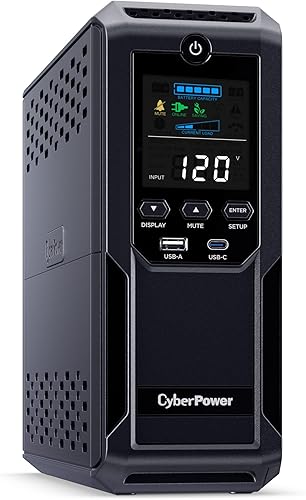
CyberPower CP1500AVRLCD3 1500VA UPS
Best for many desk devices - 7
 Check it
APC Back-UPS Pro BX1000M 1000VA
Best for modest APC desks - 8
 Check it
CyberPower EC850LCD Ecologic 850VA UPS
Best for compact low-load desks - 9
 Check it
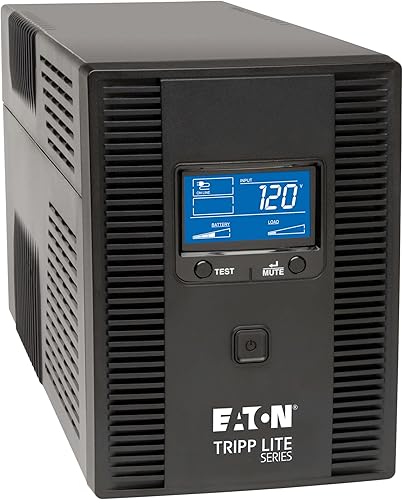
Tripp Lite OMNI1500LCDT 1500VA UPS
Best for replaceable batteries
How we chose these UPS models for desktop PCs
We compared watt capacity, output type, battery outlet count, voltage regulation, battery design and display features against common desktop PC needs. Each model earns a place here for a specific setup, from a low-load computer to a workstation with several essential accessories.
Watt capacity is a practical first filter because it helps you check whether the UPS can support the combined load. The models in this roundup range from 510W to 1000W, even though several share a 1500VA label.
Sine wave output is another useful point of comparison for a computer with an active PFC power supply. For more on UPS output and design, read standby vs line-interactive UPS types.
| Product | Best for | Capacity | Output | Battery outlets | Our score |
|---|---|---|---|---|---|
| CyberPower CP1500PFCLCD 1500VA Sine Wave UPS | active PFC PCs | 1500VA/1000W | Sine wave | 6 | 9.2 |
| APC Back-UPS Pro BR1500MS2 1500VA Sine Wave | full workstations | 1500VA/900W | Pure sine wave | 6 | 9.0 |
| APC Back-UPS Pro BX1500M 1500VA | APC loyalists | 1500VA/900W | Not specified | 5 | 8.8 |
| CyberPower CP1000PFCLCD 1000VA Sine Wave UPS | smaller active PFC PCs | 1000VA/600W | Sine wave | 5 | 8.7 |
| GOLDENMATE 1000VA/800W Lithium UPS | long battery life | 1000VA/800W | 8 | 8.6 | |
| CyberPower CP1500AVRLCD3 1500VA UPS | many desk devices | 1500VA/900W | Simulated sine wave | 6 | 8.5 |
| APC Back-UPS Pro BX1000M 1000VA | modest APC desks | 1000VA/600W | Not specified | 4 | 8.4 |
| CyberPower EC850LCD Ecologic 850VA UPS | compact low-load desks | 850VA/510W | Simulated sine wave | 6 | 8.1 |
| Tripp Lite OMNI1500LCDT 1500VA UPS | replaceable batteries | 1500VA/810W | Not specified | Not specified | 7.8 |
Best UPS for PC: sine wave and high capacity
The CyberPower CP1500PFCLCD is the strongest all-round choice here for a desktop PC with an active PFC power supply. Its 1000W rating is the highest in this group, and its sine wave output is designed for active PFC and conventional power supplies.
CyberPower CP1500PFCLCD 1500VA Sine Wave UPS: Best for active PFC PCs
- 1500VA/1000W
- Sine wave output
- 6 battery backup outlets
- AVR
Sine wave output and a 1000W rating suit a desktop PC with an active PFC power supply and several essential devices.
Pros
- Sine wave output
- 1000W capacity
- Color LCD and AVR
Cons
- Only 6 of its 12 outlets provide battery backup
Six of its 12 outlets provide battery backup and surge protection; the other six are surge-only. Reserve battery outlets for the PC and equipment you need during an outage, then use the surge-only outlets for devices that can turn off immediately.
AVR corrects minor power fluctuations without switching to battery power. The color LCD shows battery and power conditions, and its screen tilts up to 22 degrees for viewing under a desk.
Choose this model if your computer and essential accessories need more capacity than the 600W options provide. Its 1000W limit applies to everything drawing power from the UPS, so add the devices together before plugging them in.
Best sine wave UPS for a full workstation
The APC BR1500MS2 suits a workstation that needs pure sine wave output, front USB charging and several battery outlets. Its 900W rating is below the top pick's capacity, but it provides a clear fit for a full desk with a PC and key accessories.
APC Back-UPS Pro BR1500MS2 1500VA Sine Wave: Best for full workstations
- 1500VA/900W
- Pure sine wave output
- 6 battery backup outlets
- USB-C and USB-A charging
Pure sine wave output, six battery backup outlets and front USB charging suit a desk with a PC and essential accessories.
Pros
- Pure sine wave output
- USB-C and USB-A charging
- Replaceable battery
Cons
- Rated for 900W, below the top pick's 1000W
Six battery outlets can cover a PC and several essential devices, while four additional outlets provide surge protection only. Two front USB ports, one Type-A and one Type-C, charge mobile devices without taking an AC outlet.
AVR corrects high or low voltage without switching to battery, and the LCD shows load and battery status. Choose it when the output type, outlet layout and USB charging match your setup; skip it if your combined load approaches the 900W limit.
Best 1500VA APC UPS for a desktop computer
The APC BX1500M gives a desktop setup 1500VA/900W capacity, AVR and a user-replaceable battery. Its five battery outlets make it a good match for a PC and a short list of essential devices, rather than a desk where every accessory needs backup.
APC Back-UPS Pro BX1500M 1500VA: Best for APC loyalists
- 1500VA/900W
- AVR
- 5 battery backup outlets
- Replaceable battery
This APC model combines a 1500VA/900W rating with AVR and a replaceable battery for a desktop setup that needs substantial capacity.
Pros
- 1500VA/900W capacity
- AVR
- Replaceable battery
Cons
- Only 5 battery backup outlets
The 10 outlets split into five battery backup and surge outlets and five surge-only outlets. Built-in coaxial and Ethernet surge protection can also cover compatible data connections.
The LCD shows battery charge, estimated runtime, load capacity and input voltage. Choose this model if those monitoring details and a replaceable battery matter to you; skip it if you need more than five battery outlets or require a specified sine wave output.
Best 1000VA sine wave UPS for a smaller PC
The CyberPower CP1000PFCLCD is a smaller sine wave option for a desktop PC whose combined equipment load stays within 600W. It suits a modest tower and a few essential devices, with five battery outlets for the equipment that must stay on.
CyberPower CP1000PFCLCD 1000VA Sine Wave UPS: Best for smaller active PFC PCs
- 1000VA/600W
- Sine wave output
- 5 battery backup outlets
- AVR
Sine wave output supports active PFC power supplies, while the 600W rating suits a desktop setup with a lower combined load.
Pros
- Sine wave output
- AVR
- Color LCD
Cons
- 600W capacity is lower than the 1500VA options
Sine wave output is designed for active PFC and conventional power supplies. Its color LCD displays battery and power conditions, while AVR corrects minor fluctuations without using battery power.
Choose this model when your measured load leaves room below 600W and you do not need a large number of battery outlets. A high-draw gaming PC or workstation may need more capacity, so check the computer's real power draw before settling on a smaller unit.
Best lithium UPS for a desktop PC
The GOLDENMATE 1000VA/800W stands out for its lithium iron phosphate battery and eight battery backup outlets. Its 800W rating sits between the smaller 600W models and the higher-capacity 1500VA options.
GOLDENMATE 1000VA/800W Lithium UPS: Best for long battery life
- 1000VA/800W
- Lithium iron phosphate battery
- 8 battery backup outlets
- Pure sine wave output
Its lithium iron phosphate battery, pure sine wave output and 800W rating suit a desktop setup with a moderate load.
Pros
- Pure sine wave output
- 8 battery backup outlets
- Battery life claim of over 10 years and 5000 charge cycles
Cons
- Cooling fan can activate during heavy battery use
This unit provides pure sine wave output, and all eight outlets offer surge protection and battery backup. The LCD reports battery and power conditions, while its battery management system monitors battery voltage.
GOLDENMATE says the battery is designed for over 10 years and more than 5000 charge cycles. The cooling fan can turn on during heavy battery use, so consider its location if fan noise near your desk would bother you.
Choose this model if you want a lithium battery and your PC load fits within 800W. Its stated input range is 90–140V AC for standard 110V household power, so check that the input range suits your electrical supply before buying.
Best 1500VA UPS for extra outlets
The CyberPower CP1500AVRLCD3 is a 1500VA/900W option with six battery outlets and a color LCD. It can suit a desk with several devices, provided your PC power supply is compatible with simulated sine wave output.
CyberPower CP1500AVRLCD3 1500VA UPS: Best for many desk devices
- 1500VA/900W
- Simulated sine wave output
- 6 battery backup outlets
- AVR
This CyberPower model has six battery outlets and a color LCD for a desktop setup whose power supply is compatible with simulated sine wave output.
Pros
- 1500VA/900W capacity
- 12 total outlets
- Color LCD and AVR
Cons
- Simulated sine wave output
This model has 12 outlets: six for battery backup and surge protection, and six for surge protection only. Place the PC and essential equipment on the battery outlets, rather than assuming every connected accessory will remain on during an outage.
AVR corrects minor power fluctuations without switching to battery. The display shows battery and power conditions, and two USB charging ports handle mobile devices.
Choose it when its outlet count and capacity fit your desk and simulated sine wave output is appropriate for your computer. Skip it if your power supply requires pure sine wave output.
Best 1000VA APC UPS for a modest setup
The APC BX1000M fits a lower-load PC setup that needs 1000VA/600W capacity, AVR and a replaceable battery. It has four battery outlets for essential equipment and four surge-only outlets for devices that do not need outage power.
APC Back-UPS Pro BX1000M 1000VA: Best for modest APC desks
- 1000VA/600W
- 4 battery backup outlets
- AVR
- Replaceable battery
A 600W rating, AVR and replaceable battery fit a lower-load computer setup with only a few devices needing backup.
Pros
- AVR
- Replaceable battery
- LCD status display
Cons
- Only 4 battery backup outlets
Built-in coaxial and Ethernet surge protection adds coverage for compatible network connections. Its LCD displays battery charge, load capacity, estimated runtime and power conditions.
APC identifies this model as compatible with active PFC power supplies. Choose it if your PC and a few accessories fit within the capacity and outlet layout; if the monitor, router and storage devices all need battery power, check whether four battery outlets are enough.
Best compact UPS for a low-load desk
The CyberPower EC850LCD suits a compact desk setup with a lower combined power draw. Its 850VA/510W capacity and six battery outlets can cover a modest PC and essential accessories.
CyberPower EC850LCD Ecologic 850VA UPS: Best for compact low-load desks
- 850VA/510W
- 6 battery backup outlets
- ECO mode outlets
- LCD
This compact option gives a modest PC setup six battery outlets and ECO outlets that can switch off peripherals when a connected computer sleeps or shuts down.
Pros
- Compact form
- ECO mode outlets
- LCD status panel
Cons
- 510W capacity is the lowest here
The EC850LCD has 12 outlets, with six providing battery backup and surge protection. Its LCD displays battery and power information, while ECO mode can turn off connected peripherals when the computer is off or asleep.
The ECO outlets are surge-only, and ECO mode requires a USB connection. Keep the PC and anything that must stay powered during an outage on the battery outlets.
Choose it for a modest PC after checking the combined load. Its 510W rating is the lowest here, so skip it for a computer and accessories that may draw more than that.
Best 1500VA UPS with a replaceable battery
The Tripp Lite OMNI1500LCDT offers 1500VA/810W capacity, AVR and a user-replaceable battery. Its LCD reports runtime, wattage load, overload, input voltage and battery status.
Tripp Lite OMNI1500LCDT 1500VA UPS: Best for replaceable batteries
- 1500VA/810W
- AVR
- Battery outlet split not specified
- Replaceable battery
The OMNI1500LCDT pairs an 810W rating with AVR and a replaceable battery for a PC setup that benefits from its load and runtime display.
Pros
- 810W capacity
- AVR
- Replaceable battery
Cons
- Output type and outlet split are not specified
This UPS has 10 outlets and a 650-joule surge protection rating. Ethernet and telephone or DSL dataline protection may be useful when those connections are part of your computer setup.
AVR corrects brownouts and overvoltage between 92V and 150V without using battery power. The user-replaceable battery is available as Tripp Lite's RBC51 cartridge.
The output type and battery-versus-surge outlet split are not specified here. Check those details against your computer's requirements and desk layout before choosing this model; its 810W rating may suit a setup that needs more capacity than a 600W unit.
How do you choose the right UPS size for a desktop PC?
Choose a UPS by the total watt draw of the devices you want backed up, then leave room below the UPS's maximum watt rating. The PC, monitor, router and external drives all count if you want them to stay on during an outage.
Best UPS for PC size: compare watts, not just VA
VA and watts describe different limits. For these picks, the watt rating ranges from 510W on the EC850LCD to 1000W on the CP1500PFCLCD, so compare the watt figure with your equipment's load rather than choosing by VA alone.
Check your computer's power supply label or manufacturer guidance, then estimate the load of the devices you plan to keep running. A power supply's maximum rating is not always the computer's everyday draw, but the UPS still needs enough capacity for the load it may actually face.
Leave headroom for a monitor, router or storage device if those will share the battery. If you expect to add equipment later, factor it in now so you do not need to replace the UPS as soon as the desk changes.
A UPS also needs enough battery outlets for the devices that matter. Use surge-only outlets for peripherals you can turn off, and reserve battery outlets for the PC and other equipment that needs time to save work or shut down.
Does sine wave output matter for a PC UPS?
Sine wave output can matter when a desktop PC uses an active PFC power supply. The CyberPower CP1500PFCLCD, CP1000PFCLCD and GOLDENMATE model specify sine wave output; the APC BR1500MS2 specifies pure sine wave output.
The CP1500AVRLCD3 and EC850LCD use simulated sine wave output. Check your computer power supply manufacturer's guidance if you are unsure which type to choose.
Do not assume that every PC needs the same output type. If you cannot confirm what your power supply supports, choose a model with sine wave output or ask the PC or power supply manufacturer for guidance.
What should you plug into a computer UPS?
Plug the PC and any device that needs time during an outage into battery backup outlets, while using surge-only outlets for less critical equipment. Count the monitor and network gear in the UPS's total watt load.
A monitor is useful on battery if you need to see your work while saving files and shutting down. A router can keep a connection available during an interruption, but only if it has a battery outlet and the internet service itself remains available.
Speakers, lamps and other accessories usually matter less during a short outage. Put them on surge-only outlets if they need surge protection, or leave them off the UPS to keep the battery outlets and capacity free for essential equipment.
A surge-only outlet does not keep a device running during a power cut. See what to plug into a UPS for more on outlet priorities.
How should you set up a UPS for a desktop computer?
Set up the UPS on a stable, open surface near the computer and a suitable wall outlet. Leave space around it for ventilation, and keep it away from heat, moisture and enclosed areas.
Before connecting the PC, check the UPS's input requirements and the outlet type. For the GOLDENMATE, the stated input range is 90–140V AC; confirm your supply is compatible.
Connect the UPS to the wall first and follow its instructions for initial charging. Then plug the PC and the devices you need during an outage into battery backup outlets, keeping surge-only peripherals separate.
If the UPS includes USB management software, connect it to the computer and use the available settings to support automatic shutdown. Save work often, too: a UPS provides time to respond to an outage, not a guarantee that a computer can run indefinitely.
After setup, check the LCD or status indicators to confirm the unit recognizes the load. Keep the total under its watt limit and confirm that the battery outlets serve the devices you intended.
What mistakes should you avoid when choosing a PC UPS?
The most common mistake is choosing by VA alone. Two units with the same VA rating can have different watt limits, so check the watt rating against the combined load of your PC and accessories.
A second mistake is counting all outlets as battery outlets. Several models in this roundup split their outlets between battery backup and surge-only protection, and the split can determine whether you can keep the PC, monitor and router running together.
Do not overlook output type. If your computer's power supply calls for sine wave output, a simulated sine wave unit may not be the right match; check compatibility before buying.
Avoid connecting devices that add unnecessary load to the battery outlets. A printer, speaker system or other peripheral can use capacity that would be more helpful for the PC and monitor during an outage.
Finally, do not treat the UPS as long-term power for a desktop. It is intended to bridge interruptions and give you time to save work or shut down.
If you need longer backup for multiple devices, review the load and runtime needs before buying.
How do you care for a computer UPS battery?
Keep the UPS in a ventilated place and follow the manufacturer's care and charging instructions. Heat and blocked airflow can make equipment harder to keep within its intended operating conditions.
Check the display periodically for battery, load and input power information. If the unit signals a battery problem or the estimated runtime drops, consult the manufacturer guidance for that model and decide whether its battery needs service or replacement.
Battery design affects maintenance planning. Several models here use lead-acid batteries.
The APC BX1500M, BX1000M and BR1500MS2 have user-replaceable batteries. GOLDENMATE uses a lithium iron phosphate battery and claims a service life of over 10 years and more than 5000 charge cycles.
Do not cover the UPS or place it in a hot, enclosed space. The GOLDENMATE safety guidance specifically cautions against high-temperature and enclosed environments, and its fan may run during heavy battery use.
Best UPS for desktop PC: which one should you choose?
Choose the CyberPower CP1500PFCLCD if you want sine wave output and the highest rated capacity in this roundup. Pick the CyberPower CP1000PFCLCD for a smaller active PFC setup that stays within 600W, or the GOLDENMATE if lithium battery design, eight battery outlets and an 800W rating fit your needs.
Choose the APC BR1500MS2 if pure sine wave output and USB charging suit your workstation. Consider the EC850LCD for a compact, low-load desk, and check its simulated sine wave output against your PC requirements before you buy.
The right best UPS for PC use is the one that supports your actual watt load, offers the output type your computer needs and has enough battery outlets for essential devices. Compare your expected load with the UPS rating and count those outlets first; our 1500VA UPS runtime guide explains why runtime changes with load.
Our top 3 picks at a glance
-
1
Best for active PFC PCs
CyberPower CP1500PFCLCD 1500VA Sine Wave UPS
9.2/10 our score
See it on Amazon -
2
Best for full workstations
APC Back-UPS Pro BR1500MS2 1500VA Sine Wave
9.0/10 our score
See it on Amazon -
3
Frequently asked questions
What size UPS do I need for a desktop PC?
Choose a UPS whose watt rating exceeds the combined draw of your PC and the devices you want to keep powered. The 1000VA models here range from 600W to 800W, while the 1500VA options range from 810W to 1000W.
Check your computer's actual load and leave room for a monitor or router if they also need backup.
Does a desktop PC need a sine wave UPS?
A sine wave model is a useful fit for a PC with an active PFC power supply. The CyberPower CP1500PFCLCD and CP1000PFCLCD provide sine wave output, while the CP1500AVRLCD3 uses simulated sine wave output.
Check your PC power supply requirements before choosing.
Should I plug my monitor into the UPS?
Connect the monitor to a battery backup outlet if you want it to stay on during a power cut. Keep the PC and other essential devices within the UPS watt limit, and use surge-only outlets for peripherals that can shut down immediately.
Our guide to what should be plugged into a UPS explains how to prioritize outlets.
How long will a UPS run a desktop computer?
Runtime depends on the connected load and the UPS battery. A higher watt load drains the battery faster, so use the runtime estimate for your actual equipment rather than assuming a 1500VA unit will run for a set length of time.
See our guide to 1500VA UPS runtime for more context.



