8 Best UPS for a Small Office (October 2026)
The best UPS for a small office include the APC Back-UPS Pro BX1500M 1500VA for mixed desk setups, the CyberPower CP1500AVRLCD3 1500VA UPS for busy workstations, and the CyberPower CP1500PFCRM2U Rack Sine Wave UPS for active PFC racks.
On this page (9 sections)
- How we chose the best UPS for a small office
- The best UPS for small office setups
- How should you size a UPS for a small office?
- Which office equipment belongs on battery backup?
- Is AVR useful in a small office UPS?
- How long will a small office UPS run?
- How do you set up and care for a small office UPS?
- What mistakes should you avoid when choosing an office UPS?
- Which UPS is the best fit for your small office?
The APC Back-UPS Pro BX1500M is the best UPS for a small office with one desktop computer, a monitor and network gear. Its 900W capacity, AVR and divided outlet groups make it a flexible tower pick, while rack users should compare the rackmount options.
A small office may be one desk or several workstations sharing a network closet. Start with what must stay powered, then match watt capacity, battery-backed outlets and UPS shape to the room.
Use our UPS sizing guide to total the equipment load. For one computer, see our best UPS picks for a desktop PC, or compare network-focused choices in the home network UPS guide.
Our picks at a glance
-
1

-
2
-
3
 Best for active PFC racks
CyberPower CP1500PFCRM2U Rack Sine Wave UPS
8.4/10 our score
See it on Amazon
- 4
 Check it
Tripp Lite SMART1500LCDT 1500VA UPS
Best for shared office towers - 5
 Check it
Tripp Lite SMART1500LCD 2U Rack UPS
Best for flexible rack rooms - 6
 Check it
APC Back-UPS Pro 1500VA Tower UPS
Best for extended light loads - 7
 Check it
Vertiv Liebert PowerUPS 200 PSA6E-1500LVT
Best for quick status checks - 8
 Check it
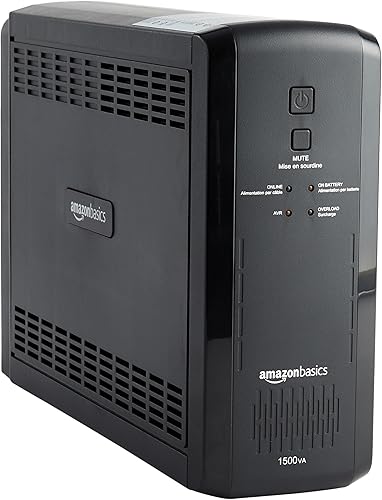
Amazon Basics 1500VA Line-Interactive UPS
Best for simple desk backup
How we chose the best UPS for a small office
The best small office UPS has enough watt capacity for essential equipment and an outlet layout that fits the workday. We compared capacity, outlet groups, AVR, form, display features and battery details.
VA and watts describe different limits, and neither number promises a particular runtime. Add up the watts of the devices on battery backup and leave some headroom for changes, such as adding a monitor or switching computers.
A desk worker may prefer a tower that sits near the equipment, while a team with a network rack may need a shallow rack unit. The picks below cover both situations and make the tradeoffs clear.
The scores reflect how well each model’s stated features match a small office’s likely needs. Runtime depends on the actual load, so use stated runtime figures only for the load they describe.
| Product | Best for | Capacity | Outlets | Form | Our score |
|---|---|---|---|---|---|
| APC Back-UPS Pro BX1500M 1500VA | mixed desk setups | 1500VA / 900W | 10: 5 battery backup, 5 surge only | Tower | 8.8 |
| CyberPower CP1500AVRLCD3 1500VA UPS | busy workstations | 1500VA / 900W | 12: 6 battery backup, 6 surge only | Mini tower | 8.5 |
| CyberPower CP1500PFCRM2U Rack Sine Wave UPS | active PFC racks | 1500VA / 1000W | 8 battery backup and surge protected | 2U short-depth rackmount | 8.4 |
| Tripp Lite SMART1500LCDT 1500VA UPS | shared office towers | 1500VA / 900W | 10 | Tower | 8.0 |
| Tripp Lite SMART1500LCD 2U Rack UPS | flexible rack rooms | 1500VA / 900W | 8 | 2U rackmount or tower | 7.9 |
| APC Back-UPS Pro 1500VA Tower UPS | extended light loads | 1500VA / 865W | 10: 5 battery backup, 5 surge only | Tower | 7.7 |
| Vertiv Liebert PowerUPS 200 PSA6E-1500LVT | quick status checks | 1500VA / 850W | 8 | Compact | 7.6 |
| Amazon Basics 1500VA Line-Interactive UPS | simple desk backup | 1500VA / 900W | 10: 5 battery backup, 5 surge only | Mini tower | 7.4 |
The best UPS for small office setups
The APC BX1500M is the strongest general desk pick here. The other models suit specific needs, including more desk outlets, rack mounting, sine wave output and simple status checks.
APC Back-UPS Pro BX1500M 1500VA: Best for mixed desk setups
- 1500VA / 900W
- 10 outlets, 5 with battery backup
- AVR
- LCD status display
A tower UPS with 5 battery backup outlets, 5 surge-only outlets, AVR and an LCD showing load and estimated runtime.
Pros
- AVR corrects low voltage and surges
- LCD shows load and estimated runtime
- User-replaceable battery
Cons
- Only 5 of the 10 outlets provide battery backup
- Replacement battery is sold separately
The APC BX1500M suits a desk with a computer, monitor and network equipment. Its 10 outlets divide evenly between battery backup and surge-only protection, so you can reserve battery power for devices that need time to save work or shut down.
AVR corrects low voltage and surges without draining the battery. The LCD shows battery charge, estimated runtime, load capacity and input voltage, making it easier to spot a rising load before an outage.
The battery is user-replaceable, though you’ll need to buy the replacement separately. Plan for that routine cost when deciding how long you want to keep the UPS in service.
Choose it for a mixed desk setup where you want a useful outlet split and detailed status information. Skip it if you need more than five battery-backed outlets; the CyberPower desk model below has six.
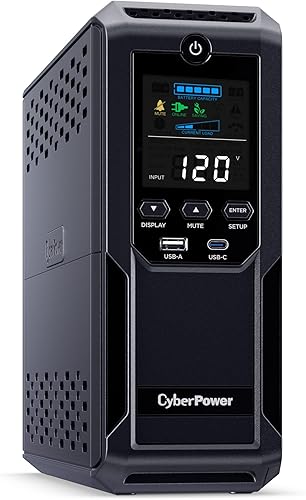
CyberPower CP1500AVRLCD3 1500VA UPS: Best for busy workstations
- 1500VA / 900W
- 12 outlets, 6 with battery backup
- AVR
- Color LCD
A mini-tower option with 12 outlets, a color LCD, AVR and USB-A and USB-C charging ports.
Pros
- 12 outlets for desk equipment
- AVR handles minor power fluctuations
- Three-year warranty includes the battery
Cons
- Simulated sine wave output
- Only 6 outlets provide battery backup
The CyberPower CP1500AVRLCD3 is a good fit for a workstation with several accessories because it has 12 outlets. Six have battery backup and surge protection, and six provide surge protection only.
Its color LCD displays battery and power conditions. AVR corrects minor fluctuations without switching to battery, while USB-A and USB-C ports can charge phones or tablets.
The unit uses simulated sine wave output. If your computer has an active PFC power supply, check compatibility with that equipment before buying; the CyberPower rack model below specifies sine wave output for active PFC and conventional supplies.
CyberPower’s three-year warranty includes the battery. Choose this mini-tower for extra desk connections and six battery-backed outlets; skip it if your equipment calls for sine wave output.
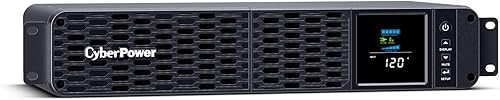
CyberPower CP1500PFCRM2U Rack Sine Wave UPS: Best for active PFC racks
- 1500VA / 1000W
- Sine wave output
- 8 battery backup outlets
- 10.5 in deep
A short-depth 2U rack UPS with sine wave output and 1000W capacity for compatible active PFC equipment.
Pros
- Sine wave output for active PFC power supplies
- Short 10.5 in depth
- Color LCD and AVR
Cons
- Rack form may not suit a desk
- Remote monitoring cards are optional purchases
The CyberPower CP1500PFCRM2U is designed for a rack-based office that needs sine wave output. It has eight battery-backed and surge-protected outlets, with a 1000W capacity.
Its 10.5 in depth fits short-depth rack installations where space is tight. Measure your rack and allow room for cables before choosing it, since the rack format is less convenient beside a standard desk.
The color LCD displays battery and power conditions, and AVR corrects minor fluctuations without switching to battery. CyberPower describes the sine wave output as suitable for active PFC and conventional power supplies.
The three-year warranty includes the battery. Remote network or cloud monitoring cards are optional, so this model suits offices that want rack installation and sine wave output but can skip it if they need monitoring included or a tower design.
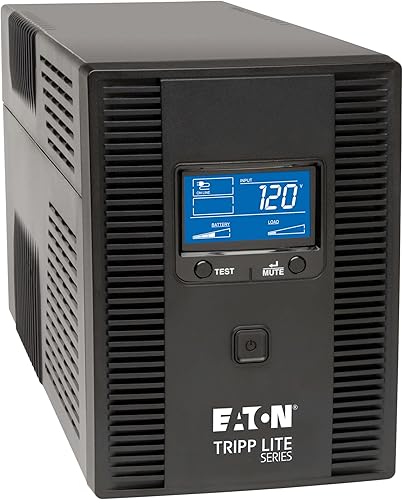
Tripp Lite SMART1500LCDT 1500VA UPS: Best for shared office towers
- 1500VA / 900W
- 10 outlets
- AVR
- Replaceable battery
A tower UPS with 10 outlets, AVR, a runtime and load display, plus replaceable internal batteries.
Pros
- LCD shows runtime and wattage load
- AVR corrects brownouts and overvoltage
- Ethernet and telephone or DSL line protection
Cons
- 650 joules of surge protection
- Battery runtime varies with connected load
The Tripp Lite SMART1500LCDT is a tower option for a shared work area with computers, a small server or network equipment. It offers 10 outlets and a 900W capacity.
Its LCD shows runtime, wattage load, overload, AVR, input voltage and battery status. AVR corrects brownouts and overvoltage between 92V and 150V back to 120V without using battery power.
The unit also protects Ethernet and telephone or DSL data lines. Its internal battery can be replaced with Tripp Lite’s RBC51 cartridge.
The exact battery-backed outlet count isn’t established here, so check the outlet labels before assigning critical devices. Choose it for a shared tower workspace where detailed status and data-line protection matter; skip it if you need a known count of battery-backed outlets before purchase.
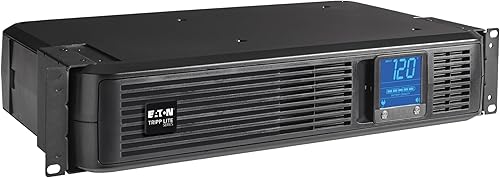
Tripp Lite SMART1500LCD 2U Rack UPS: Best for flexible rack rooms
- 1500VA / 900W
- 8 outlets
- 2U rack or vertical tower
- AVR
A UPS that fits 2U of rack space or can stand vertically with the included adapter.
Pros
- Two installation options
- User-replaceable batteries
- LCD monitors voltage, runtime and load
Cons
- Modified sine wave output in battery mode
- 29 lb unit
The Tripp Lite SMART1500LCD works in 2U rack space or as a vertical tower with the included adapter. That flexibility can help a small office that may move equipment between a desk area and a rack.
Its LCD monitors voltage, runtime, load, battery and operating mode. AVR corrects brownouts and overvoltage, and the batteries are user-replaceable.
In battery mode, this model uses modified sine wave output; in AC mode, it uses sine wave output. Check that the battery-mode output suits your equipment, especially if you use active PFC power supplies.
The unit also has an RJ45 Ethernet port for data-line surge protection. Choose it if the rack-or-tower option helps with your space plan; skip it if you need sine wave output while on battery.
APC Back-UPS Pro 1500VA Tower UPS: Best for extended light loads
- 1500VA / 865W
- 10 outlets
- AVR
- Optional supplemental battery pack
A tower UPS with AVR, 10 outlets and an optional supplemental battery pack for added runtime.
Pros
- Five outlets provide battery backup
- AVR handles voltage swings
- Optional battery pack can add runtime
Cons
- Only 5 outlets provide battery backup
- Supplemental battery pack is sold separately
This APC Back-UPS Pro is a tower choice for an office that values the option to add runtime later. It has 10 outlets, with five for battery backup and five for surge-only protection.
APC states that it provides over 73 minutes at a 100W load. That figure applies to a light load, so a computer, monitor and network devices drawing more power will run for less time.
The unit supports an optional BR24BPG supplemental battery pack to increase runtime. Its AVR handles low and high voltage without draining the battery, and built-in coaxial and Ethernet surge protection supports compatible connections.
Choose it when the supplemental battery option matters and your essential devices fit the 865W capacity. Skip it if you need more than five battery-backed outlets or expect a heavy load to run for a long time.
Vertiv Liebert PowerUPS 200 PSA6E-1500LVT: Best for quick status checks
- 1500VA / 850W
- 8 outlets
- AVR
- Four runtime LED indicators
A compact UPS with AVR, replaceable batteries, four runtime LED indicators and an alarm mute button.
Pros
- Four LEDs show remaining battery capacity
- User-replaceable batteries
- Dedicated alarm mute button
Cons
- LEDs show battery capacity rather than detailed runtime and load
- Warranty duration is unclear
The Vertiv Liebert PowerUPS 200 PSA6E-1500LVT suits an office that wants basic status at a glance. It has eight outlets, AVR and 850W capacity.
Four LED indicators show remaining battery capacity, while a dedicated mute button can silence alarms once the cause has been resolved. The LEDs don’t give the detailed runtime and load readouts available on LCD models.
Vertiv says the batteries are user-replaceable. The product information gives conflicting warranty durations, so confirm the current terms before buying.
USB-A and USB-C ports can charge portable electronics. Choose this model if simple status checks are enough; skip it if you need detailed runtime or watt-load information on the UPS display.
Amazon Basics 1500VA Line-Interactive UPS: Best for simple desk backup
- 1500VA / 900W
- 10 outlets, 5 with battery backup
- AVR
- Mini tower
A mini-tower UPS with 10 outlets and AVR; its stated runtime changes with the connected load.
Pros
- Five outlets provide battery backup
- AVR and simulated sine wave technology
- Mini tower fits under a desk
Cons
- About 1.5 minutes of runtime at full load
- Only 5 outlets provide battery backup
The Amazon Basics 1500VA UPS is a mini-tower option for a straightforward desk setup. It has 10 outlets, with five battery-backed and surge-protected outlets and five surge-only outlets.
Its stated runtime is about 10 minutes at half load and about 1.5 minutes at full load. Those figures make the tradeoff plain: connect only the devices you need for a short save-and-shutdown window.
AVR and simulated sine wave technology are included. The 6 ft power cord and mini-tower shape can fit under a desk, but keep the unit somewhere with enough open space for safe use and access.
Choose it for a moderate desk load when five backed-up outlets are enough. Skip it if you plan to run equipment near full load during an outage or need a rack installation.
How should you size a UPS for a small office?
Size a UPS by the combined watt draw of the equipment that must stay powered, then leave room for load changes. VA alone doesn’t show how much equipment a UPS can support.
Add the watt draw of each computer, monitor, router, modem and switch you plan to connect to battery-backed outlets. Keep printers and other high-draw devices off the UPS unless the UPS manufacturer confirms they are suitable.
If the office has several workstations, one UPS at each desk may be easier to plan than a single unit with long power cables crossing the room. Compare the total load at each location and keep network equipment on a separate UPS if its uptime matters.
Follow our guide to how much VA you need in a UPS for help with the calculation. For one computer and monitor, the desktop PC UPS roundup focuses on that smaller setup.
Which office equipment belongs on battery backup?
Put the computer and network equipment that need time to save work or stay connected on battery-backed outlets. Use surge-only outlets for devices that can shut off immediately.
A typical priority order is the computer, one monitor, router or modem, and a network switch if your office uses one. Each additional device adds load and can shorten runtime, so prioritize by the cost of an abrupt shutdown.
Avoid connecting a laser printer unless the UPS manufacturer confirms that it is suitable. Check the manuals for both devices before connecting equipment with high power demands.
See our guide to what should be plugged into a UPS for more device-by-device advice. If keeping routing and Wi-Fi online is the main goal, compare the options in our home network UPS guide.
Is AVR useful in a small office UPS?
AVR can correct some voltage swings without switching to battery power. That keeps the battery available for a full outage instead of using it for every correction.
Several picks here have AVR, but their stated correction ranges differ. Check those ranges if your office often has brownouts or voltage changes.
AVR doesn’t replace battery backup or surge protection. Read what AVR means on a UPS before treating it as the only feature that matters.
How long will a small office UPS run?
Runtime depends on the watt load connected to the UPS, so a capacity rating doesn’t promise a certain amount of backup time. A lightly loaded unit can run longer than the same unit supporting a computer, monitor and network equipment together.
The Amazon Basics pick gives approximate runtime figures at half and full load, while APC states a figure at a 100W load for its tower model. Your equipment may draw a different amount, so use those numbers only as reference points for the stated loads.
Plan to save files and shut down equipment rather than relying on an office UPS for extended power. For more detail, read how long a 1500VA UPS can run a computer.
How do you set up and care for a small office UPS?
Set up the UPS near the equipment it will protect, on a stable surface with space around it. Follow the manual’s placement and connection instructions, and keep the power cord accessible.
Before plugging in devices, identify which outlets provide battery backup and which provide surge protection only. Connect the computer and network essentials to battery-backed outlets, then use the surge-only group for peripherals that can power down.
After setup, check the display or indicators and confirm the connected load is within the UPS’s watt capacity. Use available management software or a computer connection when the model supports it and you want an automatic shutdown during a longer outage.
Keep the UPS dry and clear of clutter, and don’t block its vents. Lead-acid batteries age over time; follow the manufacturer’s battery-care guidance and replace the battery when needed rather than assuming the UPS will provide its original runtime indefinitely.
What mistakes should you avoid when choosing an office UPS?
The most common sizing mistake is choosing by VA alone. Compare the watt capacity with the combined draw of the devices you plan to back up, and leave headroom for changes.
Another mistake is counting every outlet as battery-backed. Several units in this roundup have a mix of battery and surge-only outlets, so check the groups before deciding how many essential devices will fit.
Don’t assume that every UPS output type suits every computer power supply. The CyberPower rack unit specifies sine wave output for active PFC equipment, while the Tripp Lite SMART1500LCD uses modified sine wave output in battery mode.
Finally, don’t treat a runtime figure at one load as a promise for your own setup. Keep battery backup focused on essential equipment and plan to save work and shut down if an outage continues.
Which UPS is the best fit for your small office?
Choose the APC BX1500M for a balanced desk setup with AVR, an LCD and five battery-backed outlets. Choose the CyberPower CP1500AVRLCD3 if you need more desk connections, or its rackmount sibling if you have active PFC equipment in a short-depth rack.
Pick the Tripp Lite SMART1500LCD when you need rack-or-tower flexibility and its battery-mode output suits your equipment. Consider the APC model with its optional supplemental battery when added runtime is the priority, or the Amazon Basics unit for a straightforward desk load with a clear shutdown plan.
For more ways to compare options, start with our best 1500VA UPS picks for home and office. If your main priority is network uptime, use the UPS guide for a home network.
Our top 3 picks at a glance
-
1
-
2
-
3
Best for active PFC racks
CyberPower CP1500PFCRM2U Rack Sine Wave UPS
8.4/10 our score
See it on Amazon
Frequently asked questions
What size UPS does a small office need?
Choose a UPS whose watt capacity covers the equipment you want to keep running, with room for load changes. Add the watt draw of the computer, monitor, router and other essentials before comparing models.
VA alone doesn't show how much equipment a UPS can support.
See our UPS sizing guide for the difference.
Should a small office choose a tower or rack UPS?
Choose a tower for equipment on or under desks, and a rack model when you have a compatible rack. The CyberPower CP1500PFCRM2U is a 2U rack unit with a short 10.5 in depth.
The Tripp Lite SMART1500LCD can also stand vertically with its adapter.
Measure clearance before choosing a location.
How many UPS outlets should a small office have?
Count devices that need battery backup separately from those that only need surge protection. Several picks here split outlets into battery and surge-only groups, so reserve battery power for essentials.
The total watt draw also affects runtime.
Our guide to what belongs on a UPS covers common choices.
Does a small office need AVR?
AVR corrects some voltage fluctuations without switching to battery power. Several picks here include it, which can preserve battery capacity for an outage.
Read what AVR means on a UPS to understand the feature and compare its role with battery backup.
Can one UPS protect office computers and network equipment?
Yes, if its watt capacity and battery-backed outlets can handle the combined load. Put the modem, router or network switch on battery backup if those devices need to stay online during an outage.
For network-focused setups, compare the picks in our home network UPS guide.



