Best 1500VA UPS Units for Home and Office: Top 9 Picks (October 2026)
The best 1500VA UPS units for home and office include the CyberPower CP1500PFCLCD 1500VA Sine Wave UPS for active PFC desktops, the APC Back-UPS Pro BR1500MS2 1500VA Sine Wave for wired data lines, and the APC Back-UPS Pro BX1500M 1500VA for detailed monitoring.
On this page (5 sections)
The CyberPower CP1500PFCLCD is the best 1500VA UPS for most home and office setups that need sine wave output and up to 1000W. The APC BR1500MS2 adds Ethernet and coax protection, while GOLDENMATE pairs 1000W capacity with a LiFePO4 battery.
A 1500VA rating does not tell you how much equipment a UPS can support by itself. Check the watt limit, the number of battery-backed outlets and the expected runtime against your actual devices.
For one computer and display, start with our best UPS picks for a desktop PC. If capacity ratings are unclear, read how much VA you need in a UPS.
Our picks at a glance
-
1
 Best for active PFC desktops
CyberPower CP1500PFCLCD 1500VA Sine Wave UPS
9.2/10 our score
See it on Amazon -
2
 Best for wired data lines
APC Back-UPS Pro BR1500MS2 1500VA Sine Wave
9.0/10 our score
See it on Amazon -
3

- 4
 Check it
CyberPower CP1500AVRLCD3 1500VA UPS
Best for a busy desk - 5
 Check it
GOLDENMATE 1500VA/1000W Lithium UPS
Best for longer battery life - 6
 Check it
Vertiv Liebert PowerUPS 200 PSA6S-1500LVT Sine Wave
Best for small offices - 7
 Check it
Tripp Lite SMART1500LCDT 1500VA UPS
Best for phone line protection - 8
 Check it
Vertiv Liebert PowerUPS 200 PSA6E-1500LVT
Best for LED status checks - 9
 Check it
Amazon Basics 1500VA Line-Interactive UPS
Best for basic computer backup
Which best 1500VA UPS fits your setup?
The best 1500VA UPS for your setup depends on its watt limit, output type, battery outlets and useful extras. The picks below cover desktop computers, office equipment, wired networks and buyers who want a lithium battery.
CyberPower CP1500PFCLCD 1500VA Sine Wave UPS: Best for active PFC desktops
- 1500VA/1000W
- Sine wave output
- AVR
- 12 outlets
Sine wave output and 1000W capacity suit active PFC power supplies and larger desktop setups. Its tilting color LCD and 12 outlets make status checks and cable planning easier.
Pros
- 1000W capacity
- Sine wave output
- AVR and color LCD
Cons
- Only 6 of 12 outlets provide battery backup
- Weighs 24.9 lb
The CP1500PFCLCD is the strongest fit for an active PFC desktop or small office that needs a 1000W ceiling and sine wave output. CyberPower specifies compatibility with active PFC and conventional power supplies.
It has 12 outlets, with 6 for battery backup and surge protection and 6 for surge protection alone. Put devices that need outage time on the battery outlets; use the others for peripherals that can go dark without interrupting a safe shutdown.
The color LCD displays battery and power conditions, and its screen tilts up to 22 degrees for easier viewing under a desk. AVR corrects minor power fluctuations without using battery power, and USB-A and USB-C ports charge phones and tablets.
Choose it when output type and watt capacity are your first concerns. Skip it if your combined load exceeds 1000W or you need battery backup from more than 6 of its outlets.
APC Back-UPS Pro BR1500MS2 1500VA Sine Wave: Best for wired data lines
- 1500VA/900W
- Pure sine wave
- 10 outlets
- Ethernet and coax protection
This APC pairs pure sine wave output with a 900W limit, USB charging and Ethernet and coax protection. Its 10 outlets split between battery backed and surge-only devices.
Pros
- Pure sine wave output
- Ethernet and coax surge protection
- User-replaceable battery
Cons
- 900W maximum
- Only 6 outlets have battery backup
The APC BR1500MS2 fits a home office that needs pure sine wave output and protection for connected data lines. It supports up to 900W, so a higher watt ceiling may suit a demanding desktop better.
Six of its 10 outlets have battery backup, with 4 surge-only outlets for less critical peripherals. Ethernet and coax protection can help when those lines connect to equipment in your setup; front USB-A and USB-C ports charge small devices without occupying outlets.
Choose this APC when data-line protection and a user-replaceable battery matter. Skip it if your load needs more than 900W or the six battery outlets cannot cover your critical devices.
APC Back-UPS Pro BX1500M 1500VA: Best for detailed monitoring
- 1500VA/900W
- AVR
- LCD with runtime and load
- 10 outlets
The BX1500M offers AVR and an LCD that shows battery charge, estimated runtime, load capacity and input voltage. Five of its 10 outlets provide battery backup.
Pros
- LCD shows runtime and load
- AVR
- User-replaceable battery
Cons
- Only 5 outlets have battery backup
- 900W maximum
The BX1500M gives APC buyers an LCD with battery charge, estimated runtime, load capacity and input voltage. AVR corrects low and high voltage without draining the battery.
Its 10 outlets include 5 battery-backed and 5 surge-only outlets. Coaxial and Ethernet surge protection add coverage for data connections, and the battery can be replaced by the user.
APC describes it as compatible with active PFC gaming PCs, but its output waveform is not specified here. Choose it for the display, AVR and APC battery replacement option; skip it if you need a stated sine wave output or more than five battery outlets.
For a direct comparison of APC’s two 1500VA options, see APC BX1500M vs BR1500MS2.
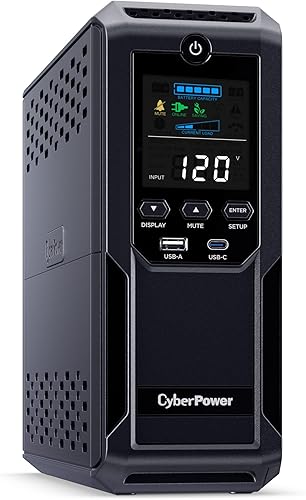
CyberPower CP1500AVRLCD3 1500VA UPS: Best for a busy desk
- 1500VA/900W
- 12 outlets
- AVR
- Color LCD
Twelve outlets and a color LCD suit a busy desk with several peripherals. Its simulated sine wave output distinguishes it from the sine wave models above.
Pros
- 12 outlets
- AVR and color LCD
- USB-A and USB-C charging
Cons
- Simulated sine wave output
- 900W maximum
The CP1500AVRLCD3 suits a crowded desk where outlet count and status information matter more than a specified pure sine wave output. Its color LCD shows battery and power conditions, while AVR handles minor voltage fluctuations without switching to battery.
There are 12 outlets, 6 battery-backed and 6 surge-only, plus USB-A and USB-C charging. The 900W ceiling can work for many computer and network setups, provided the combined load fits.
This model uses simulated sine wave output. Choose it when the 12-outlet layout and AVR fit your equipment; skip it if your power supply requires pure sine wave output.
GOLDENMATE 1500VA/1000W Lithium UPS: Best for longer battery life
- 1500VA/1000W
- LiFePO4 battery
- Pure sine wave
- 8 outlets
The GOLDENMATE combines 1000W capacity and pure sine wave output with a LiFePO4 battery. It also has a wall-mount option, emergency light and USB charging.
Pros
- 1000W maximum
- LiFePO4 battery
- All 8 outlets provide battery backup
Cons
- Only 8 outlets
- Generator compatibility may require checking
GOLDENMATE is the distinctive choice for a buyer who wants a LiFePO4 battery alongside pure sine wave output and a 1000W maximum. All 8 outlets provide battery backup and surge protection, so there is no separate surge-only group to manage.
Its display shows battery and power status, and the unit can be wall-mounted. An emergency light turns on during an outage when its switch is set to Auto, and the communication port can connect to a Windows PC, Mac or NAS for automatic safe shutdown.
GOLDENMATE says the battery supports more than 3,000 charge cycles. Its guidance also warns that generator power may not meet the UPS input requirements, so confirm compatibility if a generator is part of your backup plan.
Choose it for the battery chemistry, wall-mount option and 1000W capacity. Skip it if eight outlets are not enough or you need confidence that it will recharge from your generator.
Vertiv Liebert PowerUPS 200 PSA6S-1500LVT Sine Wave: Best for small offices
- 1500VA/915W
- Pure sine wave
- AVR
- 10 outlets
Vertiv's PSA6S pairs pure sine wave output with AVR and a color LCD that shows input voltage, battery level and load. Its user-replaceable batteries suit buyers planning for maintenance.
Pros
- Pure sine wave output
- 915W maximum
- Color LCD and AVR
Cons
- The title and one bullet give different VA figures
- Weighs 26.5 lb
The Vertiv PSA6S combines pure sine wave output with AVR, a color LCD and user-replaceable batteries. Its title gives a 1500VA/915W rating, while a bullet gives 1440VA, so confirm the exact model rating before relying on the VA figure.
The LCD shows input voltage, battery level, load and alerts. The unit also has 10 outlets, USB-A and USB-C charging, alarm mute and data-line surge protection.
Choose it for an office or point-of-sale setup where a clear status screen and replaceable battery are useful. Skip it if you need an unambiguous VA rating before purchase or a watt limit above 915W.
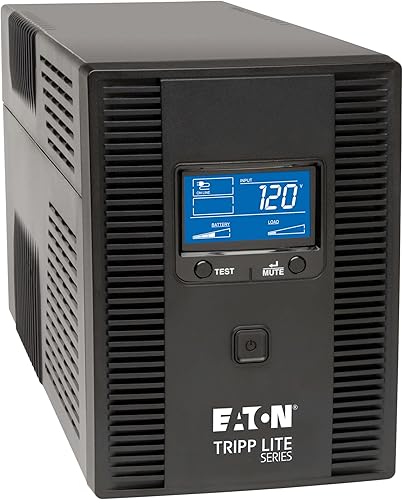
Tripp Lite SMART1500LCDT 1500VA UPS: Best for phone line protection
- 1500VA/900W
- AVR
- Ethernet and telephone line protection
- LCD
The SMART1500LCDT combines AVR with Ethernet and telephone/DSL line protection. Its LCD displays runtime, wattage load, input voltage and battery status.
Pros
- Ethernet and telephone line protection
- User-replaceable battery
- LCD status information
Cons
- 900W maximum
- 650 joules of surge protection
The Tripp Lite SMART1500LCDT fits wired network or telephone equipment, with Ethernet and telephone/DSL line protection. Its AVR corrects brownouts and overvoltage without using battery power, while the LCD shows runtime, load, input voltage and battery status.
It has 10 outlets and a user-replaceable battery. The stated surge protection is 650 joules, so focus on its data-line features and 900W limit when deciding whether it suits your equipment.
Choose it when wired line protection and the LCD matter. Skip it if your equipment needs more than 900W or your top priority is a larger surge rating.
Our UPS battery backup selection guide covers other capacity and outlet checks.
Vertiv Liebert PowerUPS 200 PSA6E-1500LVT: Best for LED status checks
- 1500VA/850W
- AVR
- 8 outlets
- Four battery capacity LEDs
The PSA6E uses four LEDs to show remaining battery capacity and includes AVR, a mute button and user-replaceable batteries. It has 850W of output capacity.
Pros
- AVR
- User-replaceable batteries
- Dedicated alarm mute button
Cons
- 850W maximum
- LED indicators instead of an LCD
The Vertiv PSA6E is for buyers who prefer simple LED status checks to an LCD. Four indicators show remaining battery capacity, while AVR helps stabilize power during voltage fluctuations.
Its 1500VA/850W capacity and 8 outlets make it a lower-watt option than several other picks. Batteries are user-replaceable, and a dedicated button mutes alarms after the cause has been resolved.
Warranty details differ between the bullet and description, which state 3 years and 2 years. Confirm the term for the exact model before buying.
Choose the PSA6E for LED indicators, alarm control and replaceable batteries. Skip it if you need an LCD, more than 850W, or a confirmed warranty term before making your choice.
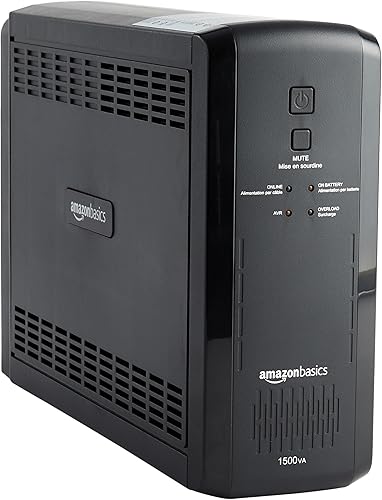
Amazon Basics 1500VA Line-Interactive UPS: Best for basic computer backup
- 1500VA/900W
- 10 outlets
- AVR
- Simulated sine wave
This line-interactive unit provides 900W, AVR and 10 outlets, with five battery-backed outlets. Its stated runtime is about 10 minutes at half load and 1.5 minutes at full load.
Pros
- 10 outlets
- AVR
- Runtime figures at half and full load
Cons
- Simulated sine wave output
- Only 5 outlets have battery backup
The Amazon Basics unit is a basic 900W choice for a computer setup, with AVR and 10 outlets. Five provide battery backup and surge protection, and the other five offer surge protection only.
It uses simulated sine wave technology, so check that output type against your computer’s power supply guidance. Its stated runtime is about 10 minutes at half load and 1.5 minutes at full load, showing how much runtime can change as demand rises.
Choose it when the watt limit, outlet arrangement and output type suit your setup. Skip it if you need pure sine wave output or more than five battery-backed outlets.
How do you choose the best 1500VA UPS?
Choose the best 1500VA UPS by matching watts, battery outlets and output type to your equipment. Then consider runtime, battery replacement, monitoring and data-line protection based on how you plan to use it.
How many watts should the best 1500VA UPS support?
The 1500VA options here range from 850W to 1000W. Add the maximum watt draw of everything you plan to put on battery, including the computer, monitor and network gear, then choose a UPS with capacity above that total.
Leave some headroom so normal changes in load do not bring the unit close to its limit. If you are choosing by the VA label alone, read how much VA you need in a UPS first.
Does a 1500VA UPS need sine wave output?
Check the power supply guidance for your computer before choosing a UPS waveform. The CP1500PFCLCD and BR1500MS2 specify sine wave output, while the CP1500AVRLCD3 and Amazon Basics model specify simulated sine wave.
The BX1500M does not specify a waveform here. If output type is essential to your choice, select a model that states the type and verify it against the equipment you plan to connect.
How many battery outlets should your UPS have?
Count battery-backed outlets separately from surge-only outlets. The products here provide between 5 and 8 outlets with battery backup, depending on the model.
Reserve those outlets for the computer, monitor, network storage or other equipment that needs time to save work or shut down. Put nonessential peripherals on surge-only outlets; our guide to what should be plugged into a UPS explains how to sort them.
How long will a 1500VA UPS run your equipment?
Runtime depends on the connected load, battery condition and UPS model, so the 1500VA label cannot tell you how many minutes you will get. Amazon Basics gives about 10 minutes at half load and about 1.5 minutes at full load for its unit.
Treat those as figures for that model and load, not a promise for a different setup. See how long a 1500VA UPS can run a computer for more runtime guidance.
How should you set up and care for a 1500VA UPS?
Set up a 1500VA UPS by charging and connecting it according to its manual, then arranging the equipment around its battery-backed outlets. Good placement and periodic status checks make the unit easier to use when power changes.
Start with a stable, accessible location near the devices and wall outlet. Leave room for cables and ventilation, and check the unit’s dimensions and weight before placing it under a desk or mounting it; the models here range from compact designs to towers weighing more than 20 lb.
Connect the UPS directly to a suitable wall outlet and follow the manufacturer’s start-up and charging instructions. Do not chain another surge protector between the wall and UPS unless the UPS instructions allow it.
Plug in only the equipment that needs battery time first. Turn on the UPS, confirm its status display or indicators show normal operation, and connect the computer and other critical devices one at a time.
Use the LCD or software when available to check load and battery status. If the displayed load approaches the unit’s watt ceiling, remove nonessential devices or choose a higher-capacity model.
A UPS battery is a consumable part, so keep an eye on alerts and changes in runtime. For battery maintenance and replacement guidance, see how often you should replace a UPS battery.
What mistakes should you avoid when choosing a 1500VA UPS?
The most common 1500VA UPS mistakes are choosing by VA alone, counting every outlet as battery-backed and assuming all models produce the same waveform. Check each detail against the devices you want to protect before settling on a unit.
Do not assume that 1500VA means 1500W. The models here have watt limits from 850W to 1000W, and exceeding that limit can overload the UPS.
Do not plug every desk accessory into battery backup just because outlets are available. A printer, speakers or other nonessential item can consume capacity that your computer needs to save work or shut down.
Do not treat runtime at one load as runtime at another. The Amazon Basics figures show a large difference between half and full load, and your own result depends on the load and UPS condition.
Do not assume surge-only outlets keep devices running through an outage. Use battery-backed outlets for equipment that needs continuity, and use the surge-only bank for items that can switch off safely.
Do not assume every computer is suited to simulated sine wave output. Check the equipment guidance, especially for active PFC power supplies, and choose a specified sine wave model if that is a requirement.
Which 1500VA UPS should you choose?
Choose the CyberPower CP1500PFCLCD for active PFC desktops that need sine wave output and up to 1000W. Pick the APC BR1500MS2 for pure sine wave and Ethernet or coax protection, or GOLDENMATE for a LiFePO4 battery and an all-battery-backed outlet bank.
For an LCD and APC’s AVR features at a 900W limit, consider the BX1500M. If your setup is a single desktop, narrow your choice with our best UPS picks for a desktop PC.
Our top 3 picks at a glance
-
1
Best for active PFC desktops
CyberPower CP1500PFCLCD 1500VA Sine Wave UPS
9.2/10 our score
See it on Amazon -
2
Best for wired data lines
APC Back-UPS Pro BR1500MS2 1500VA Sine Wave
9.0/10 our score
See it on Amazon -
3
Frequently asked questions
What is the best 1500VA UPS for a desktop PC?
The CyberPower CP1500PFCLCD is a strong fit if your desktop has an active PFC power supply and needs up to 1000W. It provides sine wave output and AVR.
Check your computer and monitor's combined power draw, then leave headroom below the UPS's watt limit.
Is a 1500VA UPS enough for a home office?
A 1500VA unit can suit a home office if its watt limit covers the computer, monitor, router and other devices you want on battery. Models here range from 850W to 1000W.
Add the devices' power draw before choosing, and count battery-backed outlets separately from surge-only outlets.
Does a 1500VA UPS provide long runtime?
Runtime depends on the connected load, battery condition and UPS model. Amazon Basics gives about 10 minutes at 450W and about 1.5 minutes at 900W for its unit.
See our guide to how long a 1500VA UPS can run a computer for more on sizing expectations.
Do I need pure sine wave output?
Pure sine wave can be a useful match for sensitive electronics and active PFC power supplies. The CyberPower CP1500PFCLCD and APC BR1500MS2 both specify sine wave output.
If you're unsure, check the power supply guidance for your computer and compare it with the UPS output type.
What should I plug into a 1500VA UPS?
Use battery-backed outlets for equipment that needs time to save work or shut down, such as a computer, monitor or network storage. Put devices that only need surge protection on surge-only outlets.
Our guide to what belongs on a UPS explains which devices to keep off battery backup.



