Lithium-Ion vs Lead-Acid UPS Batteries Compared: Which Is Better? (October 2026)
Lithium-ion UPS batteries usually last longer and need fewer replacements; lead-acid UPS batteries can suit buyers who prefer a familiar option. Compare load, warranty and battery replacement plans before you choose.
On this page (8 sections)
- Lithium-ion UPS vs lead-acid: what is the main difference?
- Which UPS battery costs less over time?
- How do the example UPS models compare?
- Which battery chemistry fits your equipment?
- How do runtime and shutdown features affect the choice?
- What should you check before choosing a battery type?
- How should you set up and care for a UPS?
- Which UPS battery should you choose?
Lithium-ion UPS batteries usually last longer and need fewer replacements, while lead-acid batteries can suit buyers who value a familiar UPS option. In a lithium ion UPS vs lead acid comparison, weigh service life alongside output, warranty and the battery replacement plan.
Lithium UPS designs use several chemistries, including lithium iron phosphate (LiFePO4) and lithium-ion. Lead-acid batteries are common in UPS units, but they still need attention and eventual replacement as they age.
Battery chemistry matters most when you expect to keep a UPS for years and want to limit replacement work. Capacity, outlets, shutdown support and warranty matter just as much because the UPS must fit your equipment first.
 Best for desktop PFC systems
CyberPower CP1500PFCLCD 1500VA Sine Wave UPS

Lithium-ion UPS vs lead-acid: what is the main difference?
The key difference is the battery chemistry and its expected replacement cycle; the UPS's output rating and design determine which devices it can support. Lithium options here have longer stated life claims, while a lead-acid unit may suit you if its replacement schedule and costs are acceptable.
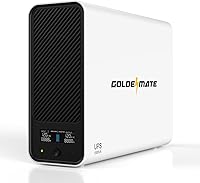
Lithium is a family of chemistries, not one single battery type. The GOLDENMATE uses lithium iron phosphate, while the Vertiv PUL-350LVT uses lithium-ion.
The CyberPower CP1500PFCLCD uses two 12V batteries, but its chemistry is not specified here. Treat it as a 1500VA UPS with a two-battery configuration and useful comparison features, not as a confirmed lead-acid example.
Don't assume all lithium UPS units provide the same capacity or runtime. These examples range from a 350VA/210W Vertiv to two 1500VA/1000W units, so match the output to your devices before choosing by chemistry.
Which UPS battery type lasts longer?
The lithium models here have longer stated battery-life claims, but those claims come from their manufacturers. GOLDENMATE says its LiFePO4 battery offers over 10 years of use and 3000+ charge cycles; Vertiv says its lithium-ion battery can offer up to 3 times the life expectancy of lead-acid batteries.
Those figures aren't a promise of the same service life in every home or office. Heat, frequent outages, load and charging conditions can affect how long a battery remains useful.
CyberPower's warranty covers the battery for 3 years. Warranty length and total battery life measure different things, so don't assume the battery will fail when coverage ends or will last for a specific number of years.
A useful comparison starts with how long you expect to keep the UPS. If you plan to replace the whole unit in a few years, paying more for a battery designed for a longer service life may bring little practical benefit.
Do both battery types need replacement?
Both UPS types need attention as their batteries age, but a lithium design may reduce how often you replace the battery. Before buying, check whether an approved replacement is available and whether the battery is serviceable in the way you expect.
Battery replacement is part of owning many UPS units. Follow the manual for inspection and service, and use only a battery the manufacturer approves for that model.
A long-lived battery can mean fewer replacements over time, but that advantage depends on the UPS lasting long enough to use it. It also depends on the battery remaining in service and on the cost and availability of any approved replacement.
Our guide on how often to replace a UPS battery explains signs that a battery may be nearing replacement. A UPS battery test can help you check whether a unit still provides backup.
Which UPS battery costs less over time?
Compare the complete UPS cost, replacement batteries and warranty coverage across the years you expect to use the unit. A lithium model may need fewer battery changes, but that doesn't guarantee it costs less in every setup.
Chemistry alone doesn't make a fair cost comparison. Capacity, outlet count, shutdown features and warranty vary between models, so first compare units that can serve the same devices.
GOLDENMATE says its LiFePO4 UPS can save up to 40% in long-term replacement costs. That's the brand's estimate; your actual cost depends on how long you keep the UPS and the cost of any replacement batteries.
The CyberPower includes a 3-year battery warranty, and Vertiv includes a 5-year full-unit and battery warranty. GOLDENMATE describes maintenance-free operation for up to 10 years, while its battery life claim is over 10 years.
A longer warranty can reduce repair or replacement risk during the covered period. Read the terms for limits, service steps and exclusions before treating coverage as a cost saving.
If you can't find a compatible battery at a reasonable cost, a unit with an easier replacement path may make more sense than an advertised long life. Ask how replacement works before buying, especially if downtime would interrupt work.
How do the example UPS models compare?
The GOLDENMATE and CyberPower are both rated 1500VA/1000W, while the Vertiv is rated 350VA/210W. Use those output limits to narrow the choice, then compare chemistry, outlet layout and features.
| UPS | Battery | Capacity | Notable details |
|---|---|---|---|
| CyberPower CP1500PFCLCD 1500VA Sine Wave UPS | Two 12V batteries, chemistry not specified | 1500VA/1000W | 6 battery backup outlets, AVR, 3-year battery warranty |
| GOLDENMATE 1500VA/1000W Lithium UPS | LiFePO4 | 1500VA/1000W | 8 battery backup and surge outlets, LCD, communication port |
| Vertiv Liebert PowerUPS 100 PUL-350LVT Lithium | Lithium-ion | 350VA/210W | 4 outlets, 5-year full-unit and battery warranty |
VA and watt ratings are separate limits. Compare both with the equipment's requirements, and allow for any startup demand rather than choosing a UPS that runs at its limit.
The GOLDENMATE and CyberPower share the same stated VA and watt ratings, but their outlet layouts differ. The GOLDENMATE has eight outlets with battery backup and surge protection; the CyberPower has six battery backup and surge protected outlets, plus six surge-only outlets.
The Vertiv is for a smaller load. Its lithium battery does not make it a substitute for a 1500VA UPS when your connected equipment needs more capacity.
For a home network, count the modem, router and any other device you want to keep on during an outage. Our guide to UPS options for a home network and Wi-Fi can help you think through the equipment and outlet needs.
Which battery chemistry fits your equipment?
Choose a UPS that meets your equipment's load and shutdown needs before weighing battery chemistry. A longer-lived battery cannot make up for too little output or an outlet layout that doesn't match your setup.
For a desktop computer, monitor and network gear, add up their expected watt draw and compare it with the UPS watt limit. A 1500VA UPS runtime guide can help set expectations, but actual runtime changes with the connected load.
Think about what you need the UPS to do during an outage. If your main goal is to save work and shut down cleanly, communication software may matter more than keeping the whole setup powered for a long time.
When does a lithium UPS make sense?
A lithium UPS makes sense when fewer battery replacements are valuable to you and you can find a model with the capacity and outlets your setup needs. It is less compelling if you expect to replace the UPS soon or can't justify its cost for the time you'll use it.
The GOLDENMATE combines a LiFePO4 battery with 1500VA/1000W output, eight battery backup outlets, a communication port for automatic safe shutdown and an LCD. It suits a buyer looking for a higher-capacity lithium model for a computer, NAS or several essential devices.
The Vertiv is a smaller lithium option. Its 350VA/210W output and four outlets may suit a modest load, and the five-year warranty covers the full unit and battery.
Skip the Vertiv if your equipment draws more than its 210W output or needs more than four connections. For a larger setup, compare its limits with the GOLDENMATE or another UPS sized for your load.
For more lithium options, see our guide to lithium UPS battery backups. Compare output and outlet layout first, then use battery life and warranty to distinguish models that fit.
When is a lead-acid UPS a practical choice?
A UPS using lead-acid batteries can be practical if you can source approved replacements and accept that battery changes may be part of ownership. Skip that route if you need to minimize service interruptions or don't want to plan for battery replacement.
The CyberPower CP1500PFCLCD is rated 1500VA/1000W and provides sine wave output for active PFC and conventional power supplies. It also has automatic voltage regulation, which corrects minor power fluctuations without switching to battery power.
Of its 12 outlets, six provide battery backup and surge protection, while six are surge protected only. Decide which devices need backup before connecting them, so you don't use a surge-only outlet for equipment that must stay on during an outage.
The battery chemistry for this model isn't specified here, so don't buy it assuming a particular replacement type. Confirm the correct replacement and service process for the exact model before making a battery-based decision.
How do runtime and shutdown features affect the choice?
Runtime depends on the connected load and the UPS, not only on battery chemistry. A larger load draws stored power faster, so estimate your equipment's wattage and decide how much time it needs to stay on.
For many computer setups, backup is there to let you save work and shut down safely rather than power through a long outage. If you need automatic shutdown, check the UPS software and communication connection against your computer or NAS.
The GOLDENMATE includes a USB communication connection for a Windows PC, Mac or NAS. CyberPower provides PowerPanel management software, and both are rated at 1500VA/1000W.
The Vertiv's output is limited to 210W. It may fit networking equipment or personal electronics if their combined demand stays within that limit, but confirm the draw before connecting devices.
Don't compare runtime claims unless they use the same load and test conditions. For help choosing backup duration, see how to choose a UPS battery backup.
What should you check before choosing a battery type?
Check load, replacement support, warranty, room conditions and shutdown needs before you buy. These factors reveal whether a UPS will suit your setup after its chemistry label has caught your attention.
- Add up device wattage. Include the computer, monitor, router, NAS and other equipment you want backed up.
- Separate backup from surge-only outlets. A surge-only outlet won't keep a device powered during an outage.
- Confirm replacement support. Use only a replacement approved for the exact UPS model.
- Read the warranty terms. Confirm coverage length and whether the battery is included.
- Check placement conditions. Keep the UPS where its manual allows, with room for airflow. Vertiv says the PUL-350LVT is designed for temperatures up to 104°F.
- Plan shutdown behavior. If the UPS supports communication software, check compatibility with your computer or NAS.
Never install a lithium replacement in a UPS designed for another chemistry unless the manufacturer approves that exact battery configuration. Different batteries can have different charging requirements, so use the battery type intended for the UPS.
How should you set up and care for a UPS?
Set up the UPS according to its manual, connect only the devices you need backed up and check that shutdown features work. Good placement and a clear outlet plan help you avoid common problems regardless of battery chemistry.
Put the UPS on a stable surface with the clearance its manual requires. Keep it away from heat sources and avoid covering its vents, since heat can shorten battery life.
Connect the UPS to a suitable wall outlet, then charge or prepare it as directed before relying on it. Plug essential equipment into battery backup outlets and reserve surge-only outlets for devices that don't need to stay powered.
If you use automatic shutdown, connect the communication cable and configure the software for the computer or NAS. Confirm the device recognizes the UPS and that the shutdown settings match the time you need to save work.
Check the UPS periodically, including its battery and power status indicators. Follow the manufacturer's guidance for self-tests and replacement, and don't wait for an outage to discover that a cable, outlet or shutdown setting is wrong.
A common mistake is connecting every device without checking total load. Another is assuming every outlet provides battery backup; inspect the labels on the unit and prioritize the modem, router, computer or NAS you need to keep running.
Which UPS battery should you choose?
For the lithium ion UPS vs lead acid decision, choose lithium when longer stated service life and fewer battery changes fit your budget; choose a UPS with a practical replacement plan when upfront cost and serviceability matter more. In either case, confirm output, outlets and warranty before buying.
For a 1500VA/1000W lithium option with a LiFePO4 battery, compare the GOLDENMATE. For 1500VA/1000W sine wave output with AVR, compare the CyberPower, but confirm the battery chemistry and replacement path for the exact model.
For a smaller load, the 350VA/210W Vertiv pairs a lithium-ion battery with a five-year full-unit and battery warranty. Choose it only if its lower output rating is enough for your equipment.
Skip a lithium model if you won't keep it long enough to benefit from a longer battery life, or if its capacity doesn't fit your devices. Skip any UPS whose replacement path, outlet layout or output limit doesn't suit your plan.
Next, estimate your expected load and backup duration with our 1500VA UPS runtime guide or review battery replacement timing as part of your ownership plan.
Frequently asked questions
Does a lithium-ion UPS last longer than a lead-acid UPS?
Lithium-ion UPS batteries can last longer, but the exact life depends on the UPS and its operating conditions. Vertiv says the PUL-350LVT lithium-ion battery offers up to 3 times the life expectancy of lead-acid batteries, while GOLDENMATE says its LiFePO4 battery supports over 10 years of use and 3000+ charge cycles.
Are lithium UPS batteries worth the higher cost?
They can be worth considering if fewer battery replacements matter over the time you plan to keep the UPS. Compare the complete UPS cost, stated battery life, warranty and replacement availability; a longer-life battery doesn't guarantee lower total cost in every setup.
Can you replace a lead-acid UPS battery with lithium?
Don't swap battery chemistries unless the UPS maker approves that specific battery for your model. Charging requirements and battery management differ, so use an approved replacement or choose a UPS designed for lithium from the start.
Which UPS battery is better for frequent outages?
Choose by load, runtime needs and recharge conditions rather than battery chemistry alone. Both types can provide backup, but you should confirm the UPS's output limits, battery replacement options and automatic shutdown support for your equipment.
Do lithium UPS batteries need maintenance?
A sealed lithium UPS may need less routine battery replacement, but the UPS still needs periodic checks. Follow its manual, keep vents clear and test backup operation; our guide to testing a UPS battery explains what to check.