Standby vs Line-Interactive UPS: Which Is Better? (October 2026)
Choose a standby UPS for basic outage backup, or a line-interactive UPS if your power often fluctuates. Standby models switch to battery during an outage, while line-interactive models can correct minor voltage changes with AVR.
On this page (5 sections)
A standby UPS provides basic outage backup, while a line-interactive UPS also uses AVR to correct minor voltage changes. Choose based on your power conditions, equipment load, and how many battery-backed outlets you need.
A standby UPS supplies battery power when utility power fails. For a small computer or router setup, that may be enough; AVR can help when minor voltage changes happen often.
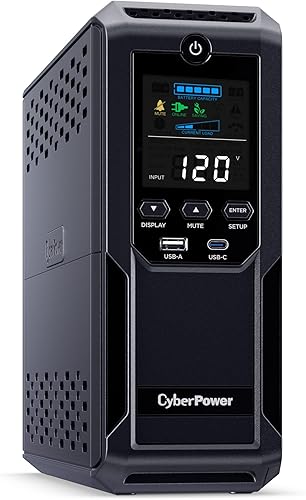
The CyberPower ST625U and APC BE600M1 are standby models. The CyberPower CP1500AVRLCD3 is line-interactive and includes AVR.

Standby vs line-interactive UPS: how do they work?
A standby UPS switches to battery when utility power fails, while a line-interactive UPS also uses AVR to correct minor voltage fluctuations. Both provide battery backup during an outage.
A standby unit passes utility power to connected devices during normal conditions. When utility power fails or moves outside the unit's acceptable range, it switches to battery power.
A line-interactive unit can regulate some changes in incoming power. The CyberPower CP1500AVRLCD3 uses AVR to correct minor fluctuations without switching to battery power.
That difference affects how each UPS responds to uneven power. Check the unit's watt capacity and outlet layout to make sure it suits the devices you plan to back up.
What does AVR do in a line-interactive UPS?
AVR corrects minor power fluctuations without switching to battery power. This can preserve battery use when voltage changes often but doesn't rise to the level of a full outage.
AVR doesn't provide backup during an outage on its own. The UPS still needs its battery to keep equipment running when utility power stops.
Read our guide to what AVR means on a UPS for more on voltage regulation and what the feature can and can't do.
Which UPS type suits your power conditions?
Choose standby if outages are your main concern, and consider line-interactive if minor voltage fluctuations happen often. Your local power pattern matters more than the topology name alone.
If power is generally steady, you may not need AVR. A standby unit can provide battery backup so you can save work, shut down a computer, or keep a router powered during an outage.
If lights dim or equipment loses power during recurring voltage changes, AVR may reduce how often the UPS switches to battery. Think about what you observe at home and which devices need backup power.
Follow the UPS manual and use surge protection and grounding as directed.
When is a standby UPS enough?
A standby UPS can suit a home computer, gaming console, or broadband router when your main goal is backup during utility outages. The CyberPower ST625U has 625VA/360W capacity, with 4 battery-backed outlets and 4 surge-only outlets.
The APC BE600M1 offers 600VA/330W for a smaller load. Five of its outlets provide battery backup and surge protection, while 2 provide surge protection only.
Check the total watt draw of the devices that need backup before choosing between these models. Our guide to how much VA you need in a UPS explains how to size a unit around your load.
When is line-interactive worth considering?
A line-interactive UPS makes sense when minor voltage fluctuations are frequent and you want AVR to correct them without switching to battery power. The CP1500AVRLCD3 combines AVR with 1500VA/900W capacity for workstations, networking devices, and home entertainment equipment.
Its color LCD panel shows battery and power conditions. Six of its 12 outlets provide battery backup and surge protection, while the remaining 6 are surge-only.
If you need backup for a modem, router, switch, and other network equipment, first check their combined load and how long they need to remain on. Our guide to choosing a UPS battery backup for your home covers capacity, runtime, and outlet planning.
Does line-interactive mean longer battery runtime?
Not by itself. AVR can help avoid using battery power for minor voltage changes, but runtime during an outage depends on the UPS battery, load, and operating conditions.
A larger VA number doesn't tell you exactly how long a particular computer or network setup will run. Check the watt rating, estimate the connected load, then consult runtime information for the exact UPS and load.
The CP1500AVRLCD3 is rated for 900W, compared with 360W for the ST625U and 330W for the BE600M1. Those figures show maximum power capacity, not guaranteed runtime.
For help matching a UPS to your equipment, see our guide to UPS backup for a home network. Keep only essential devices on battery-backed outlets if you want to limit the load.
What should you compare before choosing?
Compare topology, watt capacity, battery-backed outlet count, and the devices you need to keep running. These details help you decide whether AVR and the capacity of a model suit your setup.
| What to compare | Standby example | Line-interactive example |
|---|---|---|
| Model | CyberPower ST625U | CyberPower CP1500AVRLCD3 |
| Topology | Standby | Line-interactive |
| Capacity | 625VA/360W | 1500VA/900W |
| AVR | Not specified | Yes |
| Battery-backed outlets | 4 | 6 |
| Display | LED status lights | Color LCD panel |
The APC BE600M1 is another standby option at 600VA/330W, with 5 battery-backed outlets. Its internal battery is user-replaceable.
Outlet counts alone don't show whether a UPS can support your devices. Check each device's power draw and keep the combined load within the UPS watt limit.
Which standby or line-interactive UPS should you choose?
Pick standby for basic outage backup; pick line-interactive when AVR and higher capacity fit your needs. The CyberPower ST625U and APC BE600M1 are standby choices, while the CP1500AVRLCD3 is line-interactive.
Choose the ST625U for a compact setup that needs 4 battery-backed outlets and has a load within its 360W rating. Choose the BE600M1 for a smaller 330W load if its 5 battery-backed outlets and replaceable battery suit your desk.
Choose the CP1500AVRLCD3 when your equipment needs up to 900W and AVR is useful for recurring minor voltage changes. Check the battery-backed outlet count and the full load before connecting devices.
For the standby vs line-interactive UPS decision, match the topology to your power conditions, then size the unit for your actual equipment. Continue with how to choose a UPS battery backup for your home if you want to compare capacity, runtime, and outlet needs.
Frequently asked questions
What is the main difference between standby and line-interactive UPS?
A standby UPS switches to battery when utility power fails, while a line-interactive UPS also uses automatic voltage regulation to correct minor fluctuations without switching to battery. Both provide outage backup, but AVR can reduce battery use when voltage regularly rises or dips.
Does a line-interactive UPS always provide better protection?
Not for every setup. AVR helps manage minor voltage fluctuations, but a standby UPS can be enough if your main need is backup during outages and your utility power is generally steady.
Choose based on the power conditions and equipment you need to support.
Is the CyberPower ST625U a line-interactive UPS?
No. The CyberPower ST625U is a standby UPS rated at 625VA/360W.
It has four battery backup and surge-protected outlets, plus four surge-only outlets, so check which devices need to stay powered during an outage.
When should you choose a line-interactive UPS?
Consider line-interactive if your location has frequent minor voltage fluctuations and you want AVR to correct them without using battery power. Also check the UPS watt rating against the total load, and make sure enough outlets provide battery backup for your essential devices.


