Best 1000VA UPS Picks for a Single Desk: Top 8 Picks (October 2026)
The best 1000VA UPS for a single desk include the CyberPower CP1000PFCLCD 1000VA Sine Wave UPS for active PFC PCs, the GOLDENMATE 1000VA/800W Lithium UPS for high watt loads, and the APC Back-UPS Pro BX1000M 1000VA for wired networks.
On this page (7 sections)
- How we chose these 1000VA UPS picks
- Compare 1000VA UPS features for a single desk
- The best 1000VA UPS models for a single desk
- How to choose the best 1000VA UPS for your desk
- How should you set up and care for a desk UPS?
- What mistakes should you avoid with a 1000VA UPS?
- Which 1000VA UPS should you choose for a single desk?
The CyberPower CP1000PFCLCD is the best 1000VA UPS for a single desk if you want sine wave output, AVR and a 600W limit. GOLDENMATE’s 800W model is the pick for a higher watt load, while the APC BX1000M suits a setup that needs network surge protection.
A 1000VA rating is only one part of the decision. Compare the watt limit, count the battery-backed outlets you need and decide whether sine wave output, AVR or a replaceable battery matters for your equipment.
If you’re unsure about capacity, start with how much VA you need in a UPS. For a computer-centered comparison, see our best UPS picks for a desktop PC.
Our picks at a glance
-
1
 Best for active PFC PCs
CyberPower CP1000PFCLCD 1000VA Sine Wave UPS
8.7/10 our score
See it on Amazon -
2

-
3

- 4
 Check it
GOLDENMATE 1000VA/600W Lithium UPS
Best for 600W lithium - 5
 Check it
APC Back-UPS Pro BR1000MS 1000VA Sine Wave
Best for larger desks - 6
 Check it
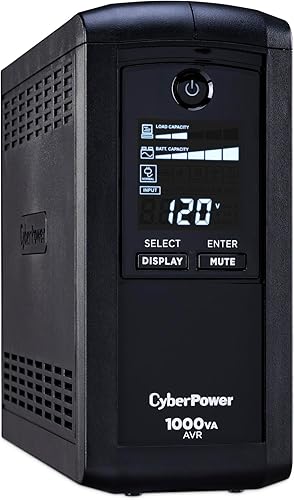
CyberPower CP1000AVRLCD 1000VA UPS
Best for basic monitoring - 7
 Check it
Tripp Lite SMART1000LCD 1000VA UPS
Best for battery swaps - 8
 Check it
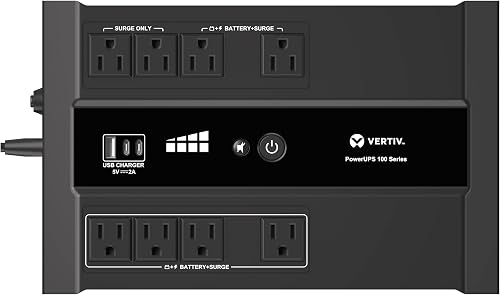
Vertiv Liebert PowerUPS 100 PST6-1100LVMT
Best for tight desk spaces
How we chose these 1000VA UPS picks
We compared watt capacity, battery-backed outlet count, output type and useful desk features across these models. The VA rating describes apparent power capacity, while the watt rating sets the load ceiling your devices must stay below.
A 1000VA unit can support different watt loads, so add the demand of your computer and accessories before choosing. For a deeper walkthrough, see our guide to sizing a UPS for your equipment.
Outlet totals can also be misleading if you count every socket as a backup outlet. Some models divide their outlets between battery backup and surge protection only, while both GOLDENMATE picks provide battery backup and surge protection on all 8 outlets.
Compare 1000VA UPS features for a single desk
The right model depends on your connected load and which devices must stay on during an outage. Compare the watt ceiling and backed outlet count first, then use output type and battery design to narrow the choice.
| Product | Best for | Capacity | Battery-backed outlets | Output | Our score |
|---|---|---|---|---|---|
| CyberPower CP1000PFCLCD 1000VA Sine Wave UPS | active PFC PCs | 1000VA/600W | 5 | Sine wave | 8.7 |
| GOLDENMATE 1000VA/800W Lithium UPS | high watt loads | 1000VA/800W | 8.6 | ||
| APC Back-UPS Pro BX1000M 1000VA | wired networks | 1000VA/600W | 4 | 8.4 | |
| GOLDENMATE 1000VA/600W Lithium UPS | 600W lithium | 1000VA/600W | 8.3 | ||
| APC Back-UPS Pro BR1000MS 1000VA Sine Wave | larger desks | 1000VA/600W | 6 | 8.3 | |
| CyberPower CP1000AVRLCD 1000VA UPS | basic monitoring | 1000VA/600W | 5 | Simulated sine wave | 7.9 |
| Tripp Lite SMART1000LCD 1000VA UPS | battery swaps | 1000VA/500W | 4 | 7.3 | |
| Vertiv Liebert PowerUPS 100 PST6-1100LVMT | tight desk spaces | 1100VA/670W | 6 | 7.1 |
The best 1000VA UPS models for a single desk
The CyberPower CP1000PFCLCD leads this selection for a desktop with active PFC, sine wave output and AVR. Other picks offer more watt capacity, different outlet layouts, lithium batteries or easier battery replacement.
CyberPower CP1000PFCLCD 1000VA Sine Wave UPS: Best for active PFC PCs
- 1000VA/600W
- Sine wave output
- 5 battery-backed outlets
- AVR
Sine wave output supports active PFC and conventional power supplies, and AVR corrects minor power fluctuations without switching to battery.
Pros
- Sine wave output
- AVR
- 3-year warranty includes the battery
Cons
- Only 5 of 10 outlets have battery backup
- 600W maximum load
The CyberPower CP1000PFCLCD is a strong match for a desktop computer with an active PFC power supply. Its sine wave output supports active PFC and conventional power supplies, while AVR corrects minor power changes without switching to battery.
Five of its 10 outlets provide battery backup and surge protection. The remaining 5 are surge-only, so reserve the backed sockets for devices that need time to save work or shut down.
Two USB ports, one Type-A and one Type-C, can charge a phone or tablet. The color LCD displays battery and power conditions, and the warranty covers the battery for 3 years.
Choose this model if your computer benefits from sine wave output and your total load fits within 600W. Skip it if you need battery backup at more than 5 outlets or a larger watt ceiling.
GOLDENMATE 1000VA/800W Lithium UPS: Best for high watt loads
- 1000VA/800W
- LiFePO4 battery
- 8 battery-backed outlets
- LCD
Its 800W rating is the highest here, and all 8 outlets have battery backup and surge protection.
Pros
- 800W capacity
- 8 battery-backed outlets
- LCD shows battery and power conditions
Cons
- Cooling fan activates during heavy battery use
- Designed for standard 110V household power
GOLDENMATE’s 1000VA/800W model is the strongest choice here for a desk whose connected load needs more than 600W. All 8 outlets have battery backup and surge protection, which makes it easier to support a computer, display and network gear from one unit.
Its lithium iron phosphate battery has a built-in battery management system, and the LCD shows battery and power conditions. GOLDENMATE says the battery is designed for more than 10 years and over 5,000 charge cycles.
The fan can start during heavy battery use, and the unit should not be used in a high-temperature or enclosed space. GOLDENMATE specifies 90–140V AC input for standard 110V household power, so confirm the supply is suitable before setup.
Choose it if your calculated load is above 600W but no more than 800W, or if all 8 backed outlets are useful. Skip it if fan noise would bother you in a quiet workspace or if your power supply falls outside its stated input range.
APC Back-UPS Pro BX1000M 1000VA: Best for wired networks
- 1000VA/600W
- 4 battery-backed outlets
- Coaxial and Ethernet surge protection
- Replaceable battery
APC combines AVR and a user-replaceable battery with coaxial and Ethernet surge protection for a desk with network equipment.
Pros
- User-replaceable battery
- Coaxial and Ethernet surge protection
- LCD shows estimated runtime and load
Cons
- Only 4 battery-backed outlets
- 600W maximum load
The APC BX1000M is a practical pick for a desk with wired network equipment. It has 4 battery-backed outlets and 4 surge-only outlets, plus coaxial and Ethernet surge protection.
AVR corrects low voltage brownouts and surges without draining the battery. The LCD shows charge, load capacity, estimated runtime and power conditions, and the user-replaceable battery can be swapped when needed.
APC specifies more than 42 minutes of runtime at a 100W load. Actual runtime depends on the connected load, so a computer, display and network gear drawing more power will have less time available.
Choose this model if you want network surge protection and a battery you can replace. Skip it if four battery-backed outlets are too few or if your load exceeds 600W.
GOLDENMATE 1000VA/600W Lithium UPS: Best for 600W lithium
- 1000VA/600W
- LiFePO4 battery
- 8 battery-backed outlets
- Pure sine wave
This lithium option keeps the load limit at 600W while giving all 8 outlets battery backup and surge protection.
Pros
- Pure sine wave output
- 8 battery-backed outlets
- LCD shows battery and power conditions
Cons
- 600W maximum load
- Cooling fan activates during heavy battery use
This GOLDENMATE model suits a desk that needs battery backup on every connected outlet but does not need more than 600W. All 8 outlets provide battery backup and surge protection, and the unit supplies pure sine wave output.
Its lithium iron phosphate battery and battery management system are designed for long service, with an LCD for checking battery and power conditions. GOLDENMATE says the battery supports more than 10 years and over 5,000 charge cycles.
The cooling fan activates during heavy battery use. Use the original or a fully compatible power cable, keep the connected load within 600W and avoid enclosed or hot locations.
Choose this model if you want lithium, pure sine wave output and 8 backed outlets at a 600W ceiling. Skip it if your desk needs more capacity; the 800W GOLDENMATE is the better fit for a heavier load.
APC Back-UPS Pro BR1000MS 1000VA Sine Wave: Best for larger desks
- 1000VA/600W
- Pure sine wave
- 6 battery-backed outlets
- USB-A and USB-C charging
The BR1000MS gives a desk 6 battery-backed outlets, 4 surge-only outlets, sine wave output and USB charging.
Pros
- Sine wave output
- 6 battery-backed outlets
- USB-A and USB-C charging ports
Cons
- 600W maximum load
- 4 of 10 outlets are surge-only
The APC BR1000MS fits a desk with several devices that need battery backup. Of its 10 outlets, 6 have battery backup and 4 provide surge protection only.
It supplies pure sine wave output and AVR, with an LCD that shows remaining runtime, load and system status. USB-A and USB-C ports can charge mobile devices, and coaxial and Ethernet surge protection adds coverage for connected network lines.
APC specifies up to 42 minutes at a 100W load. A heavier desk load reduces runtime, so treat that figure as a reference for a light setup rather than a promise for every computer and monitor.
Choose it if six backed outlets cover your essential devices and you want sine wave output. Skip it if you need a higher watt limit than 600W or want every outlet battery-backed.
CyberPower CP1000AVRLCD 1000VA UPS: Best for basic monitoring
- 1000VA/600W
- Simulated sine wave
- 5 battery-backed outlets
- AVR
This CyberPower model pairs AVR with an LCD that displays estimated runtime, battery capacity and load capacity.
Pros
- AVR
- LCD shows runtime and load information
- 3-year warranty includes the battery
Cons
- Simulated sine wave output
- Only 5 of 9 outlets have battery backup
The CyberPower CP1000AVRLCD is a lower-cost feature set for a desk where AVR and a readable status display matter. Its LCD includes estimated runtime, battery capacity and load capacity, so you can check conditions at the unit.
It has 5 battery-backed outlets and 4 surge-only outlets, with a 600W maximum load. Its simulated sine wave output distinguishes it from the sine wave CP1000PFCLCD.
CyberPower includes a 3-year warranty that covers the battery, and AVR corrects minor power changes without switching to battery. Check your computer’s power supply requirements before choosing simulated sine wave output.
Choose this model if the output type suits your equipment and you want the LCD and AVR features. Skip it if your computer requires sine wave output or if you need more than five backed outlets.
Tripp Lite SMART1000LCD 1000VA UPS: Best for battery swaps
- 1000VA/500W
- 4 battery-backed outlets
- User-replaceable battery
- Rotating LCD
The SMART1000LCD has a user-replaceable, hot-swappable battery and an LCD that rotates for horizontal or vertical placement.
Pros
- User-replaceable, hot-swappable battery
- LCD rotates for different placements
- AVR corrects undervoltage
Cons
- 500W maximum load
- Only 4 of 8 outlets have battery backup
The Tripp Lite SMART1000LCD stands out for its user-replaceable, hot-swappable battery. Its LCD rotates for horizontal or vertical placement, which can help when a desk or shelf has limited room.
It has a 500W maximum load and 4 battery-backed outlets among 8 total. Tripp Lite specifies 10 minutes of runtime at a 250W load and 3 minutes at a 500W load, a useful illustration of how runtime falls as load rises.
AVR corrects undervoltage as low as 89V without using battery power. The unit also has an audible alarm and a 3-year limited warranty.
Choose it if replaceable battery access and flexible placement matter more than extra capacity. Skip it if your setup approaches 500W or needs backup at more than four outlets.
Vertiv Liebert PowerUPS 100 PST6-1100LVMT: Best for tight desk spaces
- 1100VA/670W
- 6 battery-backed outlets
- Compact enclosure
- USB-A and USB-C charging
This compact standby UPS provides 6 battery-backed outlets, 2 surge-only outlets and user-replaceable batteries.
Pros
- Compact enclosure
- User-replaceable batteries
- USB-A and USB-C charging ports
Cons
- Simulated sine wave output
- Standby topology
The Vertiv Liebert PowerUPS 100 suits a desk with limited space and a load that fits its 670W output capacity. It is rated at 1100VA, so it sits slightly above the 1000VA class while remaining relevant to this comparison.
Six outlets provide battery backup and surge protection, with two additional surge-only outlets. The compact standby unit has a user-replaceable battery and USB-A and USB-C charging ports.
It uses simulated sine wave output, so check your computer’s power requirements if output shape matters. Vertiv describes this model as a standby UPS, rather than a line-interactive design.
Choose Vertiv if its compact enclosure and six backed outlets suit your desk. Skip it if your PC requires sine wave output or you want AVR.
How to choose the best 1000VA UPS for your desk
Choose by watt capacity, backed outlets and output compatibility before comparing extra features. A UPS only helps if it can support the combined load and the devices that matter most are connected to battery-backed sockets.
How many watts does your desk need?
Add the watt draw of the computer, monitor, router and any other equipment you want to keep running. Select a UPS whose watt ceiling is above that total, with some room for changes in load.
These models range from 500W to 800W. If your setup is near a model’s ceiling, remove nonessential devices or consider a higher capacity class; our guide to choosing the right UPS capacity explains how to size the backup.
How many battery-backed outlets do you need?
Count only outlets that provide battery backup when deciding what will stay powered in an outage. A model’s total outlet count may include surge-only sockets that won’t run devices from the battery.
The APC BX1000M has 4 backed outlets, while the BR1000MS has 6. Both GOLDENMATE units have 8 backed outlets, which can simplify a desk with several essential devices.
Does your computer need sine wave output?
Check the computer or power supply guidance if you are unsure which output type it needs. The CP1000PFCLCD, both GOLDENMATE models and APC BR1000MS specify sine wave output; the CP1000AVRLCD and Vertiv use simulated sine wave output.
For a modern desktop or workstation, output compatibility can be a deciding factor. Don’t assume every computer behaves the same way; follow the equipment maker’s stated requirements.
Are AVR and a replaceable battery useful to you?
AVR corrects some voltage changes without switching to battery, which can reduce unnecessary battery use. Several options here include AVR, including the CyberPower models, APC BX1000M and Tripp Lite SMART1000LCD.
A replaceable battery can extend the useful life of a UPS when the battery ages. The BX1000M and SMART1000LCD specify user-replaceable batteries; check the right replacement part and instructions before you need one.
Which devices belong on the battery outlets?
Put the computer and network equipment you need for saving work or shutting down on battery-backed outlets. Use surge-only outlets for peripherals that can safely turn off during an outage.
A printer or other high draw device may consume capacity that your computer needs, so check its power demand and whether it needs backup at all. Our guide to what should be plugged into a UPS helps sort essential devices from optional ones.
How should you set up and care for a desk UPS?
Set up the UPS where it has airflow, then connect essential devices to battery-backed outlets and check the load on its display. Good placement and a clear shutdown plan make the unit easier to use when power fails.
Start by choosing a stable, open location near the wall outlet. Keep ventilation clear, especially for lithium models whose cooling fan may activate during heavy battery use.
Connect the UPS directly to a suitable wall outlet, then plug in the computer, monitor and network gear that need backup. Avoid putting more devices on it than the watt limit allows, and label backed outlets if the layout is hard to remember.
Use the LCD, where available, to review load and battery conditions. Run the computer’s shutdown software or configure an orderly shutdown method if the model and your setup support it; save open work promptly during an outage rather than expecting a 1000VA unit to power a desk indefinitely.
Keep cables and vents free of dust, and check the battery condition periodically. Lead-acid battery models generally need replacement as the battery ages; lithium models have longer claimed service life, but still need a suitable location and attention to unusual noise or swelling.
What mistakes should you avoid with a 1000VA UPS?
The most common mistake is treating VA as the watt limit or assuming every outlet has battery backup. Check those two details before plugging in the desk, then plan for the short runtime that comes with heavier loads.
Don’t choose from the VA number alone. These products range from 500W to 800W, so two units labeled around 1000VA can support different equipment loads.
Don’t put every desk device on battery backup by default. A printer or accessory can use capacity that should be reserved for your computer and network connection.
Don’t assume a stated runtime applies to your full setup. The APC runtimes are specified at a 100W load, and Tripp Lite’s figures show how much shorter runtime can be at higher loads.
Don’t place a UPS in a closed cabinet or hot space. Airflow matters for safe operation, and GOLDENMATE specifically warns against high-temperature or enclosed locations.
Don’t ignore alarms or signs of battery trouble. Learn the alarm controls for your model and stop using a unit if you notice swelling or unusual noise.
Which 1000VA UPS should you choose for a single desk?
Choose the CyberPower CP1000PFCLCD for sine wave output and AVR with a 600W load ceiling. Pick GOLDENMATE’s 800W model for a heavier desk or eight backed outlets, and choose the APC BX1000M when network surge protection and a replaceable battery matter most.
For a lithium unit with an all-backed outlet layout at 600W, the GOLDENMATE 600W model is the more suitable choice. If your load is modest and you prioritize a hot-swappable battery, consider the Tripp Lite SMART1000LCD.
A 1000VA UPS is a poor fit if your equipment exceeds the watt ceiling, needs substantially longer runtime, or requires a type of output the model does not provide. Compare 1500VA UPS options for home and office if your desk needs more capacity, or see UPS picks for a desktop PC for computer-focused guidance.
Our top 3 picks at a glance
-
1
Best for active PFC PCs
CyberPower CP1000PFCLCD 1000VA Sine Wave UPS
8.7/10 our score
See it on Amazon -
2
-
3
Frequently asked questions
Is a 1000VA UPS enough for a desktop computer?
A 1000VA UPS can suit a desktop computer if the computer and connected devices stay within its watt limit. These picks range from 500W to 800W, so check your computer’s power draw and account for a monitor, router or storage device.
VA alone does not tell you how many watts the UPS can support.
How many watts can a 1000VA UPS handle?
It depends on the model. The 1000VA picks here are rated from 500W to 800W, with most at 600W.
Add the watt draw of every device you plan to connect, then choose a UPS with capacity above that total.
Keep the load within the unit’s stated watt limit.
What should I plug into a 1000VA UPS?
Use battery-backed outlets for devices that need time to save work or shut down, such as a computer, monitor or network gear. Surge-only outlets can suit peripherals that don’t need backup power.
Check the outlet layout, then read our guide to what should be plugged into a UPS before connecting equipment.
Does a 1000VA UPS have enough runtime for a full desk?
Runtime depends on the combined load and battery condition, so a 1000VA label alone cannot predict how long a full desk will stay on. The APC BX1000M specifies over 42 minutes at a 100W load, while heavier loads use more battery power.
For planning, see our guide to how long a 1500VA UPS lasts.



