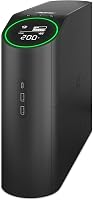
Best Rack Mount Battery Backup UPS Units
The best rack mount battery backup UPS for most buyers is the Eaton Tripp Lite SMART1500LCDXL: 1500VA/900W, 2U rack or tower mounting, and an external battery pack option. Pick the SMART1500LCD for a tighter budget, or the 1200VA SMART1200LCD for a smaller load.
On this page (9 sections)
- What should you look for in a rack mount battery backup UPS?
- How many watts does your rack equipment actually draw?
- Which rack mount UPS fits each load and mounting setup?
- How much runtime do you get at half load and full load?
- Which rack mount UPS features matter for home and small office gear?
- Can a 2U rack mount battery backup UPS run a whole home office?
- What does installation involve for a rack mount UPS?
- How do these rack mount UPS units compare on specs?
- How should you choose between these rack mount battery backup UPS units?
A rack mount battery backup UPS puts power protection in the same cabinet as your servers, switches and network gear. The best pick for most buyers is the Eaton Tripp Lite SMART1500LCDXL, a 1500VA/900W 2U unit that can take an external battery pack when you need longer runtime.
The right choice comes down to load size, runtime and mounting depth. All three units here fit 2U of rack space or stand upright as a tower, so the decision is really about watts and expansion.
Our guide to choosing a UPS battery backup covers the sizing math if you are starting from scratch.
What should you look for in a rack mount battery backup UPS?
Start with wattage and mounting depth, then add the features your gear needs. A rack mount battery backup UPS has to fit the cabinet first and carry the load second.
The unit's VA and watt ratings set the ceiling. These Tripp Lite models run 1200VA/700W to 1500VA/900W, which suits small servers, network devices, desktops and AV gear rather than whole-rack data center loads.
Mounting matters just as much. Each unit here is 17.25 in wide, 10.5 in deep and 3.5 in high, so it fills 2U of a 19-inch rack.
Measure the rack's usable depth before you buy, since the rear panel needs room for cords and the RJ45 dataline port.
Check the outlet type too. All three use eight NEMA 5-15R outlets and a NEMA 5-15P input plug on a 6 ft cord, which matches standard US wall and rack PDUs.
Then think about expansion. Only the SMART1500LCDXL accepts an external battery pack, so it is the one to choose if you expect longer outages or plan to add load later.
Write down your connected load in watts and your rack's free depth before comparing models. A unit that fits either one but not both is the wrong buy, whatever its feature list says.
How many watts does your rack equipment actually draw?
Add up the nameplate watts of everything on battery, then leave headroom. A 900W unit should not run near its limit, because load above roughly 80% shortens runtime fast.
Take a small home lab: a NAS or small server, a network switch, a router and a monitor. A typical set like that sits well under 400W, which leaves room inside a 1200VA or 1500VA unit.
For a rack in a home office, the load may include a desktop PC, monitor and modem. Those draw less than a server rack, so the 1200VA SMART1200LCD's 700W can be enough.
Business racks with two small servers and a switch push closer to the 900W ceiling. That is where the 1500VA models earn their place.
Also decide which outlets feed the battery and which only get surge protection. Printers and other high-draw devices belong on surge-only outlets so they do not drain runtime from the gear you need during an outage.
Pick a unit rated above your real load, not your imagined load. Add up what you run today and leave about 20% spare for the next device you install.
Which rack mount UPS fits each load and mounting setup?
Each of the three units suits a different buyer. The short answer: take the SMART1500LCDXL for runtime expansion, the SMART1200LCD for a lighter load, and the SMART1500LCD when budget is the deciding factor.
| Product | Best for | Capacity | Mounting | Outlets | Our score |
|---|---|---|---|---|---|
| Eaton Tripp Lite SMART1500LCDXL 1500VA 2U Rack | overall | 1500VA / 900W | 2U rack or tower | 8 x NEMA 5-15R | 9.2 |
| Eaton Tripp Lite SMART1200LCD 1200VA 2U Rack | lighter loads | 1200VA / 700W | 2U rack or tower | 8 x NEMA 5-15R | 8.7 |
| Tripp Lite SMART1500LCD 2U Rack UPS | fixed budgets | 1500VA / 900W | 2U rack or tower | 8 x NEMA 5-15R | 7.9 |
Eaton Tripp Lite SMART1500LCDXL 1500VA 2U Rack: best overall
Eaton Tripp Lite SMART1500LCDXL 1500VA 2U Rack: Best overall
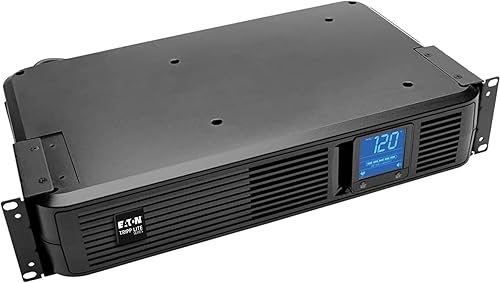
- 1500VA/900W
- 2U rack or tower
- external battery pack option
A 2U rack UPS with room to grow: the 1500VA load fits a small server rack, and an optional external battery pack adds runtime.
Pros
- External battery pack option
- Rack or tower mounting
- AVR without using battery
Cons
- External battery pack sold separately
This is the pick when outages last longer than a few minutes or you expect to add gear. Its 1500VA/900W rating covers a small server rack, and the optional BP24V15RT2U external battery pack adds 30 minutes at half load and 11 minutes at full load.
Eaton Tripp Lite also lists AVR that corrects brownouts and overvoltages without using battery, so short dips do not eat your reserve. The rotatable LCD shows voltage, runtime, load and battery status, and the internal batteries are user-replaceable.
It runs modified sine wave (PWM) output on battery and sine wave in AC mode. Check your server or switch power supply spec if it calls for pure sine wave on battery.
Our lithium UPS comparison covers models built around that requirement.
Buy it if you want one 2U unit that can grow with the rack. For a rack that will stay small and fixed, the 1200VA model covers the same outlets with a lighter load rating.
Eaton Tripp Lite SMART1200LCD 1200VA 2U Rack: best for lighter loads
Eaton Tripp Lite SMART1200LCD 1200VA 2U Rack: Best for lighter loads
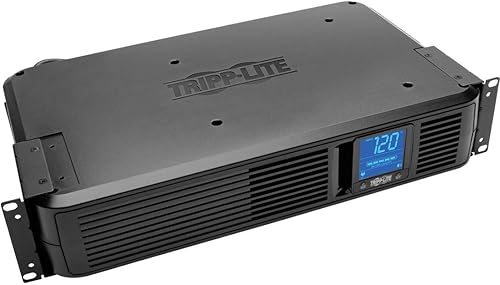
- 1200VA/700W
- 2U rack or tower
- 8 outlets
The lighter load option: 1200VA/700W for a network switch, a desktop PC or a handful of small devices in a 2U space.
Pros
- Rack or tower mounting
- AVR without using battery
- USB shutdown software
Cons
- Lower wattage ceiling than the 1500VA units
The SMART1200LCD fits a network shelf or small office rack with a modest load. Its 1200VA/700W rating gives up to 12 minutes at half load and 4 minutes at full load, which is enough to shut down safely or ride out a short blackout.
Eaton Tripp Lite lists eight NEMA 5-15R outlets, AVR, Tel/DSL/Ethernet surge protection and a USB port for unattended shutdown software. The unit mounts in 2U of rack space or upright as a tower.
The lower watt ceiling is the trade-off. Two power-hungry servers or a rack that will expand past 700W should move up to a 1500VA model.
It also protects your network line, which matters when a surge travels down the modem cable rather than the power cord. That is a real advantage for a home network closet.
Choose it when your load is known and small, like a switch, router and one desktop. Skip it if the rack will grow into server territory.
Tripp Lite SMART1500LCD 2U Rack UPS: best for fixed budgets
Tripp Lite SMART1500LCD 2U Rack UPS: Best for fixed budgets
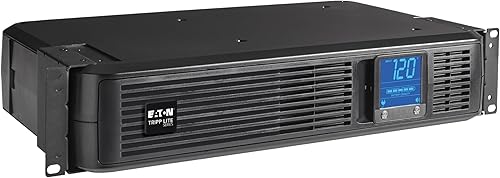
- 1500VA/900W
- 2U rack or tower
- rotatable LCD
The 1500VA model to buy when you want rack mounting and AVR without paying for the external battery expansion.
Pros
- 1500VA/900W in 2U
- Rotatable LCD
- User-replaceable batteries
Cons
- No external battery pack option
The SMART1500LCD gives you the 1500VA/900W ceiling without the expansion option. It carries the same eight outlets, AVR, RJ45 dataline protection and rotatable LCD as the XL model.
The difference is the battery path. This unit has user-replaceable internal batteries but no external battery pack support, so its runtime is fixed at what the internal battery delivers.
For many home racks, that is all you need.
Eaton Tripp Lite backs it with a 3-year limited warranty and connected equipment insurance. The XL model carries the same coverage.
Pick it when your outage plan is "save and shut down", not "keep running". If you want the option to add runtime later, the XL model is the better fit.
How much runtime do you get at half load and full load?
Runtime falls as load rises, so the same UPS runs longer with less plugged in. Eaton Tripp Lite publishes runtime at half load and full load, which gives you two useful reference points.
At 1200VA/700W, the SMART1200LCD gives up to 12 minutes at half load (350W) and 4 minutes at full load. That is enough for an orderly shutdown on a small load.
The 1500VA units carry more capacity, and the XL model's advantage is the external pack: Eaton Tripp Lite says the BP24V15RT2U adds 30 minutes at half load and 11 minutes at full load.
Plan around what you need the UPS to do. A save-and-shut-down plan needs only a few minutes; a plan to keep a switch and modem running through a long outage needs the external pack or a larger UPS.
Runtime also drifts as batteries age. Our guide to testing a UPS battery shows how to spot decline before an outage exposes it.
Set your target runtime first, then choose the model that meets it at your real load. For most home racks, a few minutes plus automatic shutdown is the practical target.
Which rack mount UPS features matter for home and small office gear?
The features that matter most are AVR, dataline protection and remote shutdown. Fancy displays help, but they do not keep your gear running.
AVR is the big one. All three units correct brownouts and overvoltages without using battery, so the battery stays charged for real blackouts.
Dataline surge protection covers the RJ45 Ethernet line up to 100 Mbps. That protects network gear from surges arriving on the data cable, which a power-only strip cannot do.
Remote shutdown comes from the USB and RS-232 ports plus free PowerAlert software. That lets a connected computer save files and shut down during a long outage instead of draining the battery flat.
Mounting hardware is included for both rack and tower setups. The control panel rotates to suit either orientation, so the LCD stays readable when the unit stands upright.
Prioritize AVR and shutdown software over display extras. Those two features do the work during an outage; the screen just tells you what happened afterward.
Can a 2U rack mount battery backup UPS run a whole home office?
It can, within its watt rating. A 900W unit handles a desktop, monitor, modem, router and a small NAS, but not a laser printer or space heater on the same battery outlets.
The catch is that a rack mount UPS is built for rack gear. It is 3.5 in high and 17.25 in wide, which is more cabinet than many desks need.
If your office has no rack, a tower UPS may fit better.
That said, all three units here include tower brackets. You can stand one beside a desk and still get rack-grade protection and the rotatable LCD.
Keep the high-draw devices off the battery. Put a laser printer on a surge-only outlet or a separate strip, and reserve the UPS for the gear that needs to stay up.
If your office runs on a whole-home backup system, a rack UPS still helps by bridging the seconds before the generator starts and by cleaning the power afterward.
Choose a rack UPS for a home office only if you have the depth and height for it. Otherwise, a tower model in the same VA class is the easier fit.
What does installation involve for a rack mount UPS?
Installation is bolt-in and plug-in: slide the unit into 2U of rail space, connect the input cord and attach your gear. The included hardware covers both rack and tower setups.
Start by checking that the rack rails are set for 19-inch spacing. The unit is 17.25 in wide and 10.5 in deep, so it needs a four-post rack with enough rear clearance for cords.
Load the UPS near the bottom of the rack when you can. Its 28.8 to 30 lb weight is easier to handle low down, and a bottom position keeps the center of gravity stable.
Plug the NEMA 5-15P cord into a grounded wall outlet or rack PDU. Then connect your critical gear to the battery outlets and run the USB cable to the device that will handle shutdown.
Let the internal battery charge before relying on it. Eaton Tripp Lite lists a 4.5-hour charge time for all three units.
Test the setup once it is charged. Our UPS battery test walkthrough covers a safe runtime check you can repeat twice a year.
Mount low, charge fully and test before the first outage. That order avoids a surprise when the power actually drops.
How do these rack mount UPS units compare on specs?
The three units share most of their platform, so the comparison comes down to capacity and expansion. The table below lines up the key differences.
| Feature | SMART1500LCDXL | SMART1500LCD | SMART1200LCD |
|---|---|---|---|
| Capacity | 1500VA / 900W | 1500VA / 900W | 1200VA / 700W |
| Outlets | 8 x NEMA 5-15R | 8 x NEMA 5-15R | 8 x NEMA 5-15R |
| Mounting | 2U rack or tower | 2U rack or tower | 2U rack or tower |
| External battery pack | Yes (BP24V15RT2U) | No | No |
| Dataline protection | RJ45 up to 100 Mbps | RJ45 up to 100 Mbps | Tel/DSL/Ethernet |
| Weight | 30 lb | 29 lb | 28.8 lb |
The XL and standard 1500VA units are close siblings. The XL adds the external battery pack connector; the standard model does not.
The 1200VA unit steps down to 700W and loses the external pack option. It makes up for it with Tel/DSL protection and the same AVR range.
All three carry a 3-year limited warranty and connected equipment insurance from Eaton Tripp Lite. All three also use user-replaceable internal batteries.
Pick by capacity first, then by whether you want to add runtime later. The outlet count is the same across the group.
How should you choose between these rack mount battery backup UPS units?
Buy the SMART1500LCDXL if runtime matters, the SMART1500LCD if budget matters, and the SMART1200LCD if your load is small. That rule covers most buyers.
For a home lab or small office rack that may grow, the XL model is the safer buy. The external battery pack option means you can extend runtime without replacing the whole UPS.
If your outages are short and your plan is save-and-shut-down, the standard SMART1500LCD does the same job without the expansion connector. Our overall UPS buying guide covers how to size a unit when your load sits between these tiers.
For a network closet with a switch, router and a few small devices, the 1200VA model is enough. Its 700W ceiling leaves headroom for that kind of load.
Whichever you pick, confirm your rack depth and your connected watts first. Then set up remote shutdown so the UPS protects your data, not just your uptime.
The best rack mount battery backup UPS is the one sized to your real load with a little headroom. Start with the highest-watt model you can fit and afford, and step down only when your load clearly stays below its ceiling.
Frequently asked questions
What does a rack mount battery backup UPS do that a tower UPS does not?
It bolts into standard 19-inch rack space so power protection lives with your network gear. These Tripp Lite units also mount upright as a tower with the included brackets, so you can move one between a rack and a shelf without buying a second UPS.
How long will a rack mount UPS run my equipment?
Runtime depends on the load. Eaton Tripp Lite gives the SMART1200LCD up to 12 minutes at half load and 4 minutes at full load.
The SMART1500LCDXL's optional external battery pack adds 30 minutes at half load and 11 minutes at full load.
Can I plug a laser printer into a rack mount battery backup UPS?
Keep laser printers and other high-draw devices off the battery outlets. A 900W unit is sized for servers, network gear and computers, and a printer's startup surge can overload the battery side or cut runtime for the equipment you actually need to protect.
Do I need pure sine wave output for rack equipment?
Check what your power supplies expect. These Tripp Lite units give modified sine wave (PWM) output on battery and sine wave in AC mode.
Active power factor corrected supplies generally prefer a pure sine wave UPS, so read your server or switch spec before deciding.
How often should I replace UPS batteries in a rack unit?
Replace them when a self-test shows reduced runtime or the unit reports a battery fault. These units use user-replaceable internal batteries, so you can swap them without sending the whole UPS in.
Run a runtime test twice a year to catch decline early.
Can these rack UPS units go in a two-post relay rack?
Plan on a four-post rack for 2U equipment. These units are 17.25 inches wide to fit 19-inch rack rails, so a two-post rack needs shelf support rather than rail mounting.
Measure the depth as well: each unit is 10.5 inches deep.