Best Wall Mount UPS Battery Backup: How to Choose
A wall mount UPS battery backup only works when the unit is built for wall or rack mounting and the wall can carry its weight. Match the outlet load to the VA and watt rating, pick pure sine wave for Active PFC power supplies, and leave room for cords and airflow.
On this page (8 sections)
- What makes a UPS safe to mount on a wall?
- Which wall mount UPS fits your outlets and gear?
- Best for desk-side gaming setups: APC Back-UPS Pro Gaming UPS
- Best for short-depth wall racks: CyberPower CP1500PFCRM2U
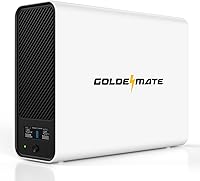
- Best for long-term lithium backup: GOLDENMATE 2000VA/1600W Lithium UPS
- How much runtime should you expect from a wall mount UPS?
- What should you check before mounting a UPS on a wall?
- Which wall mount UPS should you buy?
A wall mount UPS battery backup keeps backup power off the floor and out of the way, but only certain units are built to hang. Pick a rackmount or bracket-ready model, confirm the wall can carry its weight, and size the load to its VA and watt rating.
Anything else is a shelf unit waiting to fall.
This guide walks through the mounting question first, then the electrical side. If you want the general buying process before the wall details, our guide on how to choose a UPS battery backup covers load math and runtime basics.
Three units below show the realistic options. One hangs in a short-depth rack, one sits at the desk, and one trades mounting flexibility for a long-life lithium battery.
What makes a UPS safe to mount on a wall?
A UPS is wall-safe only when the maker supplies a mounting method for it. Rackmount models have ears or rails for a cabinet; some tower units accept an optional bracket.
A plain tower hung from a shelf or bracket it was not designed for is a hazard.
Check three things before you drill. First, does the maker list a wall or rack mount option?
Second, what does the unit weigh when loaded? Third, does the spot leave the outlets, display and power button reachable?
Mounting changes the load path. A 1500 VA unit can weigh 25 to 30 lb empty, and that weight hangs on the bracket and the wall, not on the floor.
The bracket needs anchors rated well above that figure.
Rack depth matters as much as wall strength. A short-depth wall rack often has 12 to 15 inches of usable depth, so a full-depth server UPS will not close the door.
A short-depth model like the CyberPower below solves that specific problem.
The rack's own weight rating counts too. A 2U unit like the CyberPower is 26.8 lb empty, and adding the input cord and the backed-up gear pushes the total higher.
Check what the rack rails and the wall anchors are each rated to carry, not just one of them.
Think about service access as well. A rack unit mounted high on a wall is awkward to reach when you need to silence an alarm or swap a cable.
Leave a step stool's worth of clearance and keep the front panel at a workable height.
Skip wall mounting for units with no mount option. Put those on a sturdy shelf or the floor instead.
Our overview of what a UPS battery backup is and how it works explains why the battery and inverter package is heavier than a surge strip.
Which wall mount UPS fits your outlets and gear?
Match the UPS to the gear first, then to the wall. Add the wattage of everything you want backed up, keep that total under the UPS watt rating, and choose the outlet count and spacing that fits your plugs.
Watt ratings matter more than VA for real loads. A 1500VA/1000W unit backs roughly 1000 watts of equipment; a 2000VA/1600W unit covers more, but only if the wall spot can carry its larger, heavier cabinet.
The GOLDENMATE notes its lithium system needs a bigger transformer, so its enclosure is bigger and heavier than a comparable lead-acid unit.
Count the plugs you actually need. Wall gear tends to be small and numerous: router, modem, switch, NVR, a couple of cameras, maybe a small NAS.
Wide-spaced outlets help when several wall warts compete for the same strip.
The input plug shape matters when the outlet sits behind a cabinet. The CyberPower uses a right-angle NEMA 5-15P plug set at a 45 degree offset, so the cord runs flat against the wall instead of jutting out.
That is the kind of small detail that decides whether a wall install actually fits.
Keep high-draw appliances off the UPS. Heaters, kettles and power tools belong on the wall outlet, not on backup power.
A UPS sized for electronics will trip or shut down under those loads.
Outlet count and spacing
The APC unit gives ten outlets, six with battery backup and four surge-only. The CyberPower offers eight NEMA 5-15R outlets.
The GOLDENMATE also has eight NEMA 5-15P outlets plus a Type-C and a Type-A USB charging port.
The split matters more than the total. Six backed-up outlets cover a PC, monitor, router and a couple of extras; the four surge-only outlets are for printers and speakers that do not need to ride out an outage.
On the GOLDENMATE, the two USB ports share 10W, enough for a phone or a small tablet but not for charging a laptop.
Sine wave and Active PFC
Modern desktops, NAS boxes and many network devices use Active PFC power supplies. Those supplies need a pure sine wave output.
All three units here produce sine wave power, so none of them forces you to think about that trade-off.
That matters because a simulated or stepped wave can make an Active PFC supply buzz or refuse to run on battery. Since every unit in this group is a pure sine wave model, the choice comes down to mounting, capacity and battery life rather than waveform.
The one load type still worth checking is a device with a motor, such as a small fan, which can be fussier about waveform than a plain power supply.
Best for desk-side gaming setups: APC Back-UPS Pro Gaming UPS
The APC Back-UPS Pro Gaming UPS 1500VA/900W Pure is the top pick here because it covers a full desk setup from one tower, and its display makes runtime easy to read at a glance. It is not a wall mount unit, so plan a shelf or floor spot beside the desk.
Six of its ten outlets carry battery backup and the other four are surge-only, which suits a monitor, PC, router and speakers in one place. Automatic Voltage Regulation corrects low and high voltage without draining the battery.
The Reactor Circle display sits at 160 degrees so you can read remaining runtime and load from a chair. Its RGB lighting is cosmetic, but the runtime readout is the practical part.
The display reports load wattage and power health as well as remaining runtime, so you can see when the tower is close to its 900 watt limit before it trips.
The unit is a tower form factor measuring 16.06 inches deep, 4.13 inches wide and 11.45 inches high. That footprint needs a shelf or floor spot with real depth, so it does not suit a shallow cabinet.
It carries an Energy Star rating and a 3-pin North American plug.
Pick this one when the desk is the priority and the wall is not. The 900 watt rating limits it to gaming PCs and consoles rather than whole-office loads.
For the wider field of home units, see our roundup of the best UPS battery backup options.
Best for short-depth wall racks: CyberPower CP1500PFCRM2U
The CyberPower CP1500PFCRM2U Rack Sine Wave UPS is the pick for wall mounting because it is a 2U rack unit only 10.5 inches deep. That short depth lets it close inside shallow wall racks where full-depth units will not fit.
Its eight NEMA 5-15R outlets back security systems, AV gear and network devices. Automatic Voltage Regulation extends battery life by correcting small sags without switching to battery each time.
The unit draws 8.33 A at 120 volts and runs on a 57 to 63 Hz frequency range.
The color LCD shows battery and power status at a glance, which matters when the unit hangs at eye level or above. CyberPower backs it with a 3-year warranty that includes the battery and a connected equipment guarantee.
The unit is UL certified and listed, and it ships with free PowerPanel management software for monitoring from a computer.
The cabinet measures 17 inches wide and 3.4 inches high to match its 2U rack height. That leaves the depth as the headline number for wall racks, since a standard server cabinet depth would waste space a short wall rack does not have.
The battery is lead acid with a rated life of about 3 years and an 8-hour charge time.
Choose it when the rack is shallow and the load is networking or AV. The 1500VA/1000W rating handles a switch, NVR, modem and router with room to spare.
It is heavier and deeper than a small desktop unit, so check the rack's weight rating before you load it.
Optional remote network or cloud monitoring cards are sold separately if you want to watch it from another room.
If you are weighing lithium against lead acid for a rack install, our lithium UPS roundup covers the battery-chemistry trade-offs.
Best for long-term lithium backup: GOLDENMATE 2000VA/1600W Lithium UPS
The GOLDENMATE 2000VA/1600W Lithium UPS is the pick when battery lifespan is the deciding factor. Its LiFePO4 pack is rated for more than 3,000 charge cycles and over 10 years of life, which cuts the replacement routine that lead-acid units demand.
GOLDENMATE puts the total cost of ownership saving at over 40 percent compared with lead acid.
It runs pure sine wave output with Automatic Voltage Regulation and an LCD that reports battery and power status. A built-in battery management system and PP45 terminals handle the lithium pack safely.
The display includes an automatic cutoff that stops charging and discharging when limits are exceeded, plus a mute switch for the alarm.
The outlet panel is laid out with wider spacing so several plugs with bulky cords can share the strip. It is a floor or desk form factor in a metal enclosure, with a Type-C and a Type-A USB port on the front for small device charging.
The trade-off is size. GOLDENMATE says the 51.2V lithium system needs a larger transformer, so the cabinet is bigger and heavier than a comparable lead-acid model.
That matters for a wall install, where the bracket and anchors carry the extra weight. The cabinet is 16.73 inches deep and 11.81 inches high, which is deeper and taller than most short wall racks will take.
It supports 90–140V AC input for standard 110V household power, and GOLDENMATE warns that generator power may not be accepted as a valid input. In that case the unit stays in battery mode and the battery will not recharge.
Pick it for a shelf or floor spot near the network gear, not for a light wall bracket.
The 2000VA rating also covers a small NAS or workstation alongside the router. A communication port and included USB cable let it trigger a Windows PC shutdown.
How much runtime should you expect from a wall mount UPS?
Runtime depends on the load, not just the VA rating. A light network load runs far longer than a gaming PC on the same UPS.
Plan for the time you need to save work and shut down, not for hours of full-load use.
At full load, a 1500VA/1000W unit gives only a few minutes. At a router-and-modem load of 30 to 60 watts, the same unit can run much longer.
The APC model's description puts its router and low-power runtime at up to 90 minutes and its full gaming-rig runtime at several minutes.
Those figures are maker claims for specific loads, so treat them as a starting point. Your own runtime shrinks as you add devices.
Add up the wattage on battery outlets and compare it with the UPS watt rating. A 1000 watt unit loaded to 900 watts is near its edge; the same unit at 200 watts has far more headroom.
The number of backed-up outlets matters here too. On the APC unit, only the six battery outlets count toward runtime, so spreading a printer or speakers onto the surge-only outlets leaves more of the battery for the PC and router.
That is a planning choice you can make before the first outage.
Battery chemistry changes the long game. The lead-acid units here need a battery replacement every few years, while the GOLDENMATE lithium pack is rated to last over 10 years.
That is a cost and maintenance difference more than a runtime one. A lead-acid unit rated at 3 years and a lithium unit rated past 10 years will both fade with heavy cycling, but the replacement schedule is very different.
What should you check before mounting a UPS on a wall?
Check the wall, the bracket and the clearance before the unit goes up. The mounting hardware and the wall carry the load, and a UPS that falls takes your network down with it.
Start with the anchors. Wall studs or masonry are the safe targets.
A hollow drywall anchor rated for a picture frame is not enough for a 26.8 lb unit like the CyberPower, let alone its loaded weight. Pick anchors rated for several times the total and spread them across two studs where the spacing allows.
Measure the spot against the unit. The CyberPower is 17 inches wide, 10.5 inches deep and 3.4 inches high, so a short wall rack needs at least that much interior width plus clearance.
The GOLDENMATE cabinet is 16.73 inches deep and 11.81 inches high, which rules out shallow racks. The APC tower is 16.06 inches deep and 11.45 inches high and is not a rack unit at all.
Leave airflow. Batteries and inverters give off heat while charging, and a closed cabinet with no gaps shortens battery life.
Keep the front panel and outlets reachable for resets and cable changes. If the display faces a wall or the underside of a shelf, you lose the status readout that makes these units useful.
Clearance and cable routing
Route the input cord so it does not pull on the unit. The CyberPower uses a right-angle plug with a six-foot cord.
Keep the outlet panel facing where you can reach it, and label the backed-up cables so a reset does not become a guessing game.
The right-angle plug is a real advantage in a wall rack. A straight plug pushes the cord straight out of the outlet, which eats depth in a shallow cabinet.
A 45 degree offset plug lets the cord run down the wall instead. Leave a little slack in the cord so a bumped rack does not yank the plug loose.
Which wall mount UPS should you buy?
Buy the CyberPower CP1500PFCRM2U if the UPS is going into a wall rack. Its 10.5-inch depth fits short racks, its eight outlets cover network and AV gear, and its sine wave output supports Active PFC supplies.
That combination is what a wall mount UPS battery backup needs to do well.
Choose the APC Back-UPS Pro Gaming UPS for a desk setup that stays on the floor or a shelf. Its ten outlets and tilted runtime display suit a gaming PC, monitor and router in one place.
Pick the GOLDENMATE 2000VA/1600W Lithium UPS when you want a long-life battery and have room for a bigger, heavier cabinet near the gear.
The decision rule is simple. If it hangs, it must be a rack model with a rated bracket and a wall that can hold the load.
If it sits, any of the three works, and the desk or shelf spot decides the rest. Start with the mount, then the weight, then the watts.
Frequently asked questions
Can any UPS battery backup be mounted on a wall?
No. A UPS needs a mounting method the maker supports, such as rack ears or a bracket kit.
Hanging a tower unit by its own plastic shell voids the warranty and risks a fall, so buy a rackmount model or a dedicated wall bracket.
How much weight can a wall hold for a UPS?
That depends on your wall, not the UPS. Anchor into wall studs or masonry where possible, and use hardware rated for several times the unit's loaded weight.
A UPS plus cords can weigh 30 lb or more, so a hollow drywall anchor alone is not enough.
Does a wall mount UPS need extra clearance?
Yes. Leave the maker's ventilation gaps on every side and keep the front panel and outlets reachable.
Batteries give off some heat while charging, so a closed cabinet with no airflow shortens battery life.
What size wall mount UPS do I need for a home router and modem?
A small 600 to 900 VA unit covers a router and modem for a useful stretch. Choose 1500 VA or more when the wall setup also backs a NAS, switch, security recorder or a desktop workstation.
Is pure sine wave important on a wall mount UPS?
It matters for any load with an Active PFC power supply, such as modern desktops, NAS boxes and some network gear. Pure sine wave output matches utility power closely, while a stepped or simulated wave can make some of those supplies shut down or buzz.
Can a wall mount UPS run a space heater or power tool?
No. Resistive and motor loads like heaters, kettles and power tools draw far more than a typical home UPS rating.
Keep the UPS for electronics, networking gear and small chargers, and plug high-draw appliances straight into the wall.