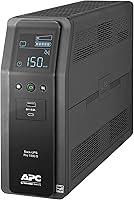
Best Pure Sine Wave UPS for a PC: How to Choose
Pick a pure sine wave UPS for a PC when your power supply is Active PFC, which is nearly every modern desktop. Size the VA and watt rating above your PC's real load, and buy a unit whose output matches the clean wave your PSU was built for.
On this page (9 sections)
- Why does a PC need pure sine wave output?
- How do you read VA versus watts?
- How much runtime do you actually need?
- How many outlets and which features matter?
- Which pure sine wave UPS fits each kind of PC?
- Does a pure sine UPS help a 3D printer or small office?
- How should you set up and maintain the UPS?
- What should you check before you buy?
- The bottom line
A pure sine wave UPS for a PC is the right buy when your desktop uses an Active PFC power supply, which covers nearly every modern build. Pure sine output matches the clean wave your PSU expects from the wall, so the computer keeps running on battery instead of dropping out or buzzing when the power fails.
That single compatibility point matters more than any label on the box. A simulated sine unit can be fine for a router or a lamp, but a modern PC is where the difference shows.
This guide covers how to match wattage, read runtime honestly, and choose a unit that fits your desk.
If you would rather skip straight to picks, our roundup of the best UPS for a desktop PC has the short list. Read on for the rules that make the choice simple.
Why does a PC need pure sine wave output?
A pure sine wave UPS protects an Active PFC power supply from the kind of power it was not designed to accept. Most desktop PSUs built in the last decade use Active PFC to meet efficiency rules, and those supplies expect a smooth, rounded wave from the outlet.
When a simulated sine UPS takes over, its stepped square-ish wave can confuse the PSU's power correction circuit. Some supplies shut down on battery, and others hum or click under the load.
Neither outcome helps during an outage.
Pure sine units deliver a wave close to utility power. CyberPower states its PFC Sinewave models use sine wave output for Active PFC and conventional supplies.
APC describes the BR1500MS2 as delivering pure sine wave power identical to your utility line.
That is why "pure sine wave" belongs in the product name and on the shortlist. The feature is not marketing decoration; it is the handshake between the UPS and the PSU.
A basic standby UPS with a simulated wave may still keep a simple device alive. For a tower PC, a laptop dock, or a workstation, choose the clean wave and stop worrying about compatibility.
Rule: if your PC has an Active PFC power supply, buy pure sine. Check the PSU label or its product description when you are unsure.
How do you read VA versus watts?
Match the UPS watt rating to your PC's real draw first, then use VA as a rough cabinet size. VA describes apparent power, while watts describe the real power the PC uses.
Marketing leans on the big VA number, but watts set what the unit can carry.
The three units in this guide show the gap. The CyberPower CP1500PFCLCD is rated 1500VA and 1000W.
The APC BR1500MS2 is 1500VA and 900W. The APC BR1350MS is 1350VA and 810W.
Same general size class, different real limits.
To find your load, add the watt draw of the PC, monitor and anything else on battery outlets. A gaming tower under load is the number that counts, not its idle draw.
Leave headroom so the UPS is not running at its ceiling.
A 1000W-rated unit gives more room for a high-end graphics card than a 900W unit, even though both say 1500VA. If you run a modest desktop and a monitor, a 900W or 810W rating covers it comfortably.
The VA figure still helps with outlet count and physical size. It just should not be the only number you compare.
Rule: choose a UPS whose watt rating sits above your peak PC load with room to spare. Treat VA as the second check, not the first.
How much runtime do you actually need?
Plan for a clean shutdown, not hours of gaming. A pure sine UPS for a PC exists to carry you through a blip or give you time to save work when the power stays out.
Two to five minutes at your real load is the useful target for most desktops.
Runtime scales down as load goes up. APC rates the BR1500MS2 at up to 73 minutes at a 100W load and the BR1350MS at up to 54 minutes at 100W.
Those figures assume a light draw, so a gaming PC running hard will see much shorter times.
That is not a flaw. A UPS is a bridge, not a generator.
The plan is to save open files, finish a short task if you can, and shut down in order.
Automatic Voltage Regulation stretches your readiness. AVR corrects small voltage swings without switching to battery, so the battery stays charged for a real outage.
The CP1500PFCLCD and both APC units list AVR.
If you also run a NAS or router, put those on battery outlets so they stay up while the PC shuts down. That keeps your network reachable and your data safe.
Rule: size runtime for the shutdown you need at your real load, and let AVR handle the small dips between outages.
How many outlets and which features matter?
Count battery-backup outlets separately from surge-only ones. Every unit here lists 10 or 12 total outlets, but only some run on battery.
The rest are surge protection only, which is fine for a printer or a lamp.
The CyberPower CP1500PFCLCD lists 12 NEMA 5-15R outlets: 6 battery backup and surge protected, plus 6 surge only. It also has 2 USB charge ports, one Type-A and one Type-C, and a color LCD that tilts up to 22 degrees for viewing under a desk.
The APC BR1500MS2 lists 10 outlets: 6 battery backup plus 4 surge only, with front USB-C and USB-A charging and a replaceable battery. The APC BR1350MS follows the same 10-outlet layout, 6 on battery and 4 surge only, with USB-C and USB-A ports.
Other features worth a look: a display that shows load and battery status, a user-replaceable battery, and dataline protection for coax or Ethernet. Both APC units include coaxial and Ethernet surge ports.
The CyberPower lists PowerPanel management software.
If your desk has a monitor, speakers and a phone charger, battery outlets fill up fast. Map your devices before you buy so the essentials fit.
Rule: put the PC, monitor and network gear on battery outlets, and let surge-only outlets handle the rest. Check the port mix and the display if you like reading status at a glance.
Which pure sine wave UPS fits each kind of PC?
The CyberPower CP1500PFCLCD is the best overall pick for most desktops. It has the highest watt rating here at 1000W, the most outlets at 12, and a color LCD that shows power conditions without guesswork.
A gaming PC or workstation with a hungry graphics card gets the most headroom from it.
Its 6 battery outlets cover a PC, monitor, router and a couple of extras. The two USB ports charge a phone or tablet even during an outage.
CyberPower backs it with a 3-year warranty that includes the battery and a connected equipment guarantee.
The tilt screen helps when the unit sits low under a desk. AVR keeps minor fluctuations from draining the battery.
This is the unit to choose when you want one box to handle a crowded desk.
Pick it for a high-draw gaming build or a workstation with several peripherals. Skip it only if your desk is small and a compact tower matters more than outlet count.
When is the APC BR1500MS2 the better fit?
The APC BR1500MS2 is the pick for a home office that wants replaceable parts and dataline protection. Its 900W rating suits a strong desktop and monitor, and the user-replaceable battery (APCRBC163) lets you extend its life without shipping the unit.
The 10 outlets split 6 on battery and 4 surge only. Built-in coax and Ethernet protection guard your data lines as well as the power.
Front USB-C and USB-A ports charge devices without using a protected outlet.
APC rates it at up to 73 minutes at a 100W load. AVR corrects brownouts and spikes without switching to battery.
It is a close second to the CyberPower on watts, but it wins on serviceability.
Choose it when you expect to keep the UPS for years and want to swap the battery yourself. It also fits a desk where the router and modem sit nearby and would benefit from line protection.
When does the APC BR1350MS make sense?
The APC BR1350MS is the value pick for a standard desktop and monitor that does not need the biggest watt rating. At 1350VA and 810W it covers an everyday PC, and it carries the same 10-outlet layout and replaceable battery (APCRBC161) as its larger sibling.
It lists up to 54 minutes at a 100W load. AVR handles voltage swings, and the LCD shows runtime, load and status.
Coax and Ethernet surge ports protect the network side.
The lower watt ceiling is the real difference. A modest desktop and one monitor fit fine; a high-end graphics card under load would push it.
Check your peak draw before choosing this over the two 1500VA units.
Pick it for a light or mid-range PC where the price tier matters. Our guide to choosing a UPS battery backup for your home walks through the same sizing steps for other rooms.
Does a pure sine UPS help a 3D printer or small office?
Yes, a clean wave is a good match for sensitive electronics beyond the desktop. A 3D printer's control board and stepper drivers are the kind of load that benefits from steady power, and an interrupted print wastes both filament and time.
Our UPS picks for a 3D printer cover units sized for that job.
In a small office, one pure sine unit can carry several desks' worth of essentials. The outlet count and replaceable batteries on the APC models suit a shared setup.
See our small office UPS picks for units chosen around multi-desk loads.
The rule is the same everywhere: match watt rating to the real load and keep the important devices on battery outlets. A clean wave helps any device with a modern power supply.
Rule: buy pure sine for any load with a switching power supply. That includes printers, network gear and office desktops, not just gaming towers.
How should you set up and maintain the UPS?
Place the UPS on a hard, ventilated surface near the wall outlet and keep its vents clear. These units are towers around 14 inches deep and 25 to 28 pounds, so they need floor or sturdy-shelf space rather than a cramped desk corner.
Plug the UPS directly into a wall outlet, not a power strip or surge protector. Then connect the PC and monitor to battery-backup outlets.
Put printers and other non-essential gear on surge-only outlets so the battery is saved for what matters.
Let the battery charge fully before you rely on it. Lead-acid batteries in these units take hours to reach full charge.
The APC units list a 16-hour charge time.
Check the display or software for load and battery status now and then. A replaceable battery keeps a good unit running for years; the APC models use user-replaceable packs.
The CyberPower warranty covers its battery for 3 years.
Keep the unit out of damp spots and away from heat. A cool, dry location helps battery life.
Rule: wall outlet, clear vents, essentials on battery, and a battery you can replace when it ages. That routine gets the most years from any unit here.
What should you check before you buy?
Confirm your PSU type, your peak watt draw and your outlet needs, in that order. Those three checks settle most of the decision before brand or price enters it.
A pure sine wave UPS for a PC is only as good as the match to your hardware.
Start with the PSU. If it is Active PFC, stay with pure sine.
Then add up the watt draw of everything you plan to put on battery outlets. Compare that total to the watt ratings here: 1000W on the CyberPower, 900W on the BR1500MS2 and 810W on the BR1350MS.
Count your plugs. A tower, monitor, router, modem and speakers already use five.
The 6 battery outlets on each unit cover that with one spare. Add a NAS and you are at the limit.
Decide whether a replaceable battery matters to you. It does if you plan to keep the UPS for many years.
Then check the physical size against your desk or floor space.
Rule: buy the unit whose watt rating clears your peak load and whose outlets fit your essentials. Everything else is preference.
The bottom line
For most desktops, the CyberPower CP1500PFCLCD is the pure sine wave UPS to buy. Its 1000W rating and 12 outlets give the most headroom for a gaming PC or a crowded desk.
Pick the APC BR1500MS2 if you want a replaceable battery and dataline protection for a home office.
Choose the APC BR1350MS for a standard desktop where 810W is enough.
The decision rule is simple. Match watt rating to your peak PC load, keep the essentials on battery outlets, and buy pure sine when your PSU is Active PFC.
That combination keeps your PC running clean through brownouts and gives you time to shut down when the power really goes.
If you are still weighing models across brands, start with our best UPS for a desktop PC roundup. It puts these picks side by side so you can choose in a minute.
Frequently asked questions
Do I really need a pure sine wave UPS for my PC?
Yes for a modern desktop with an Active PFC power supply. Pure sine output matches what your PSU expects from the wall, while a simulated sine unit can make some PFC supplies shut down or buzz on battery.
A pure sine wave UPS for a PC is the safer default.
What VA and watt rating do I need?
Add up the watt draw of your PC, monitor and network gear, then leave headroom. A 1500VA unit is the common desktop size, but the watt figure matters more: the CyberPower CP1500PFCLCD is rated 1000W and the APC BR1500MS2 is rated 900W.
How long will a UPS run my computer during an outage?
Runtime depends on your actual load, not the VA label. At a light 100W draw, APC rates the BR1500MS2 at up to 73 minutes and the BR1350MS at up to 54 minutes.
A gaming PC under full load will run far shorter, so plan to save and shut down.
Is simulated sine wave ever good enough?
It can work for a basic router or lamp, but it is a poor fit for a modern PC power supply. The cost gap to pure sine is small at the 1500VA size, and a clean wave avoids the risk of a PSU refusing to run on battery backup.
How much runtime do I need to safely shut down?
Two to five minutes is enough for most PCs to save work and power off cleanly. Size for that shutdown window rather than hours of use, and let Automatic Voltage Regulation handle brief brownouts so the battery stays charged for a real outage.
Will a pure sine wave UPS protect against brownouts too?
Yes when it includes Automatic Voltage Regulation. AVR corrects low or high voltage without switching to battery, so your PC stays on clean power and the battery stays full for a true blackout.
All three units here list AVR.