Best APC UPS for a Home PC: How to Choose
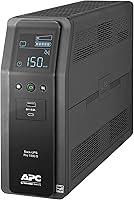
The right APC UPS for a home PC is a line-interactive Back-UPS sized in watts, not just VA. A 1500VA/900W model like the BX1500M covers most desktop and gaming setups, while a 600VA or 850VA unit is enough for a small PC plus router.
On this page (10 sections)
- How do you size an APC UPS for a home PC?
- Which APC Back-UPS model fits your desk?
- Why is the BX1500M the best APC UPS for most home PCs?
- Is the BE600M1 enough for a small PC?
- When does the BE850G2 make more sense?
- Which features should you pay for in an APC UPS?
- How much runtime should you expect from each model?
- Do you need more outlets or external batteries?
- How do you set up an APC UPS for a home PC?
- Which APC UPS should you buy for your home PC?
An APC UPS for a home PC is sized in watts first, then in VA. The Back-UPS Pro BX1500M is the best fit for most desktop and gaming setups, because its 900W output leaves room for a tower, monitor and network gear.
If your desk is small, a 600VA unit like the BE600M1 covers a mini PC or laptop dock with a router. The middle option, the BE850G2, suits a standard office PC with a few extras.
This guide walks through the numbers that matter and the Back-UPS features worth paying for. For the general method behind any brand, read how to choose a UPS battery backup first.
How do you size an APC UPS for a home PC?
Start with the watt draw of everything you want to keep running, then choose a UPS with headroom above that total. VA tells you the apparent power a UPS can deliver, but watts are what your PC's power supply actually pulls.
Most home PCs draw between 150W and 450W while gaming or working. Add a monitor at about 25 to 40W and a router and modem at about 15 to 30W combined.
That puts a typical desktop setup near 300 to 550W.
The BX1500M's 900W ceiling clears that band with room to spare. The BE850G2 at 450W handles a mainstream office PC but not a gaming tower with a discrete graphics card.
The BE600M1 at 330W is for lighter loads only.
VA versus watts: why the watt number decides
VA and watts measure different things. A UPS rated at 1500VA but only 900W can supply 900 real watts, and the gap reflects its power factor.
Your PC's power supply label lists watts. Add the watt figures of your devices rather than their VA ratings.
If a device lists only amps and volts, multiply the two to get watts.
Pick a UPS whose watt rating sits above your planned total. A unit running near its maximum gets hot and loses runtime.
Leaving 20 to 30 percent headroom keeps it cooler and gives you a longer blackout window.
That headroom matters more than the VA figure on the box. The BX1500M's 900W is the number to compare against your PC, not its 1500VA badge.
Compare watts first, then use VA to rank models that clear your total.
Which APC Back-UPS model fits your desk?
The three Back-UPS models here cover light, medium and heavy home PC loads, and each has a clear job. The highest-scoring model, the BX1500M, is the best all-round choice for a desktop.
The BX1500M earns its top score on headroom and features. The BE850G2 sits in the middle for a mainstream setup.
The BE600M1 is the lightest and the simplest.
Start with your watt total and the largest model you can afford, because UPS capacity does not upgrade later. A unit that runs near its limit will shut down sooner than one with spare capacity.
Why is the BX1500M the best APC UPS for most home PCs?
The BX1500M is the best pick for most home PCs because 900W of output covers a full tower, monitor and network gear at once. Its 10 outlets split into 5 with battery backup and 5 surge-only, so you can protect peripherals without draining runtime.
Its Automatic Voltage Regulation corrects low voltage brownouts from 88V and surges up to 13 percent without using the battery. That keeps more charge in reserve for a real blackout.
The active PFC compatibility matters for modern gaming PCs, whose power supplies can misbehave on a simulated sine wave.
The LCD panel shows charge level, estimated runtime, load and input voltage, so you can see how close you are to the limit. An ENERGY STAR rating of 92 percent or more keeps idle draw low.
The battery is user-replaceable with an APCRBC124 cartridge sold separately. Built-in coaxial and Ethernet surge protection adds a layer for cable and network lines.
The surge rating is 789 joules, and the unit uses NEMA 5-15P input and NEMA 5-15R outlets, so it fits a standard US wall socket and cord type.
The tower form factor measures 15.04 x 3.94 x 9.84 inches. That footprint suits a floor or a deep desk edge rather than a crowded shelf.
Choose the BX1500M for a desktop or gaming PC where you want to keep working or save and shut down safely.
Its 900W ceiling and AVR make it the safest general choice among these three.
Is the BE600M1 enough for a small PC?
The BE600M1 is enough for a mini PC, a laptop dock or a small desktop paired with a router, but not for a gaming tower. Its 330W output limits what it can carry through an outage.
It offers 5 outlets with battery backup and surge protection, plus 2 surge-only outlets for less critical gear. The outlets are spaced to fit bulky adapters.
A 1.5A USB port keeps a phone charged even when the power is out. The surge rating is 490 joules and the unit draws up to 5 amps.
Runtime is rated at about 23 minutes at 100W. A small PC drawing near 100W plus a router will get close to that figure.
A larger desktop will cut it short. The frequency range is 60 Hz, matching standard US mains power.
The battery is user-replaceable with an APCRBC154 cartridge sold separately, so you can restore backup performance instead of replacing the unit. A 10-hour charge time means you should plug it in and let it fill before relying on it.
The compact form factor measures 10.79 x 4.13 x 5.47 inches and weighs 7.5 pounds, light enough to sit under or beside a small desk.
Pick the BE600M1 when your total load stays well under 330W. It is the compact, low-cost way to keep a small desk and your internet connection alive through short outages.
When does the BE850G2 make more sense?
The BE850G2 makes sense when your PC and monitor draw more than the 600VA unit can carry but you do not need 900W. Its 450W ceiling covers a mainstream office desktop with a monitor, router and modem.
It has 9 outlets in total: 6 with battery backup and surge protection, and 3 surge-only. Two USB-A ports share 5V/2.4A for charging phones and tablets without giving up a protected outlet.
The surge rating is 354 joules.
Runtime is rated at about 35 minutes at 100W, which gives you more time to save work than the 600VA model. A silenceable alarm and LED indicators show status at a glance.
A built-in wiring fault indicator also warns you when the wall circuit itself has a problem. The battery is user-replaceable with an RBC17 cartridge sold separately.
APC backs it with a 3-year warranty and up to 75,000 dollars of equipment protection for connected devices harmed by a power event. That coverage is a real reason to choose it over a generic unit.
The tower measures 12.87 x 4.13 x 5.47 inches and weighs 9.6 pounds.
The trade-off is headroom: 450W is plenty for an office PC but tight for a gaming tower. A PC near 400W would leave little spare capacity.
Choose the BE850G2 for a standard home office with a mid-size PC and a few network devices.
Move up to the BX1500M if your power supply is rated near or above 450W.
Which features should you pay for in an APC UPS?
The features worth paying for are AVR, enough battery outlets and a user-replaceable battery. Everything else is convenience you can live without.
AVR is the most useful upgrade for home PCs. It trims high voltage and boosts low voltage without switching to battery, so brownouts do not drain your runtime.
The BX1500M includes AVR.
Battery outlets are the next thing to count. Your PC, monitor, router and modem all want backup power.
Surge-only outlets are fine for a printer, speakers or a lamp. The BX1500M's 5 battery outlets and the BE850G2's 6 give you more protected sockets than the BE600M1's 5.
A user-replaceable battery extends the life of the unit. All three models use a replaceable cartridge, though the batteries are sold separately.
Battery life is rated at about 3 years on the BX1500M, so plan on a swap at some point rather than a new unit.
A display or LED status panel helps you monitor load and charge. The BX1500M's LCD is the most informative; the others use LEDs.
Pay for AVR and outlet count first, and treat displays and USB ports as nice extras.
How much runtime should you expect from each model?
Runtime scales with load, so the same UPS lasts longer on a light PC than on a gaming tower. The rated figures use a 100W load as the reference point.
The BX1500M is rated at 68 minutes at 100W. The BE850G2 gives about 35 minutes at 100W, and the BE600M1 about 23 minutes at 100W.
Those numbers drop as your watt draw rises.
For a 300W desktop, expect a fraction of the 100W figure. The BX1500M's larger battery and 900W ceiling keep it ahead of the smaller units under a heavier load.
Charge time also differs: the BX1500M and BE850G2 both need about 8 hours, while the BE600M1 needs about 10 hours to refill.
Runtime is not the only goal. A UPS that runs a gaming PC for 10 minutes still lets you save and shut down.
A unit that runs a router for an hour keeps your internet alive through a short outage.
Plan your runtime around what you need to do: save files and shut down, or ride out a brief flicker. The BX1500M's longer rated runtime and higher ceiling make it the safest for a full desktop.
Do you need more outlets or external batteries?
More outlets help when you have many small devices, while an external battery helps when you need longer runtime on a small load. Most home PC users need neither.
The BX1500M already offers 10 outlets, which is more than most desks need. The BE850G2's 9 outlets cover a PC, monitor, router, modem and a few chargers.
Only a crowded desk with many peripherals would push past that.
External battery connections matter when you want hours of runtime rather than minutes. That is a different class of UPS, often a tower unit with a separate battery pack.
If you plan to keep a NAS or router running for long outages, see our guide to the best APC UPS with external battery connection.
For a home PC, the built-in battery is the right choice. It covers the save-and-shut-down window and keeps short outages from interrupting your work.
The replaceable cartridges keep that built-in battery serviceable for years.
If you are deciding between this brand and another, our APC vs Tripp Lite comparison covers how the two lines differ. For a closer look at a larger APC model, read the APC Back-UPS Pro BR1500MS2 review.
Skip external battery planning for a single home PC and put the money into AVR and headroom instead.
How do you set up an APC UPS for a home PC?
Set up the UPS by charging it fully, then plugging your PC into a battery outlet and your printer into a surge-only outlet. That order keeps your critical gear protected from the first outage.
- Plug the UPS into a wall outlet and let it charge before connecting your PC. The BX1500M needs about 8 hours to charge; the BE600M1 needs about 10 hours.
- Connect the PC and monitor to battery-backup outlets.
- Put the router and modem on battery outlets too, so your internet stays up during a short outage.
- Move printers, speakers and lamps to surge-only outlets.
- Install the monitoring software with the included USB cable so the PC can shut down automatically.
- Run a self-test and check the load display.
Keep the UPS on the floor or a sturdy surface with clear space around it. The BX1500M measures 15.04 x 3.94 x 9.84 in and weighs enough to need a firm base.
The BE600M1 is compact enough for a desk edge.
The included USB cable matters for automatic shutdown. It lets the UPS tell the PC when the battery is running low so the PC can close programs and power off cleanly.
The BX1500M also ships with a coaxial cable for its data-line protection. Charge first, then connect, so the battery is ready when you first need it.
Which APC UPS should you buy for your home PC?
Buy the BX1500M for a desktop or gaming PC, the BE850G2 for a mainstream office setup and the BE600M1 for a small PC plus router. Pick by your watt total and how long you want to keep working.
The BX1500M is the best APC UPS for a home PC overall, with 900W of headroom, AVR, 10 outlets and an LCD. It costs more than the smaller units but covers the widest range of setups.
Its active PFC compatibility and 789-joule surge rating round out the package for modern PCs.
The BE850G2 suits a mid-size office PC where 450W is enough. It adds a 3-year warranty and equipment protection.
The BE600M1 is the compact, budget choice for a light load.
If your load stays under 330W, the BE600M1 will do the job. If you are unsure, size up to the BX1500M so you do not run out of capacity later.
Frequently asked questions
Is a 600VA UPS enough for a gaming PC?
No, 600VA is too small for most gaming PCs. The BE600M1 tops out at 330W, so a gaming desktop with a discrete graphics card needs the headroom of a 900W model like the BX1500M.
How long will an APC UPS run my computer during an outage?
Runtime depends on your load, not just the model. The BE600M1 gives about 23 minutes at 100W and the BE850G2 about 35 minutes at 100W; the BX1500M is rated at 68 minutes at 100W.
A heavier PC shortens those times.
Do I need AVR in an APC UPS for a home PC?
AVR helps if your area sees frequent brownouts or voltage swings. It corrects low and high input voltage without draining the battery, so more capacity is left for a real blackout.
The BX1500M includes AVR.
Can I plug a laser printer into an APC UPS?
Keep laser printers and other heavy draw devices on the surge-only outlets. The battery outlets are meant for your PC, monitor, router and modem, so a printer cannot drain runtime when the power drops.