9 Best APC 650VA UPS Battery Backups (November 2026)
The best APC 650VA UPS battery backups include the APC Back-UPS Pro BX1500M 1500VA for whole-home-office backup, the CyberPower AVRG900LCD Intelligent LCD UPS Battery Backup for outlets on a budget, and the APC Back-UPS BE600M1 600VA for routers and Wi-Fi.
On this page (7 sections)
- The best APC 650VA UPS battery backups for different home setups
- How these APC 650VA UPS battery backups compare
- How we compared these UPS units
- What should you look for in an APC 650VA UPS battery backup?
- Is a 650VA UPS enough for a gaming PC?
- Where should you put a UPS in a home setup?
- The verdict on APC 650VA UPS battery backups
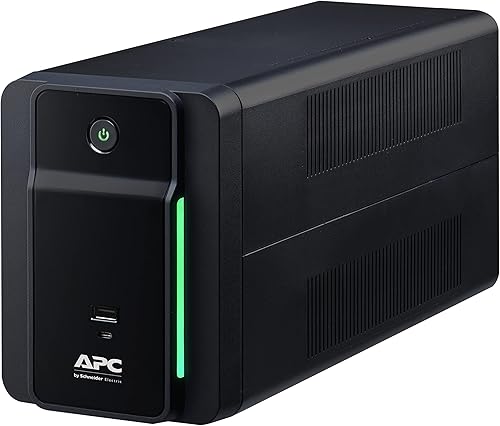
The best APC 650VA UPS battery backup for most homes is the APC Back-UPS BE600M1, a 600VA/330W unit that sits in the same size class as a 650VA model. It gives you 23 minutes of runtime at a 100W load, five battery-backed outlets and a built-in USB charger for your phone.
The 650VA class is the sweet spot for a single desk. It's enough to keep a computer, monitor and router alive long enough to save work and shut down cleanly, without the bulk or cost of a whole-home unit.
If your power goes out often or your desk has grown, though, the top pick overall here is the larger BX1500M.
If you're not sure this is the right size, our guide to how to choose a UPS battery backup walks through the wattage math. And if you want to know why these units beep and click, what is a UPS battery explains the basics.
Our picks at a glance
-
1

-
2
 Best for outlets on a budget
CyberPower AVRG900LCD Intelligent LCD UPS Battery Backup
8.7/10 our score
See it on Amazon -
3

- 4
 Check it
APC 950VA/480W Backup Battery Power Supply
Best for a home office desk - 5
 Check it
Eaton Tripp Lite AVR750U 750VA UPS 450W
Best for safe automatic shutdown - 6
 Check it
Eaton Tripp Lite ECO850LCD 850VA UPS 425W
Best for energy savings - 7
 Best for the 650VA nameplateCheck it
- 8
 Check it
CyberPower EC650LCD Ecologic 650VA UPS
Best for green-minded buyers - 9
 Check it
CyberPower ST625U Standby 625VA UPS
Best for charging phones and tablets
The best APC 650VA UPS battery backups for different home setups
The BE600M1 is the strongest fit for most people, while the larger BX1500M covers a full desk and the 950VA model puts every outlet on battery. Pick by what you need to keep running before you compare outlets or displays.
APC Back-UPS BE600M1 600VA: Best for routers and Wi-Fi
- 600VA / 330W output
- 7 outlets, 5 with battery backup
- Built-in 1.5A USB charger
- 23 minutes at 100W
The closest true fit to a 650VA search, with a USB port that keeps a phone charged during an outage.
Pros
- 23 minutes at 100W
- USB charging during outages
- Compact
- Replaceable battery
Cons
- Only five outlets on battery
- No AVR
The BE600M1 is a 600VA unit that sits in the same size class as a 650VA search, and its compact body fits behind a router or on a small shelf. The 600VA/330W rating and 23 minutes at 100W give you a realistic window to save files and shut a computer down.
Five of its seven outlets sit on battery backup, which is enough for a modem, a router, a monitor and a small desktop. The two surge-only outlets take less critical gear like a printer.
A 1.5A USB port keeps a phone charged during an outage, a small feature that matters when the cell signal is your only link left. Its 490-joule surge rating covers the everyday spikes that happen outside storms.
The battery is user-replaceable with the APCRBC154 cartridge, so a worn cell doesn't mean a new UPS. The trade-off against the AVR models here is clear: no AVR, so brownouts aren't corrected without draining the battery.
Skip it if you have a gaming PC or several monitors. The 330W ceiling makes it a fit for light loads, not a full workstation.
APC Back-UPS Pro BX1500M 1500VA: Best for whole-home-office backup
- 1500VA / 900W output
- 10 outlets, 5 with battery backup
- Automatic Voltage Regulation (AVR)
- LCD status display
The highest-capacity pick here, with ten outlets and an LCD that shows runtime and load. Best when one unit has to cover a full desk plus network gear.
Pros
- Highest VA and wattage here
- LCD shows charge, runtime and load
- AVR corrects brownouts without battery drain
- Replaceable battery
Cons
- Large tower footprint
- Costs more than the 650VA models
The BX1500M is the top pick overall for a whole desk. Its 1500VA/900W rating is the highest in this group, and 68 minutes at 100W means a real outage window rather than a two-minute scramble.
The 10 outlets split into five with battery backup and five surge-only, so you can wire a whole setup from one box. Its 789-joule surge rating and coaxial line protection add a layer the smaller units don't offer.
AVR corrects brownouts from 88V and trims surges within 13 percent, so the battery stays full for a true blackout. It's also Active PFC compatible, which matters for modern gaming PCs.
The LCD panel shows charge level, estimated runtime and load, so you know where you stand before the power fails. It runs at 92 percent or better efficiency under Energy Star, and the battery swaps with the APCRBC124 cartridge.
This is the pick when one unit has to cover a computer, monitor, router, NAS and a couple of chargers. Its tower footprint and the cost are the trade-offs, and a simple router setup doesn't need this much headroom.
APC 950VA/480W Backup Battery Power Supply: Best for a home office desk
- 950VA / 480W output
- 6 outlets, all with battery backup
- USB-C and USB-A charging ports
- Automatic Voltage Regulation (AVR)
Every outlet is on battery, so you do not have to sort critical gear from peripherals.
Pros
- All 6 outlets on battery backup
- USB-C and USB-A ports
- AVR corrects brownouts
- 3-year warranty
Cons
- Fewer outlets than the 12-outlet models
- No LCD panel
The 950VA model sits between the 650VA units and the BX1500M. All six of its outlets provide battery backup and surge protection, so there's no guessing which plug keeps running.
That's the simplest layout here for a desk where every device matters. Its 30 minutes at 100W is longer than the 650VA units manage.
AVR corrects low voltage from 88V and surges within 13 percent, and the unit is Active PFC compatible. A USB-C port and a USB-A port each charge at 5V/2A, so phones and tablets don't need a separate brick.
Its 350-joule surge rating and network dataline protection guard the gear you plug in. The metal enclosure is sturdier than the plastic bodies on most rivals.
A user-replaceable battery takes the RBC17 cartridge, and an EPO port plus a resettable breaker add control. The catch is outlet count.
Six is fewer than the 12 on the CyberPower AVRG900LCD or the Tripp Lite units, and there's no LCD panel to show runtime. Choose it when you want every outlet protected and don't need a screen.
CyberPower AVRG900LCD Intelligent LCD UPS Battery Backup: Best for outlets on a budget
- 900VA / 480W output
- 12 outlets, 6 with battery backup
- Automatic Voltage Regulation (AVR)
- LCD display
Twelve outlets and a three-year battery-included warranty make this the value pick for a desk that needs many plugs.
Pros
- 12 outlets, six on battery
- 3-year warranty includes the battery
- AVR corrects minor fluctuations
- Compact footprint
Cons
- Simulated sine wave output
- No stated runtime figure
The AVRG900LCD earns its place on value. Its 900VA/480W rating is a step above the 650VA class, and 12 outlets, six of them on battery, cover a crowded desk without a power strip.
AVR corrects minor fluctuations so the battery is saved for an actual outage. The headline feature is the warranty: three years, including the battery.
That's rare in this group, where most units cover the electronics but leave the battery to wear out on its own. CyberPower also adds a 200,000 dollars connected equipment guarantee.
Its 900VA/480W rating sits well above the 650VA units, and the five-foot cord ends in a right-angle plug that fits tight wall spaces. The multifunction LCD shows battery and power conditions at a glance.
It uses simulated sine wave output, which most home electronics handle fine, but check any device with a sensitive power supply. There's no stated runtime figure either, so plan by the wattage rather than by a minutes estimate.
It's the best fit when outlet count and warranty matter more than a battery meter.
Eaton Tripp Lite AVR750U 750VA UPS 450W: Best for safe automatic shutdown
- 750VA / 450W output
- 12 outlets, 6 with battery backup
- USB data port for PowerAlert software
- Automatic Voltage Regulation (AVR)
The USB data port lets the UPS talk to a computer so it can save files and shut down on its own during an outage.
Pros
- USB data port for unattended shutdown
- AVR corrects 89V to 145V input
- Replaceable battery
- 100,000 dollars connected equipment insurance
Cons
- Simulated sine wave in battery mode
- No LCD panel
The Tripp Lite AVR750U is the pick for hands-off shutdown. A USB port and cable connect it to a computer running PowerAlert software, so the computer can save open files and shut itself down when the battery runs low.
If you're not home when the power goes, that's the difference between a saved document and a lost one. Its 750VA/450W rating gives 42 minutes for an efficient desktop with a small LCD monitor.
AVR corrects input from 89V to 145V, and 12 outlets split six on battery and six surge-only. Its 316-joule rating covers the surge side.
It filters EMI and RFI noise that can wear on hardware, and the five-foot cord plus bottom mounting tabs let it go on a wall. The internal battery swaps with Tripp Lite's RBC51 cartridge.
A 100,000 dollars connected equipment insurance policy backs it. The trade-off is the display: there's no LCD, so status comes from simple indicators.
It's also simulated sine wave in battery mode. Pick it when unattended shutdown is the job and you don't need to watch a screen.
Eaton Tripp Lite ECO850LCD 850VA UPS 425W: Best for energy savings
- 850VA / 425W output
- 12 outlets, 6 with battery backup
- Four ECO outlets that power down with your PC
- LCD display
ECO outlets cut standby draw from printers and speakers when the computer sleeps, which matters for always-on desks.
Pros
- Four ECO outlets for idle peripherals
- LCD shows load and runtime
- Energy Star certified
- Replaceable battery
Cons
- Standby topology rather than line-interactive
- ECO savings need the USB cable connected
The ECO850LCD targets standby draw. Four ECO outlets shut off automatically when the device plugged into the master outlet sleeps or shuts down, so a printer or speakers stop sipping power.
That's a real saving for a desk that's on all day, and Energy Star certification with 98 percent or better efficiency backs the claim. The 850VA/425W rating gives 38 minutes for an energy-efficient desktop and small monitor.
Its LCD shows input and output voltage, estimated runtime and load percentage. AVR corrects from 95V to 145V.
Its 316-joule rating and RJ45 port protect a 100Mb Ethernet or phone line from data surges. The internal battery swaps with the RBC51 cartridge.
This is a standby topology unit, not line-interactive. That's fine for a home desk.
The ECO outlets only save power when the USB cable is connected and the software is set up. Pick it when you want lower bills more than the longest possible runtime.
APC Back-UPS BE650G1 650VA: Best for the 650VA nameplate
- 650VA / 390W output
- 8 outlets, 4 with battery backup
- RJ45 data-line surge protection
- 22 minutes at 100W
The model whose nameplate matches the 650VA search, with AVR and enough runtime for a short outage.
Pros
- Matches the 650VA rating in the name
- RJ45 data-line protection
- 22 minutes at 100W
- Replaceable battery
Cons
- Only four outlets on battery
- No USB charging port
The BE650G1 is the model whose nameplate literally reads 650VA. Its 650VA/390W rating and 22 minutes at 100W make it a sound fit for a small home office.
RJ45 data-line surge protection is included, which is more than the BE600M1 offers. It has eight outlets, four on battery backup and four surge-only.
A USB connection lets a computer read the UPS status. Its 340-joule surge rating plus RJ45 data-line protection covers network gear, and the unit is UL and Energy Star certified.
It's backed by a 3-year warranty and 75,000 dollars equipment protection, and the battery is replaceable with the APCRBC110. The limitation is outlet count on battery: four is fewer than several rivals here.
There's no USB charging port either. Choose it when you want the 650VA nameplate and AVR together and your desk has only a few critical plugs.
CyberPower EC650LCD Ecologic 650VA UPS: Best for green-minded buyers
- 650VA / 390W output
- 8 outlets
- ECO mode shuts off idle peripherals
- LCD panel
An ECO-focused 650VA unit with a clear LCD and a warranty that covers the battery.
Pros
- ECO mode trims idle draw
- LCD shows power conditions
- 3-year warranty includes battery
- Light 6.4 lb body
Cons
- Standby topology
- ECO savings need the USB connection
The EC650LCD matches the 650VA rating and adds ECO mode. When the connected computer is off or asleep, peripherals on the ECO outlets power down, trimming idle draw.
The LCD shows battery and power conditions at a glance. Its 650VA/390W rating covers a workstation or network setup.
The three-year warranty includes the battery, and the unit carries a 100,000 dollars connected equipment guarantee. At 6.4 lb and just 3.1 inches tall it's light and thin enough to slide onto a shelf or behind a desk.
It has eight outlets in total. This is a standby unit with simulated sine wave output.
The ECO savings need the USB cable connected. It's a good fit when you want a 650VA UPS with a screen and a battery-included warranty.
If you want AVR for brownout-prone power, the BE650G1 covers that job better.
CyberPower ST625U Standby 625VA UPS: Best for charging phones and tablets
- 625VA / 360W output
- 8 outlets, 4 with battery backup
- Two USB charging ports (2.1A shared)
- Compact body
The cheapest way into this group, with two USB ports for phones and tablets and a light 5 lb body.
Pros
- Two USB charging ports
- Compact and light at 5 lb
- GreenPower high-efficiency design
- 3-year warranty including battery
Cons
- Standby topology only
- Only four outlets on battery
The ST625U is the lightest and simplest pick here. Its 625VA/360W rating and four battery-backed outlets cover a router, modem and a small device.
Two USB ports share 2.1A, so a phone and a tablet can charge from the same unit. It's compact at 5 lb and 3.2 inches deep, which is the smallest footprint in this group.
It uses a GreenPower high-efficiency design. The three-year warranty includes the battery.
Status comes from LED lights for power-on and wiring faults. Choose it for a light load and a small budget.
It's a standby topology unit with only four outlets on battery, so it isn't the pick for a desktop with a big monitor. For a router corner, though, it's the smallest footprint here.
How these APC 650VA UPS battery backups compare
The BE600M1 wins on fit for the 650VA search, the BX1500M wins on capacity, and the AVRG900LCD wins on outlets and warranty. Use the table to sort by the spec that matters for your desk.
| Product | Best for | Capacity | Outlets | Runtime | Our score |
|---|---|---|---|---|---|
| APC Back-UPS Pro BX1500M 1500VA | whole-home-office backup | 1500VA / 900W | 10 (5 battery backup) | 68 minutes at 100W | 8.8 |
| CyberPower AVRG900LCD Intelligent LCD UPS Battery Backup | outlets on a budget | 900VA / 480W | 12 (6 battery backup) | 8.7 | |
| APC Back-UPS BE600M1 600VA | routers and Wi-Fi | 600VA / 330W | 7 (5 battery backup) | 23 minutes at 100W | 8.5 |
| APC 950VA/480W Backup Battery Power Supply | a home office desk | 950VA / 480W | 6 (all battery backup) | 30 minutes at 100W | 8.4 |
| Eaton Tripp Lite AVR750U 750VA UPS 450W | safe automatic shutdown | 750VA / 450W | 12 (6 battery backup) | 42 minutes for a desktop with small monitor | 8.1 |
| Eaton Tripp Lite ECO850LCD 850VA UPS 425W | energy savings | 850VA / 425W | 12 (6 battery backup) | 38 minutes for an efficient desktop | 7.9 |
| APC Back-UPS BE650G1 650VA | the 650VA nameplate | 650VA / 390W | 8 (4 battery backup) | 22 minutes at 100W | 7.8 |
| CyberPower EC650LCD Ecologic 650VA UPS | green-minded buyers | 650VA / 390W | 8 | 7.6 | |
| CyberPower ST625U Standby 625VA UPS | charging phones and tablets | 625VA / 360W | 8 (4 battery backup) | 7.4 |
How we compared these UPS units
We compared the nine units on the specs that decide whether a UPS does its job: VA and wattage ratings, how many outlets sit on battery, runtime at a 100W load, whether AVR is included, and whether the battery is user-replaceable. We also weighed battery warranty, display type, and how each unit's footprint fits a home desk or a network corner.
Our score weighs specs, features and buyer feedback against what you're shopping for. The BX1500M leads on capacity and display, the AVRG900LCD on outlets and warranty, and the BE600M1 on being the right size for a typical router-and-desktop setup.
We ranked the units by that score, so the first pick is the one we'd choose for most homes.
What should you look for in an APC 650VA UPS battery backup?
Look first at watts, not VA. A 650VA unit like the BE650G1 is rated 390W, and that real-power figure is what your devices draw.
Add up the wattage of everything you want on battery and leave headroom, because a UPS run near its limit gives very little runtime.
Then check how many outlets sit on battery. The BE650G1 has four, the AVRG900LCD has six, and the BX1500M has five.
Count your critical plugs before you buy, and put printers and speakers on the surge-only side.
Should you pick AVR or a plain surge protector?
Pick AVR if your lights dim or your power dips. AVR corrects brownouts and surges without switching to battery, so the battery stays full for a real outage.
The BE600M1 and ST625U lack it, while the BX1500M, the 950VA model, the AVRG900LCD and both Tripp Lite units include it. The BX1500M and the 950VA model correct from 88V, the ECO850LCD from 95V, and the AVR750U from 89V up to 145V.
How much runtime do you actually need?
Plan for the time it takes to save and shut down, not to keep working. Five to ten minutes covers a graceful shutdown for most desktops.
The BE650G1 gives about 22 minutes at 100W, which is plenty for a router or a quick file save. A larger unit like the BX1500M stretches that to 68 minutes, which matters only if you plan to ride out long outages.
Do you need a user-replaceable battery?
Yes, if you want the unit to last past its first battery. Lead-acid batteries in this class average about three years.
The BE600M1, BE650G1 and BX1500M all take a replaceable cartridge, so a worn cell costs a battery, not a new UPS. The Tripp Lite units use the RBC51 cartridge and the 950VA model uses the RBC17.
Check that the replacement is sold separately before you count on it.
Is an LCD panel worth paying for?
It depends on how you use the UPS. A panel like the one on the BX1500M shows charge level, estimated runtime and load, so you can see how close you are to the limit before an outage.
The AVRG900LCD and ECO850LCD show similar data. If you set the unit and forget it, simple indicator lights on the BE600M1 and ST625U are enough.
The BX1500M's LCD is the most useful because its load figure tells you whether a gaming PC will fit.
What do the different UPS topologies mean?
The units here fall into three families, and the label tells you how each one behaves. A line-interactive unit like the BX1500M or the 950VA model runs power through AVR and only switches to battery when the input leaves a wide band.
A standby unit like the ECO850LCD or the ST625U waits in the background and switches to battery on a dip. That difference matters in a brownout: the line-interactive units correct it without draining the battery, while the standby units fall back on the battery sooner.
The BE600M1 is the simple end of the line, with no AVR at all. Read the spec sheet for the topology before you compare two units with the same VA rating, because a higher number does not always mean better brownout behavior.
Is a 650VA UPS enough for a gaming PC?
Probably not. A gaming PC with a dedicated graphics card can draw well over 400W under load, and a 650VA unit is rated around 390W.
The BX1500M at 900W is the safer fit, and APC notes it's Active PFC compatible for modern gaming PCs. The 950VA model at 480W is Active PFC compatible too, but it leaves little headroom for a heavy graphics card.
For a light desktop or a network setup, a 650VA unit is enough. For a workstation with two monitors or a gaming rig, step up to the 950VA model or the BX1500M.
Where should you put a UPS in a home setup?
Put it on the floor or a low shelf near the outlet, not on a desk where it can be knocked. Leave clearance for the vents and keep it out of damp areas.
The compact units here fit behind a router or under a desk. The BE600M1 and BE650G1 have compact bodies, and both Tripp Lite units have bottom mounting tabs if floor space is tight.
Plug the UPS into a wall outlet, not a power strip or surge protector. Then connect your modem and router first, since they keep you online, and your computer next.
Label the battery outlets so you know which plugs stay live.
If you want the longest life from the unit, read our roundup of the best lithium UPS battery backups, which swap lead-acid for a longer-lasting chemistry. For a specific brand path, the best APC UPS with lithium-ion battery covers that lineup.
The verdict on APC 650VA UPS battery backups
For most homes, the BE600M1 is the right 650VA-class UPS: 23 minutes at 100W, five battery outlets and a USB charger in a compact body. It covers a router, modem and small desktop without paying for capacity you won't use.
Step up to the BX1500M if your desk has grown or your outages run long. Choose the AVRG900LCD if outlets and a battery-included warranty matter more than runtime figures.
And if a 650VA nameplate is the requirement, the BE650G1 is the unit that matches it.
Whichever you pick, count your critical plugs and check the wattage first. That's the step that keeps a UPS useful when the lights actually go out.
Our top 3 picks at a glance
-
1
-
2
Best for outlets on a budget
CyberPower AVRG900LCD Intelligent LCD UPS Battery Backup
8.7/10 our score
See it on Amazon -
3
Frequently asked questions
Is a 650VA UPS enough to run a desktop computer?
For a typical home desktop and monitor, yes for a short outage. The BE650G1 gives 22 minutes at 100W, enough to save work and shut down cleanly.
Add a gaming PC or a second monitor and the runtime shrinks fast, so check your wattage first.
What does 650VA mean in watts?
VA is apparent power and watts are real power. A 650VA unit like the BE650G1 is rated 390W, roughly 0.6 of its VA figure.
Always size your UPS by the watts drawn by your gear, not by the VA number.
Do I need AVR on a 650VA UPS?
Yes if your power dips or spikes often. AVR corrects brownouts and surges without draining the battery, so the battery stays full for a real outage.
The BX1500M and the 950VA model both include it.
Can a 650VA UPS keep my Wi-Fi running during an outage?
Yes. A 600VA to 650VA unit covers a modem and router easily.
The BE600M1, for example, gives 23 minutes at 100W, which is plenty for a router and modem load.
How long does a 650VA UPS battery last?
The internal lead-acid battery in this class typically has about a 3-year average life. Buy a unit with a user-replaceable battery so you can swap it rather than replace the whole UPS.


