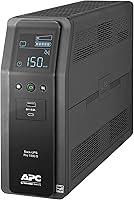
Best 1500VA Pure Sine Wave UPS Units to Buy
The CyberPower CP1500PFCLCD is the best 1500VA pure sine wave UPS for most homes, with a 1500VA/1000W rating and 12 outlets. Pick the APC BR1500MS2 if you want longer rated runtime and network line protection.
On this page (7 sections)
- What does 1500VA pure sine wave actually mean for your setup?
- Why pure sine wave matters for active PFC power supplies
- The best 1500VA pure sine wave UPS units compared
- Which 1500VA UPS fits your desk?
- How to set up and test a 1500VA sine wave UPS
- Common mistakes when buying a 1500VA UPS
- Which 1500VA pure sine wave UPS should you buy?
A 1500VA pure sine wave UPS gives you two things at once: enough capacity to ride out a short outage and clean output that modern power supplies can use. The CyberPower CP1500PFCLCD is the best pick for most homes, because its 1500VA/1000W rating and 12 outlets cover a full desk without splitting the load.
The sine wave part matters more than the VA number. An active PFC power supply draws current in sharp pulses, and a pure sine wave UPS feeds it a smooth curve it handles properly.
That is why the three units below are the ones worth shortlisting.
Our picks at a glance
-
1

-
2

-
3

What does 1500VA pure sine wave actually mean for your setup?
VA and watts are not the same number, and the watts figure is the one that matters. A 1500VA rating describes apparent power, while watts describe the real power your devices draw.
The gap between the two tells you how much capacity you can actually use.
The three units here show that gap clearly. The CyberPower CP1500PFCLCD is rated 1500VA/1000W.
The APC BR1500MS2 is 1500VA/900W. The smaller APC BR1350MS is 1350VA/810W.
A 1500VA label does not guarantee 1000W, so read both numbers before you commit.
Pure sine wave is the other half of the name. A pure sine wave unit outputs a smooth curve close to what the utility line delivers.
A simulated sine wave unit steps the output instead. For an active PFC supply, the stepped version can cause the supply to shut down or strain, so the smooth curve is the safer match.
The "1500VA" band also sits at a useful size for a home office. It is large enough for a desktop, a monitor and a router, yet small enough to fit under a desk.
That makes it a common pick for people moving up from a 600VA or 850VA unit.
Check the load before you choose. Add up the watt figures on the devices you want on battery: the PC, monitor, modem and router are the usual set.
If the total lands near 800W, the CyberPower's 1000W rating gives you the 20% headroom to aim for. If your total is closer to 600W, the smaller APC has room to spare.
For a broader look at matching capacity to your gear, read our guide on how to choose a UPS battery backup.
Rule: size against watts, not VA, and keep your battery load at least 20% under the rating.
Why pure sine wave matters for active PFC power supplies
A pure sine wave UPS is the safe match for any PC built in the last decade. Most modern desktop power supplies use active PFC, a design that corrects the way the supply draws current.
It expects a smooth input waveform, and a pure sine wave unit provides one.
The mismatch shows up when the UPS switches to battery. A simulated sine wave unit may cause the PFC supply to shut down or trip, even though the battery has charge.
The PC loses power at the moment the UPS was meant to protect it. Pure sine wave output avoids that failure mode.
The benefit goes beyond the PC. Network gear, NAS drives and home office electronics all run on supplies that prefer clean input.
A smooth curve keeps those devices running as designed during an outage. The CyberPower's description states its sine wave output serves both active PFC and conventional power supplies.
Pure sine wave also helps at the surge and brownout stage. All three units here include Automatic Voltage Regulation (AVR), which corrects low or high voltage without switching to battery.
AVR handles the small dips and spikes that happen daily. The sine wave output covers the moments when AVR cannot correct and the unit has to run on battery.
For a PC-specific comparison of sine wave models, see our roundup of the best pure sine wave UPS for a PC. If you run a 3D printer, the same logic applies: its motors and heated bed draw steady current, and a sine wave unit keeps the controller stable during a brief outage.
Our UPS for 3D printer guide covers the load math for that setup.
Rule: if your PC has an active PFC supply, buy pure sine wave and skip simulated sine wave units.
The best 1500VA pure sine wave UPS units compared
The CyberPower CP1500PFCLCD wins on output and outlets, while the APC BR1500MS2 wins on runtime and network protection. Both are strong 1500VA pure sine wave units; the choice comes down to what you need to keep running.
The smaller APC BR1350MS is the pick when your load is lighter.
The table below lines up the three units on the figures that decide the purchase. Our score weighs specs, features and buyer feedback against what a 1500VA pure sine wave shopper wants.
| Product | Best for | Capacity | Outlets | Battery outlets | Our score |
|---|---|---|---|---|---|
| CyberPower CP1500PFCLCD 1500VA Sine Wave UPS | overall | 1500VA/1000W | 12 total | 6 | 9.2 |
| APC Back-UPS Pro BR1500MS2 1500VA Sine Wave | network gear | 1500VA/900W | 10 total | 6 | 9.0 |
| APC Back-UPS Pro BR1350MS 1350VA Sine Wave | smaller loads | 1350VA/810W | 10 total | 6 | 8.4 |
The CyberPower earns the top score of 9.2 for its 1000W rating and 12 outlets. The APC BR1500MS2 scores 9.0: it gives up 100W of output but adds coax and Ethernet surge protection and a longer rated runtime at 100W.
The APC BR1350MS scores 8.4 as the smallest of the group, with 810W and a lower VA rating. Each unit gets its own section below.
CyberPower CP1500PFCLCD: the best overall 1500VA unit
The CyberPower CP1500PFCLCD is the best 1500VA pure sine wave UPS for most homes. Its 1000W output is the highest here, and its 12 outlets mean you don't need a second strip for the monitor, router and speakers.
CyberPower CP1500PFCLCD 1500VA Sine Wave UPS: Best overall
- 1500VA/1000W
- 12 outlets
- color LCD
The highest wattage here and the most outlets, with a tilting color screen for under-desk installs.
Pros
- 1000W output
- 12 outlets
- 3-year battery warranty
Cons
- No surge protection for coax or Ethernet data lines
The outlet count breaks into 6 battery backup and surge protected outlets and 6 surge only outlets. That split lets you keep the PC, monitor and network gear on battery while less critical devices sit on surge protection alone.
Two USB ports, one Type-A and one Type-C, charge a phone or tablet from the front of the unit.
The color LCD is the feature that stands out for under-desk installs. It shows battery and power conditions at a glance, and the screen tilts up to 22 degrees so you can read it when the unit sits low.
AVR corrects minor fluctuations without draining the battery.
CyberPower backs it with a 3-year warranty that includes the battery and a connected equipment guarantee. The 24.9 lb weight is worth planning for: it is the lightest unit here, but still a two-hand lift, so pick the spot before it arrives.
For more 1500VA options, see our 1500VA UPS roundup.
Rule: pick the CyberPower when you need 1000W and the most outlets in one box.
APC Back-UPS Pro BR1500MS2: the best for network gear
The APC BR1500MS2 is the best 1500VA pure sine wave UPS when your network gear needs protection. It has built-in coax and Ethernet surge ports, so the data lines get guarded alongside the power lines.
APC Back-UPS Pro BR1500MS2 1500VA Sine Wave: Best for network gear
- 1500VA/900W
- 10 outlets
- coax and Ethernet protection
Pure sine wave with built-in coax and Ethernet surge ports, so data lines get protection too.
Pros
- Network line protection
- up to 73 minutes at 100W
Cons
- 900W caps the load below the CyberPower
Its 1500VA/900W rating handles a demanding desk, and APC rates up to 73 minutes of runtime at a 100W load, the longest rated runtime of the three at that load. The 10 outlets split into 6 battery backup and 4 surge only, enough for a PC, monitor, router and NAS on battery with peripherals on surge.
The 900W ceiling is the honest limit. A high-draw gaming PC plus a monitor can approach it, so check your total before you buy.
The pure sine wave output suits active PFC supplies, and AVR corrects brownouts and spikes without switching to battery. Two front USB ports, Type-C and Type-A, charge devices without using a protected outlet.
APC makes the battery user-replaceable (APCRBC163, sold separately), so you can extend the unit's life without service. The 27.6 lb weight is the heaviest of the group.
Its 3-year warranty covers the unit. If your setup centers on network gear, this is the one to pick.
Rule: pick the APC BR1500MS2 when routers, a NAS or coax lines need surge protection too.
APC Back-UPS Pro BR1350MS: the best for smaller loads
The APC BR1350MS is the best 1500VA class unit for a desk that doesn't need a full 1000W. Its 1350VA/810W rating fits a lighter setup, and it keeps the sine wave output and network protection of its bigger sibling.
APC Back-UPS Pro BR1350MS 1350VA Sine Wave: Best for smaller loads
- 1350VA/810W
- 10 outlets
- replaceable battery
A slightly smaller sine wave unit for a desk setup that doesn't need a full 1000W.
Pros
- User-replaceable battery
- USB-C and USB-A ports
Cons
- 810W is the lowest output of the three
Its 10 outlets give you 6 battery backup and 4 surge only, plus coax and Ethernet surge ports. APC rates up to 54 minutes of runtime at a 100W load.
That is shorter than the BR1500MS2, which is the trade-off for the lower capacity. AVR corrects low and high voltage without draining the battery.
The real-time LCD shows remaining runtime and power load in watts, so you can see how close your gear sits to the ceiling. Two USB ports, one USB-C and one USB-A, charge phones and tablets.
The battery is user-replaceable (APCRBC161, sold separately), which keeps maintenance simple.
Pick it when your battery load is comfortably under 810W and you want the same sine wave and network features for less capacity. Skip it if you plan to add a second PC or a large monitor later, because the headroom won't be there.
At 25.7 lb it is heavier than the CyberPower but lighter than the BR1500MS2.
Rule: pick the BR1350MS when your load stays under about 650W and you want sine wave without the extra capacity.
Which 1500VA UPS fits your desk?
Match the unit to your total watt draw and your outlet count, then pick the feature you can't do without. The three units here overlap on sine wave output and AVR, so the deciding factors are capacity, outlets and network protection.
Start with the load. Add the watt figures for the PC, monitor, modem and router.
If the total is near 800W, the CyberPower's 1000W rating gives you the headroom the APCs lack. If the total sits around 600W, the BR1350MS covers it with room to spare.
Next, count outlets. A desktop, two monitors, a router, a modem and speakers already fill six battery outlets.
The CyberPower's 12 total outlets leave more room for peripherals without a strip. The APCs' 10 outlets split six and four the same way.
Then decide on network protection. If your router, modem or NAS sits on coax or Ethernet lines, the APC units' built-in surge ports are a real advantage.
The CyberPower covers power surges but leaves the data lines to separate protection. Consider the screen too: the CyberPower's color LCD tilts for under-desk viewing, while the APC units show runtime and load in real time on an angled display.
Either works; the tilt helps in a low spot.
Finally, think about battery replacement. Both APC units have user-replaceable batteries, so you swap the pack when it ages.
The CyberPower's warranty covers its battery for three years. For a wider set of 1500VA models beyond these three, our best 1500VA UPS units guide covers more options.
Rule: choose by watt headroom first, outlets second, and network ports only if your data lines need them.
How to set up and test a 1500VA sine wave UPS
Plug the UPS into a wall outlet, not a strip or another UPS, and let it charge before you trust it. A new unit ships with a partial charge, and the battery needs a full charge to deliver its rated runtime.
- Place the unit on a firm, level surface with the vents clear. The CyberPower measures 14 x 3.9 x 11 inches; the APC BR1500MS2 is 14.49 x 3.94 x 10.24 inches. Leave space around it for airflow.
- Plug the UPS directly into a grounded wall outlet. Avoid extension cords and surge strips, which can limit the current the unit draws.
- Let it charge. APC lists a 16-hour charge time for both its units. Plan to leave it plugged in overnight before a real test.
- Connect your critical gear to the battery backup outlets. Put the PC, monitor, modem and router there. Save the surge only outlets for printers, speakers and other devices that don't need battery power.
- Run a self-test if the unit offers one, then pull the wall plug briefly to confirm the battery outlets stay on. Watch the display for load and runtime.
- Install the management software if you want shutdown control. CyberPower includes PowerPanel software for download.
A laser printer is the device to keep off battery outlets. Its heating cycle draws a large surge and can overload a 1500VA unit.
Leave it on surge only or on a separate strip.
Test the runtime with your real load once everything is connected. The rated minutes at 100W are a benchmark, not a promise for a gaming PC.
A real load draws more, so the runtime will be shorter. Know how long your PC takes to save and shut down, and size the battery load so you have that much time.
Label the battery outlets so nobody plugs a space heater or vacuum into them. For the load math in more detail, revisit our UPS battery backup guide.
Rule: charge overnight, plug into the wall directly, and keep high-surge devices off the battery outlets.
Common mistakes when buying a 1500VA UPS
The most common mistake is buying by VA alone and ignoring the watt rating. A 1500VA label can mean 810W or 1000W, and the watt figure is what your devices draw.
Check watts before you compare features.
The second mistake is putting the wrong devices on battery. A laser printer, space heater or vacuum on a battery outlet will overload the unit and cut runtime for the gear that matters.
Keep those on surge only or off the UPS entirely.
The third is skipping sine wave for a modern PC. A simulated sine wave unit may not play well with an active PFC supply, and the PC can shut down when the UPS switches to battery.
Buy pure sine wave when your supply is active PFC, which covers most desktops built in the last decade.
The fourth is buying too little headroom. A 1500VA unit running near its watt ceiling delivers short runtime and runs hot.
Leave at least 20% headroom so the unit has room to carry the load.
The fifth is forgetting the data lines. If your router or NAS sits on coax or Ethernet, the APC units' surge ports matter.
The CyberPower protects power but not the data lines. Decide whether that matters for your setup.
Finally, don't expect a 1500VA unit to run a whole office. It is sized for a desk, not a room.
Match the unit to the gear you actually need on battery. Our pure sine wave UPS for PC guide covers the PC side in more depth.
Rule: read watts, leave headroom, keep surge heavy devices off battery, and buy sine wave for active PFC.
Which 1500VA pure sine wave UPS should you buy?
Buy the CyberPower CP1500PFCLCD for most desks, because its 1000W output and 12 outlets cover a full setup without a second strip. It is the best 1500VA pure sine wave UPS here for a home office that needs room to grow.
Pick the APC BR1500MS2 if your network gear needs protection. Its coax and Ethernet surge ports guard the data lines, and its 73 minutes at 100W is the longest rated runtime here.
The 900W ceiling is the limit to check against your load.
Pick the APC BR1350MS if your load stays under about 650W. It keeps the sine wave output, AVR and network ports in a smaller package.
The 810W rating is the lowest here, so leave it for lighter setups.
Whichever you choose, match the watt rating to your gear and keep a margin. A 1500VA pure sine wave UPS works best when it runs well below its ceiling.
For the wider field of 1500VA models, start with our best 1500VA UPS units guide. For a printer setup, see our UPS for 3D printer picks.
Rule: buy the CyberPower for capacity, the APC BR1500MS2 for network protection, and the BR1350MS for a lighter load.
Frequently asked questions
Is a pure sine wave UPS necessary for a modern PC?
Yes, for most modern desktop PCs. Active PFC power supplies draw current in short pulses that a simulated sine wave UPS may not handle cleanly.
A pure sine wave unit like the three here matches utility power and keeps the supply running as designed.
What is the difference between 1500VA and watts on a UPS?
VA rates the apparent power the unit can deliver, while watts rate the real power your devices actually use. A 1500VA unit here ranges from 810W to 1000W.
Size your load against the watt figure, because that is what your gear draws.
How long will a 1500VA UPS run a gaming PC?
It depends on the PC's draw. APC rates the BR1500MS2 at up to 73 minutes at a 100W load and the BR1350MS at up to 54 minutes at 100W.
A gaming PC under load pulls far more, so expect a few minutes to save and shut down.
Can I plug a laser printer into a 1500VA sine wave UPS?
Don't put a laser printer on battery backup outlets. Laser printers draw large surges when they heat up and can overload a 1500VA unit.
Leave the printer on a surge-only outlet or a separate strip, and keep battery outlets for your PC, monitor and network gear.
Do these UPS units work with a NAS or a home server?
Yes. All three deliver pure sine wave output and have battery outlets for always-on gear.
The APC BR1500MS2 adds coax and Ethernet surge ports for the data lines.
Match the total draw of the NAS and drives to the watt rating before you buy.
How often should I replace the UPS battery?
Expect three to five years from a lead acid battery in normal use. The APC BR1500MS2 and BR1350MS have user-replaceable batteries, so you swap the pack without service.
The CyberPower's three-year warranty covers its battery.