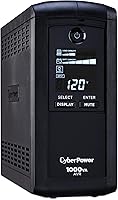
Best 600W UPS Uninterruptible Power Supplies
A 600W UPS uninterruptible power supply should cover your real load with headroom and deliver pure sine wave output for sensitive gear. The GOLDENMATE 1000VA/600W Lithium UPS is the best pick for most homes, because its lithium battery and eight backup outlets fit a whole desk or network corner.
On this page (7 sections)
A 600W UPS uninterruptible power supply keeps your electronics running through short blackouts and protects them from surges. The GOLDENMATE 1000VA/600W Lithium UPS is the best pick for most homes, because its lithium battery, eight backup outlets and pure sine wave output cover a full desk or network corner for years.
The 600W figure is the key limit. It is the most real power the unit can supply, and your connected gear has to fit under it with some room to spare.
The three models below all share that ceiling but differ in battery type, outlet count and how much runtime you get.
This guide explains how to size a 600W unit, what features matter, and which model suits which setup. If you want the broader picture first, our home uninterruptible power supply guide covers larger whole-home choices.
How much load can a 600W UPS uninterruptible power supply carry?
Keep your total connected load comfortably under 600W, ideally around 480W to leave headroom. A UPS works best when it is not running at its ceiling.
Add up the wattage on the labels of everything you want on battery. A typical desktop tower draws 150W to 350W, a monitor about 25W to 40W, a router 10W to 20W and a modem similar.
A gaming PC with a strong graphics card can pull 500W or more on its own.
That last case matters. A 600W unit paired with a 500W gaming rig leaves almost no margin for a monitor and network gear.
Check the actual draw with a plug-in power meter before you buy, because nameplate wattage on a power supply is the maximum, not the typical draw.
The comparison also runs the other way. The APC BR1000MS gives up to 42 minutes of runtime at a 100W load.
That same figure is what you should look for when you size your own list, because runtime shrinks quickly as load climbs. A light desk near 100W gets the long end of that window, while a heavier draw gets far less.
| Device | Typical draw | Fits a 600W UPS? |
|---|---|---|
| Wi-Fi router and modem | 20W to 40W combined | Yes, with lots of headroom |
| Desktop PC and monitor | 200W to 400W combined | Yes, comfortably |
| Gaming PC with a strong GPU | 400W to 550W | Yes, but little headroom |
| NAS with drives | 40W to 80W | Yes |
| Space heater or kettle | 1,000W to 1,500W | No |
Why headroom matters more than the exact total
A UPS that runs near its limit loses efficiency and heats up faster. It also has no spare capacity for a device that spikes briefly at startup, such as a printer or a NAS with several drives spinning up.
Plan for about 80 percent of the rated watts. That gives you roughly 480W of usable load on a 600W unit.
Anything above that and you should look at a larger model or move non-essential gear to the surge-only outlets.
The outlet split on these units matters here too. The BX1000M and the BR1000MS both put only part of their outlets on battery, so a device you park on a surge-only outlet draws from the wall in normal times and gets no runtime when the power fails.
That changes your real load on the battery side, not just the total.
Treat 600W as a hard ceiling, not a target. If your list comes close, buy more capacity rather than squeeze every device onto one unit.
What should you check before buying a 600W UPS?
Check four things first: the watt rating, the output waveform, the number of backup outlets and the battery type. These decide whether the unit fits your gear and how long it lasts.
The watt rating is the headline. A 1000VA rating sounds larger, but VA and watts are not the same, and a unit may be sold as 1000VA/600W.
Always compare on watts for the devices you will plug in.
Output waveform comes next. Pure sine wave output is the safe choice for modern computers with active PFC power supplies and for sensitive audio or network gear.
A stepped wave can work for simple loads but may cause buzzing or shutdowns on picky electronics.
Then count the backup outlets. Some units put every outlet on battery, while others split them into battery and surge-only groups.
Surge-only outlets protect against spikes but do not keep devices running in an outage.
Battery type changes the long-term cost
Lead-acid batteries are the traditional choice. They are cheap to replace but typically last a few years and need a swap sooner.
Lithium iron phosphate batteries cost more up front and last much longer.
The GOLDENMATE unit uses a LiFePO4 battery that the maker rates for over 10 years and more than 5000 charge cycles. The APC models use lead-acid batteries with user-replaceable packs sold separately.
The BX1000M lists a battery average life of 3 years, and its replacement pack is the APCRBC158.
If you dislike maintenance, lithium saves you the periodic battery swap. If you prefer a well-known brand and easy replacement, lead-acid is simple to service.
Either way, the replacement pack is sold separately on the APC units, so budget for it over the years.
Outlets and form factor
Check the outlet count against your gear list. A router, modem, PC, monitor, NAS and a phone charger already fill six spots.
The BR1000MS offers ten outlets in total but only six of them are on backup.
The BX1000M has eight outlets, four of them on backup. The GOLDENMATE model puts all eight outlets on battery and surge protection, which simplifies planning.
The BR1000MS lists NEMA 5-15R outlets, so ordinary US plugs fit without adapters, and the other two units use standard NEMA connectors. The BR1000MS also has USB Type A and USB Type C connectors for charging phones and tablets straight from the unit.
Form factor matters too: the APC units are towers, while the GOLDENMATE model is a compact unit listed at about 12.99 by 4.13 by 9.84 inches.
Decide your outlet count before you compare prices. Moving a device to a surge-only outlet mid-outage defeats the purpose.
Which 600W UPS is best for most homes?
The GOLDENMATE 1000VA/600W Lithium UPS is the best overall pick for most homes. It balances battery life, outlet count and pure sine wave output better than the two APC units here.
Its LiFePO4 battery is the standout feature. The maker rates it for over 10 years and more than 5000 charge cycles, with a total cost of ownership more than 40 percent lower than lead-acid.
That matters if the unit will sit in a corner running for years.
All eight outlets provide surge protection and battery backup, so you don't have to sort devices between groups. A color LCD shows battery and power conditions in real time, and an automatic safety mechanism stops charging or discharging if limits are exceeded.
That safety cut-off protects the system from overloading and overheating.
The cooling fan stays under 50 dB and only ramps up when the battery management system detects heavy use. Pure sine wave output keeps sensitive gear happy.
The compact plastic enclosure keeps the weight down compared with the metal towers, though the fan can be heard when the unit works hard.
Pick the GOLDENMATE for a set-and-forget unit with a long battery life and no outlet juggling. Check your outlet voltage first, because it supports 90–140V AC input for standard 110V household power.
The maker also asks you to use only the original or a fully compatible power cable and to keep the load within 600W. For more on waveform choices, read what AVR means on a UPS and how it relates to sine wave output.
Which 600W UPS suits office electronics?
The APC Back-UPS Pro BX1000M is the best fit for a home office where voltage sags are common. Its automatic voltage regulation corrects brownouts without draining the battery.
The BX1000M provides 1000VA/600W and over 42 minutes of runtime at a 100W load. That covers a computer, router and a couple of accessories through a typical short outage.
Its four battery backup outlets handle the essentials, while four surge-only outlets take peripherals. Built-in coaxial and Ethernet surge protection guards network gear, and the LCD shows battery charge, load and estimated runtime.
The unit also runs at a 60 Hz frequency range, which matches standard US mains power.
The AVR range is worth knowing in detail. The maker says it corrects low voltage from 88V upward and trims surges of about 13 percent, boosting or trimming to a stable 120V.
That means the UPS handles small sags and swells without switching to battery at all. The maker also lists active PFC compatibility for gaming PCs and 75,000 dollars equipment protection for connected devices.
APC rates the unit Energy Star certified for 92 percent or better efficiency. The battery is user-replaceable (APCRBC158, sold separately), so you can swap it without downtime.
It is a tower at about 15.9 pounds and 12.2 by 3.58 by 7.48 inches.
Choose the BX1000M for a small office with dirty power, where AVR does real work. If you need more backup outlets or pure sine wave for a high-end PC, look at the other two units.
Our standby vs line-interactive UPS comparison explains where AVR fits in the UPS family.
Which 600W UPS handles a bigger desk setup?
The APC Back-UPS Pro BR1000MS is best for a full workstation with many devices. Ten outlets and USB charging ports make it the roomiest option here.
Its 1000VA/600W rating matches the others, but the outlet count sets it apart. Six outlets sit on battery backup and four are surge-only, with coaxial and Ethernet surge protection built in.
Two USB ports (one USB-C and one USB-A) charge phones and tablets from the unit.
Pure sine wave output is active PFC compatible, so modern computer power supplies run cleanly. Automatic voltage regulation boosts low and trims high voltage without using the battery.
At a 100W load the maker claims up to 42 minutes of runtime.
The LCD shows remaining runtime, watt load and status, angled for reading from a seated position. The battery is user-replaceable and the replacement pack is sold separately.
It is a metal tower at 22.4 pounds and 14.5 by 3.9 by 10.2 inches, the bulkiest unit in this group, so it needs a solid spot.
The surge protection on this unit is thorough. Beyond the outlets, the coaxial and Ethernet ports guard your cable or antenna line and your network cable against spikes, which is useful when a storm takes out the power.
The 1,080-joule surge energy rating covers the outlet side.
Choose the BR1000MS when your desk has more than four things to protect and you want sine wave output plus USB charging in one box. It is the heaviest unit here, so plan shelf space.
If backup time matters more than outlet count, compare a portable power station against a UPS before deciding.
How do you set up a 600W UPS at home?
Set up a 600W UPS by plugging it into a wall outlet, charging it fully, then adding devices one at a time. A planned order keeps the load balanced and avoids overloading the unit.
Start by placing the unit on a firm, ventilated surface near the wall outlet. Avoid enclosed cabinets and high-temperature spots, and keep the vents clear.
The GOLDENMATE instructions warn against enclosed or hot areas for good reason.
Plug the UPS into a standard wall outlet and let it charge. The GOLDENMATE unit has a 6-hour charge time.
The APC BX1000M lists an 8-hour charge time. Use the unit only after it reaches a full charge so the battery is ready for the first outage.
Then connect your most important devices to the battery outlets first. Put the router and modem on early, then the PC and monitor.
Add peripherals to surge-only outlets where the model has them. On the APC units, keep a mental map of which outlets are on backup, since only some of them are.
Label each cord so you know what runs on battery. Keep the total under 600W and check the LCD load reading as you add devices.
The BR1000MS display shows watts directly, which makes this step easy. The GOLDENMATE color LCD gives the same kind of live battery and power readout.
What to check during the first week
Watch the load figure once everything is plugged in. If it sits close to 600W, move a non-essential device to a surge-only outlet or off the unit.
If the fan runs loudly and often, the load is heavy, and the GOLDENMATE fan note says it ramps up when the battery system detects hard use.
Check that the LCD status stays normal and that the unit is not warm to the touch in an unusual way. The GOLDENMATE safety notice says to stop use and contact the maker if you see swelling or hear unusual noise.
Test once with a real outage or the unit's self-test, then leave it alone. For the safety basics, follow the maker's instructions on load limits and cable use.
The GOLDENMATE notice says to use only the original or a fully compatible power cable and to keep the load within 600W.
Which 600W UPS should you buy?
Buy the GOLDENMATE 1000VA/600W Lithium UPS for most homes, the APC BX1000M for a small office with unstable voltage, and the APC BR1000MS for a crowded desk that needs ten outlets. Match the model to your outlet count and battery preference, then keep your load under 600W.
Here is the decision rule in plain terms. If you want a long-lived battery and every outlet on backup, pick the GOLDENMATE.
If brownouts are your main worry and four backup outlets are enough, pick the BX1000M. If your desk has many devices and you want sine wave plus USB charging, pick the BR1000MS.
The battery story separates the two APC units from the lithium model. Both APC units use lead-acid packs you replace yourself, which is easy but comes sooner.
The GOLDENMATE unit trades that for a lithium pack the maker rates at over a decade and thousands of cycles. Neither path is wrong; it depends on whether you value low upkeep or a familiar name.
All three share the 600W ceiling, so none will run a heater or a large motor. Size your device list first, then choose the unit that covers it with headroom.
For the wider category, browse our home UPS guide and the UPS vs portable power station comparison. Whichever model you choose, a 600W UPS uninterruptible power supply is enough for a normal desk or network setup, as long as you plan the load before you plug in.
Frequently asked questions
What does the 600W rating on a UPS mean?
600W is the most real power the UPS is designed to pass to connected devices on battery. Add up the wattage of everything you plan to plug into the backup outlets and keep the total below that figure, ideally with some headroom.
Can I run a space heater or fridge on a 600W UPS?
No. A 600W UPS is meant for electronics such as computers, routers and network gear.
Heaters, kettles, fridges and motors draw far more than 600W and will overload the unit.
How long will a 600W UPS run my computer?
Runtime depends on your actual load. The APC BR1000MS offers up to 42 minutes at a 100W load, so a light desk setup gets far more time than a gaming PC drawing several hundred watts.
Check the runtime figure at your own watt draw.
Why does sine wave output matter on a 600W UPS?
Pure sine wave output matches utility power closely and suits sensitive electronics and active PFC power supplies. A stepped or simulated wave can cause some power supplies to buzz or shut down, so sine wave is the safer choice for modern computers.
What input voltage does a 600W UPS accept?
Check the input range before buying. The GOLDENMATE unit supports 90–140V AC input for standard 110V household power, while the APC models run on 120V input.
A wider range helps where voltage sags often.
Do I need AVR in a 600W UPS?
AVR is worth having if your area sees brownouts or voltage swings. It boosts low voltage and trims high voltage without switching to battery, so the UPS saves its stored power for real outages.