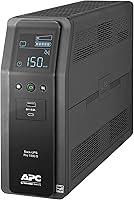
Best Home Uninterruptible Power Supply Units
The best home uninterruptible power supply for most households is a 1500VA sine wave unit. It covers a desktop, monitor, router and a couple of small devices, rides out short outages cleanly and corrects voltage swings without draining the battery.
On this page (7 sections)
- What does a home uninterruptible power supply actually do?
- How much power does your home setup really draw?
- Why does sine wave output matter for a home computer?
- Which home UPS fits your setup?
- How long will a home UPS last during an outage?
- What should you check before you plug it in?
- Which home UPS should you buy?
The best home uninterruptible power supply for most people is a 1500VA sine wave unit, because it covers a desktop, monitor and network gear while feeding modern power supplies cleanly. A UPS like that switches to battery in milliseconds and corrects small voltage swings without touching the battery.
That combination matters more at home than raw capacity. Most home outages last seconds to minutes, and the goal is to save work, keep a call connected and shut down in order.
This guide explains the numbers on the box, how they map to your gear and which of three units fits each kind of household. If you are deciding between a battery box and a bigger backup battery, our UPS vs portable power station comparison covers that choice first.
What does a home uninterruptible power supply actually do?
A home UPS does three jobs at once. It passes wall power through to your devices, switches to its internal battery when the power drops, and conditions the power in between.
The battery switch is the headline feature. A line-interactive unit moves to battery in a few milliseconds, fast enough that a desktop PC does not reboot and a router does not drop its connection.
The third job is automatic voltage regulation, usually shortened to AVR. When the wall voltage sags or spikes within a small band, AVR corrects it without draining the battery.
That keeps your gear steady through brownouts and extends battery life, since the battery is saved for real outages.
A UPS is not a generator and not a whole-home battery. It holds minutes of runtime for the load plugged into it.
That is enough for a clean shutdown or a short interruption, not for running a house through a long blackout.
Capacity is quoted in VA and watts. VA describes the apparent power the unit can deliver, watts describes the real power.
A 1500VA unit might be rated 900W or 1000W depending on its design, and the watt figure is the one that matters when you add up your devices.
Sine wave output is the other spec to check. Modern computers use active PFC power supplies that expect a smooth sine wave.
A pure sine wave UPS provides it, while a simulated or stepped sine unit can cause some supplies to buzz or refuse to run on battery.
Rule: buy a pure sine wave, line-interactive UPS rated in watts above your real load. Everything else is detail you can tune around that base.
How much power does your home setup really draw?
Add up the watts printed on each device you plan to plug into battery outlets. The total against the UPS watt rating decides whether it works, not the VA number alone.
A typical home office is lighter than people expect. A desktop tower might draw 200 to 400 watts under normal use, a monitor 20 to 40 watts, a router and modem together maybe 20 to 30 watts.
Add a laptop charger or a desk lamp and you are still well under 500 watts.
Gaming PCs and workstations push higher. A machine with a large graphics card can pull 600 watts or more at full load, which eats most of a 900W unit's headroom before you add a monitor.
Here is how to size it without guessing:
- Check the label or power supply rating on each device you want on battery.
- Add the watts together for everything that must stay on.
- Add about 20 percent headroom so the UPS is not running flat out.
- Compare that total with the watt rating of the units you are considering.
If your total lands near a unit's limit, step up or move a device to a surge-only outlet. A UPS that runs at its ceiling every day wears its battery faster and has less time to shut down cleanly.
Watts also set your runtime. A 1500VA unit carries a small load much longer than a heavy one.
APC cites up to 73 minutes at 100W for its BR1500MS2, which is a light load; a full desktop will see far less.
Rule: size by watts with headroom, then check runtime at your real load. If you expect to expand the setup, our 1500VA UPS roundup covers units at that size in more detail.
Why does sine wave output matter for a home computer?
Pure sine wave matters because most modern PCs need it to run safely on battery. Active PFC power supplies are built for the smooth waveform from the wall.
A simulated sine wave unit approximates that waveform with steps. Some PFC supplies tolerate it, others buzz, overheat or shut down when the UPS switches over.
The failure shows up exactly when you need the backup most.
All three units in this guide deliver pure sine wave output. That puts them ahead of cheap stepped-sine boxes for a desktop, a NAS or a home theater receiver.
You may not need sine wave for every load. A lamp, a fan or a basic phone charger does not care about waveform shape.
But a home UPS usually shares its battery outlets with the computer, so buying sine wave covers the whole setup without a second unit.
The same logic applies to how you connect things. Stacking surge protection on top of a UPS is a common mistake, and we explain the safe way in can you plug a surge protector into a UPS.
Rule: if a computer, NAS or AV receiver goes on battery, insist on pure sine wave. Save the stepped-sine units for simple motor and lighting loads.
Which home UPS fits your setup?
Three 1500VA units cover most home needs, and each suits a different buyer. The how to choose a UPS battery backup guide walks through the full checklist; here is the short version for each home.
Best for most homes: CyberPower CP1500PFCLCD
The CyberPower CP1500PFCLCD is the pick for a typical home office. It is a 1500VA/1000W line-interactive unit with pure sine wave output, so a desktop with an active PFC supply runs on battery without complaint.
It gives you 12 NEMA 5-15R outlets, split into 6 battery backup and surge protected plus 6 surge protected. That is enough to put the PC, monitor, router, modem and a couple of chargers on battery and keep the printer or speakers on surge-only outlets.
The multifunction color LCD shows battery and power status at a glance and tilts up to 22 degrees, which helps when the unit sits under a desk. Two USB charge ports, one Type-A and one Type-C, charge a phone or tablet directly, even during an outage.
Automatic voltage regulation handles brownouts and minor spikes without switching to battery. CyberPower backs it with a 3-year warranty that includes the battery and a 500,000 dollars connected equipment guarantee.
Pick it for a home office or a mixed desktop and network setup. The outlet split and the screen make it easy to see what is protected and what is not.
It leads this list on score for that reason.
Best for network gear: APC Back-UPS Pro BR1500MS2
The APC Back-UPS Pro BR1500MS2 suits a home where the network is the thing you cannot lose. It is a 1500VA/900W pure sine wave unit with 10 outlets, 6 of them battery backup.
Its standout feature for home use is built-in surge protection on coax and Ethernet data lines. If your cable or fiber service enters near the desk, those ports guard the modem and router from surges on the data cable as well as the power line.
The 6 battery outlets cover a PC, monitor, router and NAS, while 4 surge-only outlets take peripherals. Front USB ports, one Type-A and one Type-C, charge devices without using a protected outlet.
The battery is user-replaceable, which matters for a unit you plan to keep for years; APC lists the replacement as APCRBC163. AVR corrects high and low voltage without draining the battery, and APC covers it with a 3-year warranty.
Pick it when the router, modem and a NAS sit at the heart of your setup, or when data line surges are a real concern where you live. The lower watt rating than the CyberPower means a very heavy gaming PC should look elsewhere.
Best for long-term battery life: GOLDENMATE 1500VA/1200W Lithium UPS
The GOLDENMATE 1500VA/1200W is the pick if you want to install a UPS and leave the battery alone. It uses a LiFePO4 battery pack rated for more than 3,000 charge cycles and over 10 years of life, so it avoids the periodic lead-acid battery swap.
Its 1200W rating is the highest real-power figure in this group, and the eight outlets are spaced wider than usual so bulky adapters fit side by side. The built-in battery management system guards against overcharge and over-discharge.
It also has a communication port with a USB cable, so a Windows PC can shut itself down automatically when the battery runs low. Two front USB ports, Type-C and Type-A, charge small devices.
Two points to know before you buy. GOLDENMATE says it accepts 90 to 140V AC input for standard 110V household power, so check your outlet voltage first.
It also warns that generator power may not meet its input requirements, in which case the unit stays on battery and will not recharge.
Pick it for a home where battery replacement is a hassle, or where you want the highest watt rating and wider outlet spacing. Skip it if you plan to run the UPS from a generator.
How long will a home UPS last during an outage?
A home UPS gives you minutes, not hours. How many minutes depends on your load and the battery inside, and both change over time.
The math is simple in principle. A bigger battery and a lighter load stretch runtime.
A 1500VA unit running a router and modem might last well over an hour, while the same unit on a full gaming PC lasts only a few minutes.
Use that time to save and shut down cleanly. A UPS with a USB data port and shutdown software, like the GOLDENMATE's Windows shutdown feature or the CyberPower's PowerPanel software, can close your PC for you when the battery gets low.
Runtime shortens as the battery ages. Lead-acid batteries typically need replacing every few years under regular use; a lithium unit stretches that to many years.
This is the main long-term cost difference between the units here.
Check runtime at your real load before you buy, not the headline figure. A maker's longest quoted runtime usually assumes a light load like a router alone.
Our battery runtime and 1500VA guides go deeper on matching capacity to load.
Rule: plan for minutes of clean shutdown, and size the battery for how often you actually lose power. If outages are frequent or long, a UPS is the wrong tool and a portable power station or generator is the better buy.
What should you check before you plug it in?
Check the room, the outlet and the load before the UPS goes in. Placement and connection mistakes cause more UPS failures than outages do.
Start with the location. Put the unit on a hard, level surface with vents clear on all sides.
Avoid damp basements and unheated garages unless the maker approves those temperatures; the APC's listed operating range starts at 32°F, for example.
Check the outlet. A 1500VA unit draws a meaningful current when charging and running, so use a grounded wall outlet on its own circuit where possible.
Avoid sharing a circuit with a space heater or a microwave.
Plan the connections before you move gear. Put the devices that must stay on during an outage on battery outlets, and everything else on surge-only outlets.
Keep the display and the power button reachable.
Don't stack surge strips on the UPS. Plug devices straight in, and if you must extend a surge-only outlet, use a plain extension cord.
The reasoning is in our surge protector guide linked above.
Once it is running, test the battery. Most units have a self-test button or menu option.
Do that within the first week, then repeat it every few months, and note when the battery was installed so you know when replacement is near.
Rule: treat the UPS as a piece of furniture with a power job. Give it space, a dedicated outlet and a clear load plan, then test it on a schedule.
Which home UPS should you buy?
Buy the CyberPower CP1500PFCLCD if you want one unit for a home office, with 12 outlets, a readable color screen and 1000W of headroom. It is the best home uninterruptible power supply for most readers, and the score reflects that.
Buy the APC Back-UPS Pro BR1500MS2 if your network is the priority and you want coax and Ethernet surge protection built in. Buy the GOLDENMATE 1500VA/1200W if you would rather not replace a battery for years and want the highest watt rating here.
Skip all three if your outages routinely last hours. A UPS is a bridge to a clean shutdown, not a power source for a long blackout.
For that, read our UPS vs portable power station comparison and size a larger battery or generator instead.
Whatever you pick, size by watts first, insist on pure sine wave for computers, and test the battery before you rely on it. That order keeps the best home uninterruptible power supply choice simple.
CyberPower CP1500PFCLCD 1500VA Sine Wave UPS: Best for most homes

APC Back-UPS Pro BR1500MS2 1500VA Sine Wave: Best for network gear

GOLDENMATE 1500VA/1200W Lithium UPS: Best for long-term battery life

Frequently asked questions
What size uninterruptible power supply do I need for a home office?
Start with a 1500VA unit for a desktop PC, monitor and router. Add up the watts printed on each device's label and leave headroom; a 1500VA unit rated around 900 to 1000 watts handles a typical single-PC setup with room to spare.
Is a pure sine wave UPS worth it for a home computer?
Yes for modern PCs with active PFC power supplies. A pure sine wave unit feeds the power supply the same clean waveform the wall gives it, while a simulated sine unit can stress some PFC supplies or make them shut down during a switchover.
How long will a UPS run a desktop PC during an outage?
Expect minutes, not hours. A 1500VA unit gives you enough time to save work and shut down cleanly, and APC cites up to 73 minutes at a light 100W load for its BR1500MS2.
Can I plug a surge protector or power strip into a UPS?
Don't plug a surge-protecting strip into a UPS battery outlet. Stacking two surge devices can interfere with each other and void protections; plug devices straight into the UPS, and use only plain extension cords where you must extend a surge-only outlet.
Where should I put a UPS in my house?
Put it on a hard, level floor or shelf with the vents clear and the outlets reachable. Keep it out of damp basements and unheated garages unless the maker approves those temperatures, and leave room to read the display and swap the battery later.
Do I need a UPS for my router and modem as well as my PC?
It helps. Plugging the router and modem into battery outlets keeps your connection alive when the PC is on battery, so a short outage doesn't drop a call or an upload mid-way.