Best UPS for a Computer and Printer: How to Choose
For most computer and printer setups, a 1000VA to 1500VA pure sine wave UPS is the right size. Pick a 1500VA line-interactive model for a desktop plus a laser printer, or a smaller lithium unit when the printer draws little power and you want long battery life.
On this page (10 sections)
- How much UPS power does a computer and printer need?
- Why pure sine wave matters for your computer and printer
- CyberPower CP1500PFCLCD: best UPS for most computer and printer setups
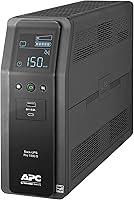
- APC Back-UPS Pro BR1500MS2: best for network gear and a full workstation
- GOLDENMATE 1000VA/800W: best for light loads and long battery life
- Which UPS fits your printer type?
- How many outlets do you need for a computer and printer?
- How long will the battery last during an outage?
- Is a UPS worth it for a home computer and printer?
- The verdict: pick the right UPS for your setup
The best UPS for a computer and printer is a 1500VA line-interactive unit with pure sine wave output, because it covers a desktop, monitor and printer while feeding clean power to active PFC supplies. A smaller 1000VA lithium model works when your printer draws little power and you want a longer battery lifespan.
Match the UPS to what you plug in, not to the biggest number on the shelf. A tower, monitor, router and printer add up fast, and a unit that runs near its limit gives you only minutes of backup.
Our top pick is the CyberPower CP1500PFCLCD. The APC Back-UPS Pro BR1500MS2 is the runner-up for network gear, and the GOLDENMATE 1000VA is the light-load choice when you want lithium endurance.
Below we explain how to size a UPS for a computer and printer, then how each model fits.
How much UPS power does a computer and printer need?
Add up the wattage of everything you want on battery, then choose a UPS rated about 30 to 40 percent above that total. A typical desktop draws 200 to 400W, a monitor adds 25 to 60W, a router adds 10 to 20W and an inkjet printer adds 20 to 50W while printing.
A laser printer is the exception. Its fuser pulls a large surge when it wakes and heats, often several hundred watts for a short burst.
A UPS rated for the printer's steady draw alone can trip when that surge hits.
The watt figure matters more than the VA figure. A 1500VA unit rated at 900W or 1000W is the useful number to compare.
Leave headroom for startup, since computers and printers both draw more at power-on than at idle.
Size to the watt rating, not the VA label, and add the printer's surge to your total before you buy.
Watts vs VA on a UPS label
A UPS label lists two numbers, and they rarely match. The VA figure is the total apparent power, while the watt figure is the real power the unit can deliver.
Power factor is the gap between them. A 1500VA unit with a 0.6 power factor delivers about 900W, and a 1500VA unit with a 0.67 power factor delivers about 1000W.
The higher the power factor, the more real load the same VA rating supports.
The CyberPower CP1500PFCLCD is rated at 1500VA and 1000W. The APC Back-UPS Pro BR1500MS2 is rated at 1500VA and 900W.
Both are honest about their real output, so compare the watt figure first.
Why pure sine wave matters for your computer and printer
Pure sine wave matters because modern computer power supplies use active PFC, and those supplies expect a smooth sine wave from the wall. A simulated sine wave UPS can cause an active PFC supply to shut down or work harder than it should.
A pure sine wave unit switches to battery and delivers output close to what your utility line provides. Your computer sees a normal supply, and its power supply runs as designed.
Printers are less picky, but a laser printer's motor and heater still behave better on a clean wave.
If your desktop, monitor or laptop charger is recent, assume it has an active PFC supply. That makes a pure sine wave UPS the safe default for a computer and printer setup.
Choose pure sine wave for any modern desktop, and skip simulated sine wave units unless the load is small and the equipment is old.
When simulated sine wave is enough
A simulated sine wave UPS can still suit small loads. A router, a modem or an inkjet printer with an external adapter usually runs without trouble on one.
The risk rises with wattage. A 600W gaming tower on a simulated sine wave unit is the classic case that fails when the battery takes over.
The supply sees the stepped wave and either shuts down or stresses its components.
If your budget is tight, put the pure sine wave unit on the computer and leave the printer on a surge-only outlet. That gives the sensitive load the clean power and the printer basic protection.
Our computer UPS backup guide compares more pure sine wave models if you want to weigh this trade-off across brands.
CyberPower CP1500PFCLCD: best UPS for most computer and printer setups
The CyberPower CP1500PFCLCD is the best overall pick for a home office with a desktop and a printer. It pairs a 1500VA/1000W pure sine wave output with 12 outlets, so the whole setup fits on one unit.
Six outlets run on battery and surge protection, and six more give surge protection only. You can put the tower, monitor, router and printer on the battery side and the speakers, lamp and phone charger on the surge side.
The color LCD shows load and battery status at a glance, and it tilts up to 22 degrees so you can read it when the unit sits under a desk. Automatic Voltage Regulation corrects small brownouts without draining the battery.
A 3-year warranty covers the batteries too, and CyberPower backs it with a connected equipment guarantee. Two USB ports, one Type-A and one Type-C, charge a phone even during an outage.
Pick this one when a desktop and printer share one desk, or when you want room to add a NAS later. Its 1000W rating leaves headroom for a mid-range tower plus peripherals.
The main trade-off is weight, at 24.9 lb, so you will want help lifting it into place. Our guide to choosing a UPS battery backup walks through matching this size to your load.
Who the CyberPower suits
This is the pick for a family or home office where one UPS covers several devices. The 12 outlets and 1000W rating mean you can protect the computer, monitor, router and printer without a second unit.
It also suits anyone who wants to see status without opening an app. The tilting color screen makes sense when the UPS sits low or in a cabinet.
Skip it if you only need backup for a laptop and a router, since a smaller, lighter unit covers that load for less money.
APC Back-UPS Pro BR1500MS2: best for network gear and a full workstation
The APC Back-UPS Pro BR1500MS2 is the best pick when your computer and printer share a desk with a router and NAS. It delivers 1500VA/900W of pure sine wave power and adds network line protection for your data cables.
Six outlets give battery backup for the tower, monitor, router and NAS, while four surge-only outlets handle peripherals. Built-in coax and Ethernet ports protect the data lines that feed your network, which a plain power strip cannot do.
APC rates runtime at up to 73 minutes at 100W.
The battery is user-replaceable, so you can refresh the unit after several years instead of buying a new UPS. Two front USB ports, Type-A and Type-C, charge devices without using a protected outlet.
Choose this one when your network lives beside your computer, or when replaceable batteries matter to you. The 900W rating still covers a strong desktop plus monitor and router.
The lower watt rating than the CyberPower is the real trade-off, so if your tower runs near 800W under load, the CyberPower leaves more headroom.
Who the APC suits
This model fits a home office that runs a gaming PC or workstation alongside a router and external drives. The data line protection is the feature that sets it apart for that crowd.
It also suits buyers who plan to keep the UPS for years. Replacing the battery costs less than replacing the whole unit.
Pass on it if your printer is a laser model that pulls a heavy surge and your total load already sits near 900W.
GOLDENMATE 1000VA/800W: best for light loads and long battery life
The GOLDENMATE 1000VA/800W is the best pick when your computer and printer draw modest power and you want a battery that lasts. Its LiFePO4 pack is rated for more than 5000 charge cycles and a lifespan over 10 years.
Eight outlets combine surge protection and battery backup, and the pure sine wave output keeps active PFC supplies happy. A color LCD shows battery and power conditions in real time.
The lithium battery changes the long-term math, since you avoid the periodic lead-acid replacement that a traditional UPS needs.
The cooling fan stays under 50 dB in normal use and ramps up when the battery works hard. A buzzer mute function lets you silence the outage alarm with one press of the switch.
Pick this one for a small desktop, monitor and inkjet printer, or for a laptop dock and network gear. Its 800W rating covers light loads well.
The lower watt rating is the trade-off, since a high-end gaming tower or a laser printer with a heavy surge needs the headroom of a 1000W unit like the CyberPower.
Who the GOLDENMATE suits
This is the pick for buyers who dislike replacing batteries every few years. The LiFePO4 pack should outlast several lead-acid units, which matters if the UPS sits in a spot that is hard to reach.
It also suits a light home setup, such as a mini PC or laptop dock plus a monitor and inkjet printer. Skip it if your total load pushes past 800W or if your printer is a laser model with a big startup surge.
Also confirm your outlet voltage, since GOLDENMATE supports 90 to 140V AC input.
Which UPS fits your printer type?
Your printer type decides how much headroom you need. An inkjet printer adds only a small load, so it fits on any of the three picks.
A laser printer draws a short, heavy surge when its fuser heats, so it needs a UPS with watt headroom.
Check the printer's rated wattage, then add its surge to your computer's load. A small inkjet rated at 20 to 50W fits easily beside a 300W desktop on the GOLDENMATE.
A laser printer rated at 400 to 600W while printing needs more. Put it on the CyberPower's 1000W output and keep the rest of the load modest, or leave the printer on a surge-only outlet and let the battery side carry only the computer.
Runtime also changes with the printer. A printing job on battery drains the UPS faster than a desktop sitting idle.
Plan the UPS around saving work and shutting down, not around finishing a print job.
Match the UPS to the printer's surge, and keep the computer on battery even when the printer sits on surge-only protection.
Inkjet vs laser printer loads
An inkjet printer usually has a small power brick or a modest internal supply. Its draw while printing stays low, and its startup surge is short.
A laser printer is different. The fuser is a heater that pulls several hundred watts for a few seconds each time the printer wakes or starts a job.
That burst can trip a UPS that looked big enough on paper. If you print often on a laser model, size the UPS for the printer's surge plus the computer's steady load.
If you print rarely, a surge-only outlet plus a strong computer backup is the practical setup.
Our UPS guide for a 3D printer covers a similar load pattern, since those machines also draw steady power and spike on heat-up.
How many outlets do you need for a computer and printer?
Count every device you want protected, then add two spare outlets for future additions. A typical setup needs the tower, monitor, router, modem and printer on battery, which is 5 outlets before spares.
The CyberPower's 12 outlets give you 6 battery-backed and 6 surge-only, so the whole desk fits. The APC gives 6 battery and 4 surge-only outlets plus network ports.
The GOLDENMATE has 8 outlets with surge and battery backup combined.
Keep the battery-backed outlets for devices that need to keep running or shut down cleanly. Put speakers, a desk lamp and a phone charger on surge-only outlets so they do not eat into runtime.
Avoid daisy-chaining power strips off a UPS, since plugging a strip into one battery outlet loads that circuit and can exceed the outlet's rating.
Leave at least two outlets free, and keep the battery side for the devices that matter during an outage.
How long will the battery last during an outage?
Runtime depends on the total load and the battery size. At 100W the APC is rated for up to 73 minutes, and heavier loads cut that time quickly.
A desktop plus monitor plus printer can draw 400 to 500W, so expect minutes rather than an hour at that load.
Plan the UPS around a clean shutdown. A modern desktop saves work and shuts down in under a minute, so even a short runtime is enough if the software is set up.
Check whether the UPS offers management software, since CyberPower includes PowerPanel, which can trigger an automatic shutdown when the battery runs low. That matters more than a long runtime number.
The lithium pack in the GOLDENMATE is rated for a lifespan of over 10 years and more than 5000 charge cycles, so it avoids the periodic battery replacement a lead-acid UPS needs. That is the real advantage of lithium for a UPS that sits in a home office.
Size the runtime for a shutdown, not for hours of work, and use the management software to make it automatic.
Is a UPS worth it for a home computer and printer?
Yes, a UPS is worth it when outages or brownouts interrupt your work or risk a file. It gives you time to save and shut down cleanly, and it filters small voltage swings that shorten electronics life.
The math is simple. A lost document or a corrupted drive costs more than the UPS.
A brownout that resets your desktop mid-session costs time every time it happens. A UPS also helps in places with frequent voltage swings, since Automatic Voltage Regulation corrects small dips without switching to battery and keeps your computer on steady power.
Skip the UPS if your power is stable and your work saves constantly to the cloud. Even then, a small unit on the router keeps your network up during short outages.
Our guide to whether a UPS is worth it weighs the cost against the risk for a home setup.
The verdict: pick the right UPS for your setup
Pick the CyberPower CP1500PFCLCD if a desktop and printer share a desk and you want the most real power and outlets for the money. Its 1000W output covers a mid-range tower plus a printer and leaves headroom for a NAS later.
Pick the APC Back-UPS Pro BR1500MS2 if your network gear lives beside the computer and you want replaceable batteries and data line protection. Pick the GOLDENMATE 1000VA/800W if your load is light and you want a lithium battery that should outlast lead-acid.
For a laser printer, favor the 1000W CyberPower or keep the printer on a surge-only outlet. For an inkjet, any of the three works, so choose on outlets and battery type instead.
Size the UPS by adding the watt ratings, leaving 30 to 40 percent headroom and choosing pure sine wave for active PFC supplies. Do that and the unit will carry your setup through short outages without stress.
Frequently asked questions
Can I plug a laser printer into a UPS?
Only into a UPS whose watt rating covers the printer's peak draw. Laser printers pull high surge current when the fuser heats, so check the watt figure and keep the printer on a battery-backed outlet only if the UPS can handle that load.
How long will a UPS run a computer and printer?
Runtime depends on the total load and the battery inside. A 1500VA unit gives short outages real coverage at typical desktop wattages, but adding a printer shortens that time, so plan the UPS around save-and-shut-down, not long printing sessions.
Do I need a pure sine wave UPS for my computer?
Yes, for any modern desktop or laptop charger with an active PFC power supply. A pure sine wave output matches utility power and keeps the supply running as designed, while a simulated sine wave can cause shutdowns or added stress.
How many outlets should a computer and printer UPS have?
Look for at least 6 battery-backed outlets so the tower, monitor, router and printer have room, plus a few surge-only outlets for speakers or a lamp. Extra outlets cost little and spare you daisy-chaining power strips.
What size UPS do I need for a 600W computer?
Choose a UPS rated at least 900W to 1000W so the computer runs at about 60 to 70 percent of capacity. That headroom leaves room for a monitor and router and keeps the unit from running hot during an outage.