Best Computer UPS Battery Backups: How to Choose
Match the UPS to your PC's real watt draw first, then pick sine wave output for any modern power supply. A 600VA unit covers a basic desktop plus router; a 1000 to 1500VA sine wave model covers a gaming PC or workstation.
On this page (9 sections)
- How much UPS capacity does your computer actually need?
- Why does sine wave output matter for a modern PC?
- How long will the battery actually last during an outage?
- Which UPS fits a basic desktop versus a gaming PC?
- CyberPower CP1500PFCLCD 1500VA: best for high-draw gaming PCs
- APC Back-UPS Pro BR1000MS 1000VA: best for a mid-range gaming or office PC
- APC Back-UPS BE600M1 600VA: best for a basic desktop and router
- How many outlets and what features should you look for?
- Which UPS should you buy?
The best computer UPS backup is one rated above your PC's real watt draw with pure sine wave output. Start with the watt rating, not the VA number on the box.
A 600VA unit covers a basic desktop and router; a 1000 to 1500VA sine wave model covers a gaming PC or workstation.
Most buyers overshop VA and undershop sine wave. A modern active PFC power supply can refuse stepped output, so the waveform matters as much as capacity.
This guide walks through load, runtime, outlets and battery type so you can size a UPS in a few minutes.
How much UPS capacity does your computer actually need?
Size the UPS by watt draw under load, because VA and watts are not the same number. A UPS rated 1500VA may deliver only 1000W, and that watt figure is the one your PC cares about.
Every UPS carries both ratings. VA (volt-amps) describes apparent power; watts describe real power the unit can supply.
Power supplies with active PFC pull power differently, so the watt rating is the safer ceiling.
The three units in this guide show the gap clearly. The CyberPower CP1500PFCLCD is rated 1500VA but delivers 1000W.
The APC BR1000MS is rated 1000VA and delivers 600W. The APC BE600M1 is rated 600VA and delivers 330W.
In each case the watt number is roughly two-thirds of the VA number.
Add up what you plan to plug into battery outlets. A typical desktop tower draws 200 to 400W at load, a gaming PC with a strong graphics card can pull 500 to 700W, and a monitor adds roughly 20 to 40W.
A router and modem together draw little, often under 30W.
Then leave headroom. A UPS running near its watt limit gives short runtime and runs hotter.
Aim for a UPS whose watt rating sits comfortably above your combined load, roughly 20 to 30 percent above for steady use. A 330W unit, for example, leaves little room once a mid tower and monitor are counted.
If you only need to ride out short blips and shut down cleanly, a smaller unit works. If you want to keep working through an outage, buy the larger watt rating and accept the extra cost and weight.
Check the supply in your PC first; a 750W unit tells you which class you belong in.
Rule: match the UPS watt rating to your PC's load plus 20 percent, and never size by VA alone.
Why does sine wave output matter for a modern PC?
Pure sine wave output is the right choice for any desktop built in the last decade, because active PFC power supplies expect a smooth wave. Stepped or simulated sine wave output can cause those supplies to buzz, trip or shut down when the UPS takes over.
Active PFC (power factor correction) is standard in modern ATX supplies. It draws current in short pulses rather than a smooth draw, and it depends on a clean sine wave to regulate properly.
A stepped approximation can confuse the supply's controller.
The practical symptom is a PC that reboots the moment the power fails, even though the UPS has charge. Some supplies handle stepped output fine; many do not.
Since you cannot easily predict which, sine wave removes the risk. That risk grows as supply wattage rises, which is why high-draw gaming builds are the least forgiving.
Sine wave also suits networking gear, NAS boxes and anything with a motor or sensitive electronics. It costs more than a stepped-output unit of the same capacity, and the gap is worth paying for on a computer.
The output also runs cooler in the connected supply, which is the argument APC makes for its sine wave line.
Both the CyberPower CP1500PFCLCD and the APC BR1000MS deliver pure sine wave output. The smaller APC BE600M1 is a stepped-output unit, so it fits basic gear rather than a high-draw active PFC tower.
Match the waveform to the supply, not to the size of the box.
Rule: buy sine wave for any active PFC desktop; reserve stepped output for routers, modems and simple accessories.
How long will the battery actually last during an outage?
Runtime depends on load and battery capacity together, so the same UPS gives very different minutes to a router and a gaming PC. Treat published runtime figures as light-load guidance.
APC rates the BR1000MS at up to 42 minutes at a 100W load. At 500W, that same battery would last far less, though the exact figure depends on the load curve.
The BE600M1 is rated at 23 minutes at 100W.
For a desktop, plan for enough time to save open files and shut down cleanly. Five to ten minutes at your real load is usually plenty.
If you want to keep working through an outage, you need a much larger unit or a lithium model. The CyberPower's larger 1000W ceiling is what buys that extra breathing room at high draw.
Runtime also fades as batteries age. A lead acid pack loses capacity over time, so the minutes you get on day one are the best you will see.
Our guide to what a UPS battery is and how it works explains the chemistry behind that fade. The CyberPower's 3-year warranty covers the batteries themselves, which softens the replacement cost.
Check the watt load you expect before trusting a runtime number. A 1500VA unit rated for long light-load runtime will not carry a 700W gaming PC for the same minutes.
Plan the shutdown routine around the load you actually run, not the marketing figure.
Rule: size runtime for your real load and buy for a clean shutdown, not hours of work.
Which UPS fits a basic desktop versus a gaming PC?
A 600VA unit suits a basic desktop and network gear, while a 1000 to 1500VA sine wave model fits a gaming PC or workstation. The split comes down to watt draw and waveform needs.
Basic desktops, office PCs and home network stacks draw modest power and often use conventional supplies. A 600VA/330W unit like the APC BE600M1 covers a computer, monitor and router with room for a safe shutdown.
Its 5 battery outlets are enough for that stack plus one spare device.
Gaming PCs and workstations pull more watts and almost always use active PFC supplies. They need sine wave output and a higher watt ceiling.
The 1500VA CyberPower delivers 1000W of sine wave power; the 1000VA APC BR1000MS delivers 600W. Between them, the CyberPower is the safer bet for a 750W or larger supply.
Count outlets too. A gaming setup often needs battery backup for the tower, monitor, speakers and network gear.
Surge-only outlets handle printers and lamps without draining the battery. The CyberPower gives 6 battery and 6 surge outlets; the BR1000MS gives 6 battery and 4 surge; the BE600M1 gives 5 battery and 2 surge.
If your PC's supply is rated 750W or higher, lean toward the 1500VA class. A 1000VA unit may still work if your actual draw stays low, but the headroom shrinks.
Rule: 600VA for a basic desktop, 1000VA for a mid gaming build, 1500VA when your supply is 750W or higher.
CyberPower CP1500PFCLCD 1500VA: best for high-draw gaming PCs
The CyberPower CP1500PFCLCD is the pick for a gaming PC or workstation with a large power supply. Its 1500VA/1000W rating and pure sine wave output handle active PFC supplies that smaller units struggle with.
It gives you 12 NEMA 5-15R outlets in total, split into 6 battery backup and 6 surge-only. That is enough to protect a tower, monitor, speakers, router and modem on battery while leaving peripherals on surge protection.
The input is a NEMA 5-15P right angle plug with a 45 degree offset and a 5 foot cord, which helps when the wall outlet sits behind a desk.
The color LCD shows battery and power status at a glance, and the screen tilts up to 22 degrees so you can read it when the unit sits low. Automatic Voltage Regulation corrects minor sags and swells without switching to battery, which saves runtime.
The display is meant to flag problems before they affect your gear, not just report them after.
Two USB ports, one Type-A and one Type-C, charge phones and tablets even during an outage. CyberPower backs it with a 3-year warranty that includes the battery, plus a 500,000 dollars connected equipment guarantee.
PowerPanel management software is a free download for monitoring.
It weighs 24.9 pounds and measures 14 by 3.9 by 11 inches, so plan shelf or floor space. This is a large unit for a large job.
Rule: pick the CP1500PFCLCD when your PC supply is 750W or higher and you want sine wave headroom.
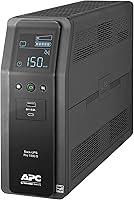
APC Back-UPS Pro BR1000MS 1000VA: best for a mid-range gaming or office PC
The APC BR1000MS is the best fit for a mid-range gaming build or a home office with several devices. It delivers 1000VA/600W of pure sine wave power and adds network surge protection.
Ten outlets split into 6 battery backup and 4 surge-only, so you can keep the essentials running and park the rest. Built-in coaxial and Ethernet surge protection guards your router and modem lines, not just the power cord.
The 1,080-joule surge rating covers the power side of that protection.
APC rates it at up to 42 minutes at a 100W load. That covers light gear for a long stretch and gives a mid gaming PC enough time to shut down.
AVR corrects low and high voltage without draining the battery. The unit runs at 50/60 Hz and takes standard 120V input.
The LCD shows remaining runtime, load in watts and system status, angled for viewing from a seated position. Two USB ports, one USB-C and one USB-A, charge phones and tablets.
The battery is user-replaceable, so you can extend the unit's life with a replacement cartridge instead of a new UPS. The metal enclosure adds durability.
It weighs 22.4 pounds. The 600W ceiling means a 750W supply running near peak may exceed what it can carry on battery, so check your real draw first.
Rule: choose the BR1000MS when your load stays under about 500W and you want network line protection.
APC Back-UPS BE600M1 600VA: best for a basic desktop and router
The APC BE600M1 is the best pick for a basic desktop, router and modem that only needs short battery rides. It is compact, light and simple to set up.
It has 7 NEMA 5-15R outlets: 5 with full battery backup and surge protection, plus 2 surge-only. Five well-spaced battery outlets cover a tower, monitor, router, modem and one more device.
Runtime is rated at 23 minutes at a 100W load, which is plenty to save work and shut down. A 490-joule surge rating shields connected gear from spikes.
The built-in 1.5A USB port works during outages for phone charging. LED status indicators and audible alarms tell you when the unit is on battery or when utility power returns.
It weighs 7.5 pounds and has a compact form that can sit on the floor or mount on a wall. The battery is user-replaceable, so aging does not mean replacing the whole unit.
Charging from empty takes about 10 hours.
This is a stepped-output unit, so it suits conventional supplies and light gear. A high-draw active PFC tower belongs on a sine wave model instead.
Rule: buy the BE600M1 for a modest desktop and network stack where clean shutdown is the goal.
How many outlets and what features should you look for?
Count battery-backed outlets first, then check for AVR, USB charging and user-replaceable batteries. The features that matter most are the ones that keep your PC safe and make the unit last.
Battery outlets run on the battery during an outage; surge-only outlets only protect against spikes. Plan which devices need battery time: the tower, monitor, router and modem usually do.
Printers and lamps can go on surge-only. A laser printer draws too much to sit on a battery outlet, and a heater belongs nowhere near one.
Automatic Voltage Regulation matters in areas with frequent sags and swells. AVR corrects the voltage without switching to battery, so your runtime stays available for real outages.
All three units here include AVR.
USB charging ports are a convenience during an outage. The CyberPower and APC BR1000MS both offer Type-A and Type-C, while the BE600M1 has a single 1.5A USB-A port.
Which add-on features are worth the money?
Three features earn their keep on a computer UPS. First, a user-replaceable battery lets you keep the same unit through more than one battery pack.
Look for a named replacement cartridge so you know what to buy later; the APC models name theirs.
Second, management software and a status display help you see load and battery health before an outage tests them. The CyberPower includes PowerPanel as a free download and a tilting color LCD; the BR1000MS shows runtime, watts and status on an angled LCD.
Third, line surge protection for network gear. The BR1000MS adds coaxial and Ethernet surge ports, which matter if your router and modem sit next to the UPS.
The CyberPower and BE600M1 protect the power side only. A tilting or angled display helps when the UPS sits under a desk, though it is not essential.
Rule: prioritize battery outlet count, AVR and a replaceable battery over extra ports and screens.
Which UPS should you buy?
For most desktop owners, the CyberPower CP1500PFCLCD is the best computer UPS backup because its 1500VA/1000W sine wave rating covers a high-draw PC and leaves headroom. Choose the APC BR1000MS when your load stays lower and you want network line protection.
Pick the APC BE600M1 for a basic desktop and router that only need a safe shutdown.
If you want longer runtime without a bigger box, read our guide to the best lithium UPS battery backups. Lithium packs typically deliver more minutes per pound than lead acid and last longer.
Before you buy, run our step-by-step UPS battery backup guide to confirm watt draw, outlet count and runtime. And if you are still unsure what the unit does, start with what a UPS battery is.
The short version: size by watts, insist on sine wave for modern PCs, and buy a replaceable battery so the best computer UPS backup stays useful for years.
Frequently asked questions
What size UPS do I need for a desktop computer?
Start with the watt rating your PC draws under load, then choose a UPS rated comfortably above it. A basic desktop and monitor fit a 600VA unit, while a gaming PC or workstation with a high-wattage supply needs 1000VA or more.
Do I need a pure sine wave UPS for a computer?
Yes for most modern PCs. Active PFC power supplies are common in current desktops and can shut down or buzz on stepped or simulated sine wave output.
A pure sine wave UPS matches utility power and keeps those supplies running cleanly.
How long will a UPS keep my computer running?
Runtime depends on load and battery capacity. APC rates the BR1000MS at up to 42 minutes at a 100W load and the BE600M1 at 23 minutes at 100W.
A heavier gaming load drains the battery much faster, so treat those figures as light-load guidance.
Can I plug a printer or space heater into a UPS?
No. Battery backup outlets are for electronics you need to keep running or shut down safely.
Laser printers, heaters and other high-draw appliances belong on surge-only outlets or a plain surge protector, because they can overload the battery.
How often should I replace UPS batteries?
Lead acid UPS batteries typically last 3 to 5 years before runtime drops noticeably. Choose a model with a user-replaceable battery so you can swap the pack instead of buying a new unit.
The APC BR1000MS and BE600M1 both use replaceable cartridges.
Is a bigger VA rating always better?
No. A larger UPS costs more, weighs more and takes up more space.
Buy headroom above your real load, not the biggest number available.
Extra capacity only pays off if you plan to add hardware or want longer runtime at your current draw.