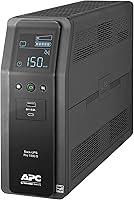
Best APC Pure Sine Wave UPS Models: How to Choose
The APC pure sine wave UPS to start with is the Back-UPS Pro BR1500MS2, because its 1500VA/900W rating leaves headroom for a full desktop setup and its pure sine wave output suits modern Active PFC power supplies. Step down to the BR1000MS or BR1350MS when your load and runtime needs are smaller.
On this page (10 sections)
- What makes an APC pure sine wave UPS different from a basic UPS?
- How do you size an APC UPS for your setup?
- Which APC pure sine wave UPS fits a full desktop setup?
- Which APC model suits a mid-size workstation?
- Which APC model suits a small home office?
- How do the three APC pure sine wave models compare?
- How do you know whether 1000VA or 1500VA is right?
- What else should you check before buying an APC UPS?
- How should you set up and maintain an APC pure sine wave UPS?
- Which APC pure sine wave UPS should you buy?
The APC pure sine wave UPS to start with is the Back-UPS Pro BR1500MS2, because its 1500VA/900W rating leaves headroom for a full desktop setup and its pure sine wave output suits modern Active PFC power supplies. Step down to the BR1000MS or BR1350MS when your load and runtime needs are smaller.
Pure sine wave output matters more than it did a few years ago. Modern PCs, NAS drives and home office gear use power supplies that expect clean, smooth AC power, and APC's Back-UPS Pro line delivers that instead of the stepped waveform of a basic UPS.
This guide compares the three APC pure sine wave UPS models in the Back-UPS Pro family and shows you how to match one to your setup. It is written for the home office, gaming desk or small network closet where one unit has to cover the whole workload.
What makes an APC pure sine wave UPS different from a basic UPS?
An APC pure sine wave UPS outputs a smooth, continuous AC waveform that matches what the utility line delivers. That matters most for electronics with Active PFC power supplies, which include most modern desktop PCs and many NAS units.
A basic UPS often puts out a simulated sine wave, a stepped approximation that some power supplies tolerate and others do not. When a supply sees that stepped waveform, it can shut down or work harder than it should, which is the opposite of what you want during an outage.
The three models here all sit in APC's Back-UPS Pro series. Each is line-interactive, meaning it regulates voltage without switching to battery for small fluctuations.
They also include Automatic Voltage Regulation (AVR), which corrects low and high voltage before it reaches your equipment.
Pure sine wave output is the headline feature, but the outlet layout matters just as much. All three give you 10 total outlets: 6 with battery backup and surge protection, and 4 surge-only for peripherals.
Built-in coax and Ethernet ports protect the data lines running into your router or NAS.
APC rates each unit at a 1,080-joule surge energy level and lists a 60 Hz frequency range, with the BR1000MS covering 50/60 Hz. The BR1500MS2 switches to battery in as little as 8 milliseconds, so a desktop never sees the gap as a shutdown.
That combination of fast transfer and clean output is what separates the Pro line from a bare surge strip.
Pick a pure sine wave model when your gear has an Active PFC supply or you want to stop second-guessing waveform compatibility. For anything with a simple transformer supply, a simulated sine wave unit can do the job, but the price gap is small enough that sine wave is the safer default.
How do you size an APC UPS for your setup?
Size the UPS by the total watts you plan to back up, not by the volt-ampere number alone. Every model here lists both figures, and the watt rating is the one that tells you what it can actually run.
Start by adding up the wattage of the devices you want on battery during an outage. A typical desktop PC might draw a few hundred watts under load, a monitor adds a little more, and a router and modem together are a small but constant draw.
A NAS with several drives sits somewhere in the middle.
Compare that total with each model's watt rating and leave headroom. A UPS run near its limit gives you very little runtime and stresses the battery.
Running at half load or less keeps the unit cooler and stretches the minutes you get when the power drops.
Runtime figures are quoted at a light 100W load, so treat them as a ceiling. APC lists up to 42 minutes for the BR1000MS, up to 54 minutes for the BR1350MS and up to 73 minutes for the BR1500MS2.
Your real number falls as the load climbs.
A 12 A amperage rating on the BR1500MS2 and a 5 A rating on the BR1000MS hint at how much current each input is built to handle, and both run from a standard 120V wall outlet. The BR1350MS shares the same 120V input, so all three drop into the same wall socket without a special circuit.
Rule of thumb: add your backed-up watts, then choose a model rated at least double that. If you are unsure, the BR1500MS2 gives the most room to grow.
Our APC BR1500MS2 review walks through its specs in more detail.
Which APC pure sine wave UPS fits a full desktop setup?
The BR1500MS2 is the best fit for a full desktop setup because its 1500VA/900W rating handles a gaming PC or a loaded workstation with room to spare. It is the top pick here for anyone who wants one unit to cover the whole desk.
Its 900W rating is the highest of the three, and that headroom is what lets it run a real load rather than a stripped-down one. The 6 battery-backup outlets cover a PC, monitor, router and NAS at once, while the 4 surge-only outlets take printers and other peripherals.
AVR corrects brownouts and spikes without draining the battery, which matters in older buildings or areas with chronic voltage swings. The front USB-C and USB-A ports charge a phone without using a protected outlet.
The battery is user-replaceable with the APCRBC163, so you can extend the unit's life instead of replacing the whole box. Its tower form factor measures 15 by 4.4 by 11.9 inches and weighs 27.6 pounds, which is a floor or under-desk placement rather than a shelf ornament.
The 16-hour charge time is worth planning around. A fresh unit needs most of a day plugged in before it can carry a full load on battery, so set it up before the storm season rather than during one.
Choose this one when your desk has a powerful PC or you want the longest runtime headroom.
Which APC model suits a mid-size workstation?
The BR1350MS is the best fit for a mid-size workstation because its 1350VA/810W rating covers a strong PC plus peripherals without paying for capacity you will not use. It sits between the other two on both power and runtime.
Its 810W rating leaves less headroom than the BR1500MS2 but more than the BR1000MS. That suits a single high-end PC, a monitor or two and a router, with a little room for a NAS if the total stays sensible.
The feature set matches the rest of the line: 10 outlets, 6 with battery backup, AVR, coax and Ethernet surge protection, and USB-C plus USB-A charging. The USB ports share 5V/3A across the pair, so one phone or tablet charges quickly without an adapter.
The LCD shows load and battery status so you can see how close you are running.
The battery is user-replaceable with the APCRBC161. It uses the same 14.5 by 3.9 by 10.2 inch tower footprint as the BR1000MS and weighs 25.7 pounds.
Pick the BR1350MS when the BR1500MS2 feels like more capacity than your desk needs but the BR1000MS looks tight.
Which APC model suits a small home office?
The BR1000MS is the best fit for a small home office because its 1000VA/600W rating matches a modest PC, a monitor and network gear. It is the lightest and least expensive way into the Back-UPS Pro sine wave line.
The 600W rating covers a basic desktop or a laptop dock, a monitor and the router and modem that keep you online. It still gives you the full 10-outlet layout, so the 6 protected outlets are not cut down just because the capacity is smaller.
Runtime tops out at up to 42 minutes at 100W. That is enough to save work and shut down cleanly, but not enough to ride out a long outage with a big load attached.
The lower 5 A input rating reflects its lighter build.
It keeps AVR, dataline protection and USB charging, and the battery is user-replaceable. Its 14.5 by 3.9 by 10.2 inch tower matches the BR1350MS and weighs 22.4 pounds, so it is easy to slide beside a small desk.
Choose it when your desk is modest and you want sine wave protection without extra capacity.
How do the three APC pure sine wave models compare?
The three models share almost everything except capacity and runtime. The BR1500MS2 gives the most power and minutes, the BR1350MS sits in the middle, and the BR1000MS is the compact option.
| Model | Capacity | Runtime at 100W | Outlets | Battery |
|---|---|---|---|---|
| BR1500MS2 | 1500VA/900W | Up to 73 minutes | 10 (6 backup) | APCRBC163 |
| BR1350MS | 1350VA/810W | Up to 54 minutes | 10 (6 backup) | APCRBC161 |
| BR1000MS | 1000VA/600W | Up to 42 minutes | 10 (6 backup) | User-replaceable |
All three use the same line-interactive design with AVR and pure sine wave output. Each carries a 1,080-joule surge rating and coaxial plus Ethernet protection.
The front USB ports differ only in layout, with USB-C and USB-A on all three.
The real decision is how much load you need to carry and how long you want to keep it running. A small desk rarely needs 900W, while a gaming rig with a big GPU can exceed 600W under load and leave the BR1000MS short.
Where do the specs actually diverge?
Beyond capacity, the weight and footprint tell you how each unit sits in a room. The BR1500MS2 is the heaviest at 27.6 pounds and the tallest at 11.9 inches, while the BR1350MS and BR1000MS share a 10.2 inch height and a 14.5 by 3.9 inch base.
The BR1000MS is the lightest at 22.4 pounds.
The enclosures also differ. APC lists a metal enclosure for the BR1350MS and BR1000MS and does not publish the material for the BR1500MS2.
The BR1000MS covers both 50 and 60 Hz, while the other two list 60 Hz.
Battery chemistry is identical across the line: lead acid cells with a listed average life of 5 years. The replacement part numbers differ, so order the right one for your model.
Use the table to rule out models by watt rating first, then pick the smallest one that still leaves headroom.
How do you know whether 1000VA or 1500VA is right?
Start with your backed-up watt total. If it lands under about 300W, the BR1000MS gives you plenty of room; between 300W and 400W, the BR1350MS; above 400W or with plans to upgrade the PC, the BR1500MS2.
A 1000VA unit rated at 600W is comfortable for a laptop, monitor and network gear. A 1500VA unit rated at 900W is the safer call for a desktop with a discrete graphics card.
The BR1350MS covers the middle ground.
VA and watts are not the same, and the gap between them widens with the power factor of your load. That is why the watt number matters more for sizing.
Read the label on your PC's power supply and add your monitor's draw to get a rough figure.
If you expect to add a NAS, a second monitor or a bigger GPU later, buy the headroom now. A UPS that is already near its limit has no room to absorb an upgrade.
The 900W ceiling on the BR1500MS2 is the one to reach for when the plan includes a future GPU swap.
Pick by watt rating, then confirm the runtime figure gives you enough minutes to save and shut down. Our APC BX1500M vs BR1500MS2 comparison shows how the sine wave Pro model differs from the simulated sine wave BX line.
What else should you check before buying an APC UPS?
Check the outlet types, the physical size and the battery replacement path before you commit. Those three details decide whether the unit fits your desk and stays serviceable.
All three models use NEMA 5-15R outlets and a standard 120V input, so they plug into a normal US wall outlet. The tower form factor sits on the floor or beside the desk.
The BR1500MS2 is the heaviest at 27.6 lb, with the BR1350MS at 25.7 lb and the BR1000MS at 22.4 lb.
Battery replacement is the long-term cost that matters. Each model uses a different replacement battery, sold separately, and APC designs them for user replacement.
APC lists a 5-year average battery life for the BR1500MS2, and that is the figure to plan around. That keeps the unit useful for years instead of turning it into e-waste when the battery ages.
The front USB ports are handy for charging a phone without giving up a protected outlet. The LCD on each model shows load and battery status, which helps you see whether you are running near capacity.
On the BR1350MS and BR1000MS the screen is angled for viewing from a seated position, so a quick glance from the desk tells you the remaining runtime.
The BR1500MS2 carries UL and Energy Star certification, which matters if the unit sits in a home office where efficiency counts. Confirm the outlet count you need, the space the tower takes and the replacement battery model, then buy the capacity that matches your load.
How should you set up and maintain an APC pure sine wave UPS?
Plug the UPS into a wall outlet, not a surge strip, and let it charge before relying on it. APC lists a 16-hour charge time on the BR1500MS2 and BR1350MS, so plan to give it a full day before you count on battery runtime.
Connect your most important gear to the 6 battery-backup outlets. Put the PC, monitor, router and NAS there.
Use the 4 surge-only outlets for printers and accessories that do not need to survive an outage.
Run the coax and Ethernet lines through the built-in protection ports if your network gear sits nearby. That guards the data lines as well as the power lines.
The BR1000MS also lists Gigabit Ethernet protection on its dataline ports, so a wired network gets the same treatment as the power side.
Keep the unit in a ventilated spot and away from damp. Check the LCD periodically to see how much load you are drawing.
If you are consistently near the top of the watt rating, consider stepping up a model. The BR1500MS2 has a 32 °F lower temperature rating, so keep it out of an unheated garage in winter.
Replace the battery when runtime drops noticeably. The user-replaceable design means you can order the right part and swap it yourself.
For the bigger picture on how APC compares with its main rival, our APC vs Tripp Lite brand comparison is the next read.
Which APC pure sine wave UPS should you buy?
Buy the BR1500MS2 for most full desktop setups, because its 1500VA/900W rating and up to 73 minutes at a light load give you the most headroom and the longest runtime. It is the best overall APC pure sine wave UPS here.
Choose the BR1350MS if your workstation sits in the middle and the BR1500MS2 feels like more capacity than you will use. Its 1350VA/810W rating and up to 54 minutes cover a strong PC plus peripherals.
Choose the BR1000MS for a small home office with a modest PC, a monitor and network gear. Its 1000VA/600W rating and up to 42 minutes match a light load and keep the cost down.
If you are also weighing other brands, our CyberPower pure sine wave UPS 1500VA guide shows how that line compares. For the full APC story on the top pick, the BR1500MS2 review covers its specs in depth.
The rule is simple: add your backed-up watts, double it, and buy the APC pure sine wave UPS that meets that number with the runtime you need.
Frequently asked questions
Is a pure sine wave UPS necessary for a modern PC?
A pure sine wave UPS is the safer match for a modern PC with an Active PFC power supply. APC's Back-UPS Pro models deliver sine wave output that mimics utility power, while simulated sine wave units can stress some of these supplies.
What is the difference between the BR1000MS, BR1350MS and BR1500MS2?
The main difference is capacity: 1000VA/600W, 1350VA/810W and 1500VA/900W. All three are line-interactive Back-UPS Pro units with 10 outlets, pure sine wave output, AVR and USB charging, so the choice comes down to load and runtime headroom.
How long will an APC pure sine wave UPS run my equipment?
APC lists up to 42 minutes at 100W for the BR1000MS, up to 54 minutes for the BR1350MS and up to 73 minutes for the BR1500MS2. Your real runtime drops as the connected load rises, so add up the watts you plan to back up.
Do these APC UPS models work with a NAS and a router?
Yes. Each has 6 battery-backup outlets for essentials like a PC, monitor, router and NAS, plus 4 surge-only outlets for peripherals.
Built-in coax and Ethernet protection also guards the data lines running into your network gear.
Can I replace the battery myself on a Back-UPS Pro?
APC designs these units with user-replaceable batteries, so you can swap the battery without professional service. The BR1500MS2 takes the APCRBC163 and the BR1350MS takes the APCRBC161, each sold separately.